Bug Reports
%22%2F%3E%3Ctext%20x%3D%2232%22%20y%3D%2233%22%20text-anchor%3D%22middle%22%20dominant-baseline%3D%22central%22%20font-family%3D%22Arial%2C%20sans-serif%22%20font-size%3D%2226%22%20font-weight%3D%22600%22%20fill%3D%22%23fff%22%3EMA%3C%2Ftext%3E%3C%2Fsvg%3E "Martinez Buitrago, Maria A")
Buggy Copy/Paste for Multiple items.
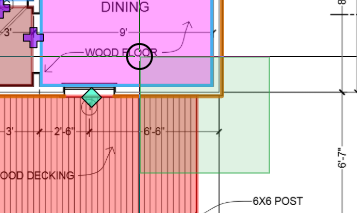
I'm trying to copy/paste several takeoff items from one sheet to another, including an area with cutouts, but only the area with cutouts is pasting over. The other takeoff condition filling in the cutout area is not pasting over. If I try to select the whole floor plan by dragging across the entire floor plan, the hyperlinks are also selected and then copied/pasted. I dont think this should be happening.
Also, when I go to paste a large area, in order to move it, I have to click on the cross, but then that means that i can't zoom in to a corner to ensure i place the pasted item in exactly the right spot. It feels like i should be able to move an item by dragging it from anywhere on the image, not just the cross at the center.

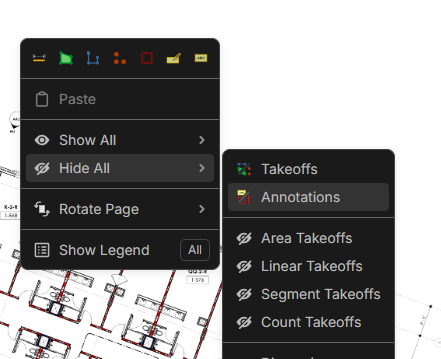
Right click and hide all annotations to not select the hyperlinks. I hope hyperlinks become more "hidden" in the future to your point.
If you hold ALT, then click/drag you can move anything freely, vs using the "cross" move handelbars.
IDK about the first part of your question tho.

Thanks, Kyle! In our next update, we are making it so hyperlinks can't be selected as easily.
Another tip is that you can select from the bottom right to the upper left, and anything the box intersects will be selected. The selection box will be green instead of a bluish color.