











Item Order Issues
In the item properties box under the "Materials & Labor" area is a sorting/organizing issue. If you add materials using a 01, 02, 03.... Whatever order you create them will be the order they are always shown. In the screenshot, I created #02 after I created the others. Thinking that once I closed the box and reopened they would be in order. Only workaround I've done is to delete what's needed and start over or delete all and start over. The interesting part is that over on the right side menu, the order of materials is always correct. Even when done out of order. Like doing 03 first, then 01 & 02. In the properties box the order will always be 03, 01, 02. But in the right side menu it will default to 01, 02, 03. Hopefully that is making sense. Is there a way to "organize" the material items in the property box? If not, I feel this would qualify as a bug........... possibly a bug........
Tysen
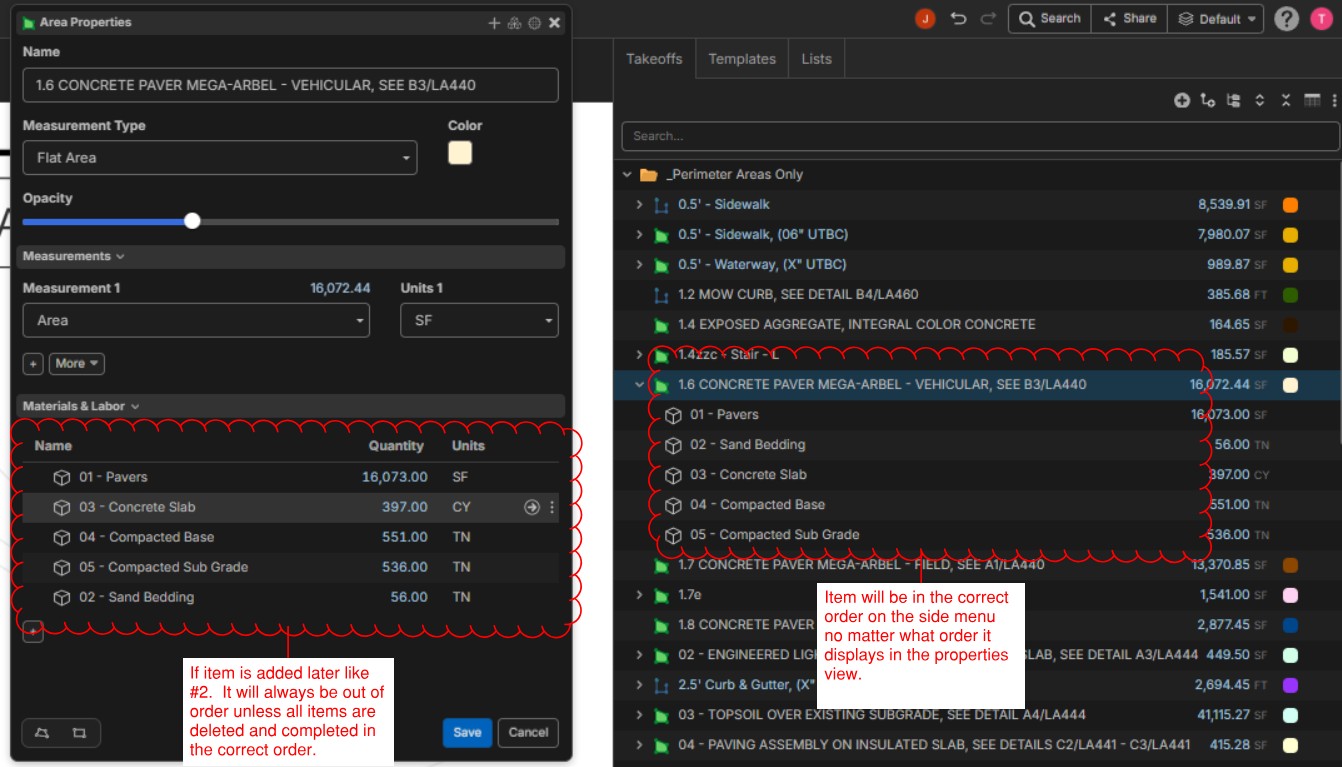

Hey Tysen, are you grouping by anything in the Takeoff sidebar? If so, it alphabetically sorts the items, but if you open up the takeoff, it sorts them by order. Right now we don’t have a way to re-order/sort the items in the materials and labor panel, but I will mention this to the team. 🙂
If you ungroup the takeoff sidebar, you should be able to re-order the items.

My sidebar was grouped by folder. Once I unchecked that, the same order of my properties menu showed up. And if I group again by folder, the items do get sorted in order.
👍1