Bug Reports
Print Selected Pages - Right click
If I select certain plans that I want to print by holding CTRL then right click to select "print selected pages" the pop up window select all plans rather than my selected ones.

Hey Tim, thanks for reporting this. I have not been able to replicate this on my machine. What browser are you using, and are you on Mac or Windows?
Any steps/screenshots to help reproduce this would be appreciated.
%22%2F%3E%3Ctext%20x%3D%2232%22%20y%3D%2233%22%20text-anchor%3D%22middle%22%20dominant-baseline%3D%22central%22%20font-family%3D%22Arial%2C%20sans-serif%22%20font-size%3D%2226%22%20font-weight%3D%22600%22%20fill%3D%22%23fff%22%3ETL%3C%2Ftext%3E%3C%2Fsvg%3E "Tim Lotterhand")
Using chrome on PC. See below for screen shots.
Selected these five pages, right click to bring up menu, select print selected pages
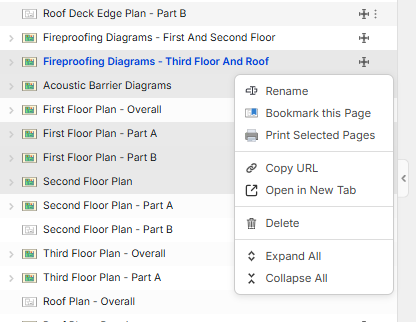
Everything gets selected to print
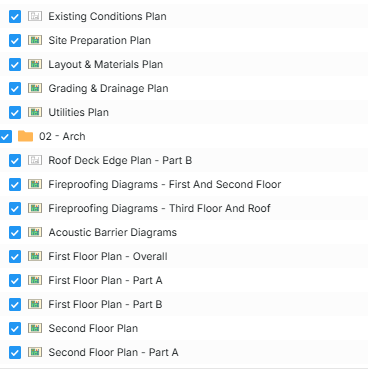

Very strange. We have not been able to reproduce this. A bunch of our team members have tried. We will keep trying. If you run into any additional clues, please let us know.

Works fine for me too.
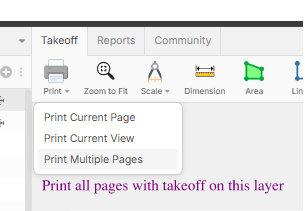
On this topic, suggestion for the box is this option in purple....but low priority.
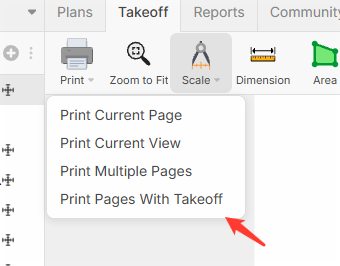
Is this still an issue for you Tim? We made a few updates in this area - added Print Pages With Takeoff, along with a few other tweaks. 🙂