











 Bug Reports
The pages panel expands unprompted when a revision set is added
The pages panel will expand all the pages you have clicked on the revision number (circled below) for the current session (i.e. until the tab is refreshed). It happens when you're trying to expand only one page to view/adjust overlays and it'll sometimes expand the pages when starting a new measurement with a takeoff.

I think it maybe only happens when you have multiple pages with overlays?
Also, side note- can we filter out takeoffs from the pages panel view? I would like to be able to just see the pages and the revisions sometimes when overlaying pages. Scrolling through all the takeoffs to realign the page multiple times is a bit of a workflow annoyance.

Thanks for reporting @Victor. We'll dig into this bug. Perhaps we could add an option to show/hide takeoffs in the pages sidebar.
👍1%22%2F%3E%3Ctext%20x%3D%2232%22%20y%3D%2233%22%20text-anchor%3D%22middle%22%20dominant-baseline%3D%22central%22%20font-family%3D%22Arial%2C%20sans-serif%22%20font-size%3D%2226%22%20font-weight%3D%22600%22%20fill%3D%22%23fff%22%3EJ%3C%2Ftext%3E%3C%2Fsvg%3E "Jes")
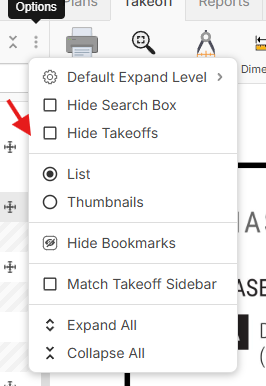
@Victor, this issue should be solved. Also, we have a new button to filter out the takeoffs from the pages sidebar.
%22%2F%3E%3Ctext%20x%3D%2232%22%20y%3D%2233%22%20text-anchor%3D%22middle%22%20dominant-baseline%3D%22central%22%20font-family%3D%22Arial%2C%20sans-serif%22%20font-size%3D%2226%22%20font-weight%3D%22600%22%20fill%3D%22%23fff%22%3EVT%3C%2Ftext%3E%3C%2Fsvg%3E "Victor Tengowski")
Thank you!!
I see some of the inside track features from the 'Ready to Test: Auto Count, Auto Scale, Permissions & Roles, Locking, Plugins, and more' post are live now.
Yup! We're just getting some initial testing to make sure we didn't introduce any major bugs, and then we're doing an announcement hopefully later today.