





 Developers / AI / MCP
Live server
How do I test my plugins and scripts on my own live data? It seems I can only run them and let them show in the takeoff bar, for example, if I'm in the sandbox. I remember something from the developers webinar that I had to be on the ultimate package, but I don't know how to get them to work with the live server. When I open up the dev tools, I can see my scripts and everything, and they are set to show up on the takeoff toolbar, but when I go back, they're not there. When I'm in the sandbox, they are there.

Did you deploy them?

No, I guess I don't know how to do that
How???

Hi Jeff,
Currently you can move lists, templates and projects from the live server to the sandbox for developing and testing. (use the three dots and copy to sand box)
There will be an approval process to get them on the live server in order to protect the zz servers from any errors, extreme data usage and crashing the servers or malicious codes. The process to do this is finished, but the dev team is buttoning up security and approval process. Once it is finished then you will submit your plugin either to your live server or the plugin store. I am sure that the team at zz will let everyone know when it is ready to deploy your work. There is no ultimate package at this time either, we are hoping to keep the current price the same unless the server costs spike, then we will possibly need to have a separate fee for that.

so we cannot create a toolbar button? Is that why I cant see my toolbar button even though I selected the placement and created an icon?

Hey Jeff and Jeffery. To test plugins/scripts on your live data, you can select the Plugin in the Dev Tools sidebar and click the "Deploy" button on whichever version you want to deploy. If you are not seeing the toolbar button, you may be in live mode with the plugin not deployed. Let us know if this works for you.
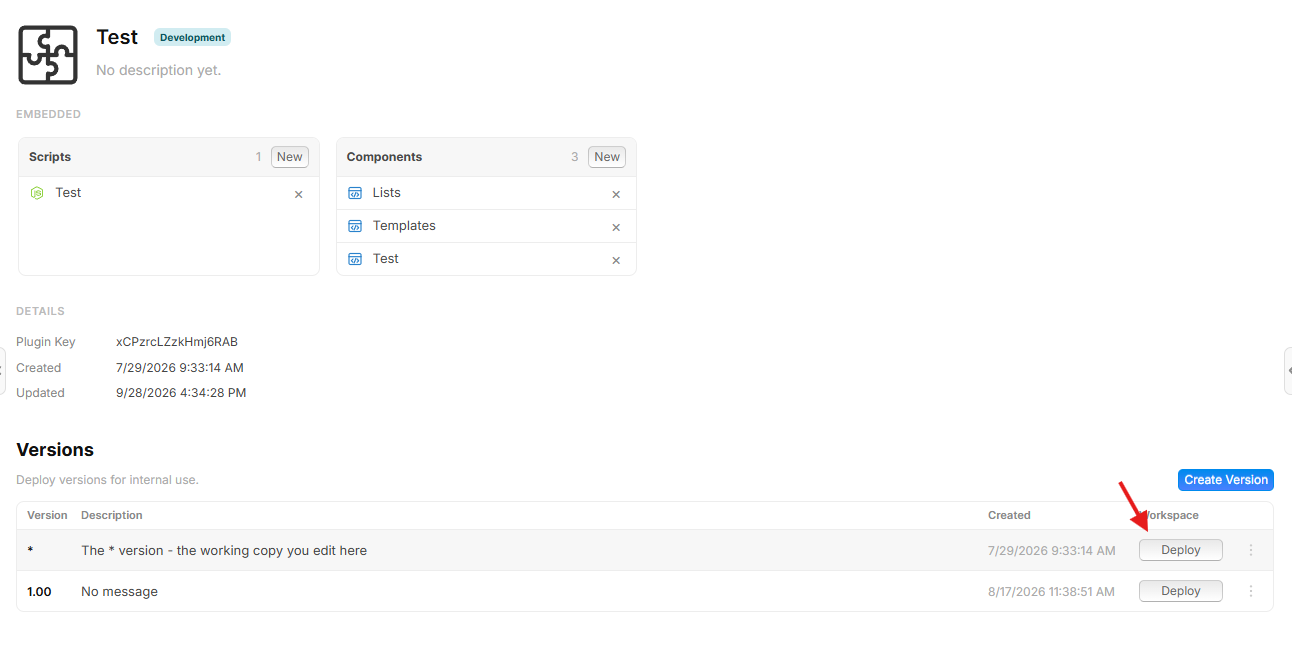

Jeff, did you click the gear and select it there? I had not realized I needed to do that at first. Then must hit save on top left.
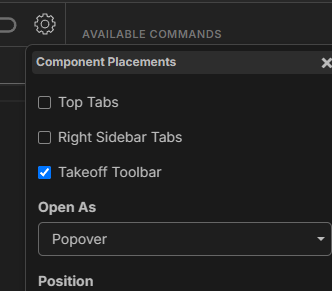
Yes I did that, but I didnt do the deploy yet, I'll try that now.
Yes, that worked! now for the fun! I'm having too much fun with this, I created a lot of cool scripts modifying the extract schedule feature
🚀1@Jeffery that's what I've been working on as well. As far as I'm concerned, the standard Extract Schedule feature should be deprecated at this point compared to what I'm able to do with mine now 🥱