











 Feature Requests
Ability to Rename Custom Quantities & Folders
Objective:
Allow users to assign meaningful, user-defined names to custom quantity columns (e.g., “Measurement 2”) and folders in takeoff results tables for improved clarity, organization, and export usability.
Description:
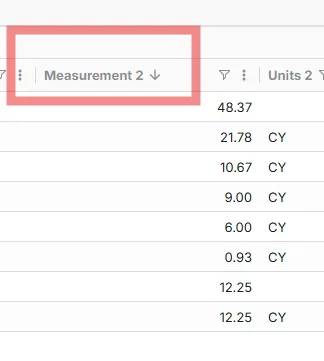
Currently, additional quantity columns display under generic labels such as “Measurement 2,” “Measurement 3,” etc., and folders may retain generic or auto-generated names. This limits clarity when multiple custom quantities or folder groupings are used, especially in collaborative workflows where users must remember what each represents.
Suggested Enhancements:
- Provide a rename option via right-click or column/folder settings to update the display name of each custom quantity or folder.
- Persist renamed labels across views, exports, and reports.
- Optionally allow default naming in the creation process (e.g., “Depth (ft)” for quantities, “Mat Foundations” for folders).
Benefits:
- Improves readability and organization of takeoff data both on-screen and in exports.
- Reduces confusion when multiple custom quantities and folders are in use.
- Supports more professional and context-specific output for client-facing reports.


Thank you for the feedback. I'll send this request over to the development team.

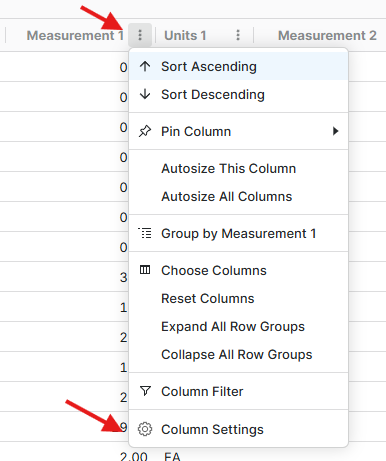
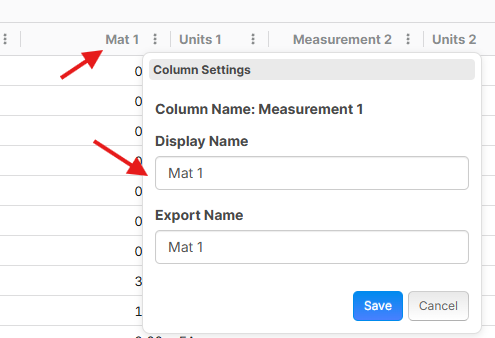
Hey Chaz, just following up on this post. We recently added the ability to rename the columns in reports for display and export. I've attached a few screenshots below.

@Lorin I think I picked up on that - Thank you!