











 Feature Requests
Add Group By Page in the Takeoff Tab
Can you please add the grouping by page in the takeoff tab?

Hey Edisna, thanks for the feature request! The main reason why we don't have "Group by Page" in the takeoff sidebar is that in zzTakeoff, the takeoffs are not on any individual pages; it is the sections of those takeoffs that are on a page. For grouping by page, we recommend using either the worksheet at the bottom of the page or in reports with the "Advanced Takeoff Reports".
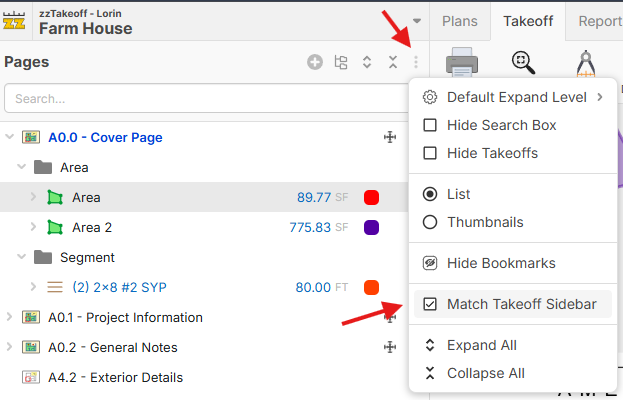
In addition to the report options, the pages sidebar should be the simplest version of "Group By Page". We also have the option "Match Takeoff Sidebar", which should help if you want to group your takeoffs by page, then WBS.

Understood, Lorin, but here is the issue. In the Takeoff tab, I can double-click an item and edit it immediately. That is one of the reasons I am asking for this functionality to be added here as well.
As you pointed out, we can use the bottom worksheet or the reports, but that creates several additional steps just to edit an item. Even if I save a report, I still have to filter it by layer each time because, for some reason, the report does not retain the selected layer filter. After getting the report into the view I need, I then have to right-click the takeoff, select Properties, and drill down to the item.
That is already too many steps for something that could be handled with a double-click. I would not mind using this view nearly as much if I could double-click the item and edit it directly.
Lastly, the worksheet and the top ribbon take up a considerable amount of screen space. There should be an option to minimize both the top ribbon and the worksheet ribbon. It would also be useful to dock the worksheet in the same area where the Takeoff tab currently lives.
👍2Thanks for the feedback/clarifications! I'll follow up with the team on this. 🙂
👍2