











Color Blind Settings
Team - i may have added this before - but being color blind makes the find item feature, where zztakeoff selects it for you, a bit difficult to see. Would be nice to be able to turn on a highlighter yellow type select option.
Best!

Not sure if it would work, but have you tried using a chrome extension?
ClearColorVision - Advanced Color Vision Deficiency Corrections - Chrome Web Store
%22%2F%3E%3Ctext%20x%3D%2232%22%20y%3D%2233%22%20text-anchor%3D%22middle%22%20dominant-baseline%3D%22central%22%20font-family%3D%22Arial%2C%20sans-serif%22%20font-size%3D%2226%22%20font-weight%3D%22600%22%20fill%3D%22%23fff%22%3EDM%3C%2Ftext%3E%3C%2Fsvg%3E "David Mehan")
Ah well, hopefully it’s helpful for other things! There are a few others out there too. I just figured there might be a Chrome extension that could help with this. Maybe a different one will work for you. Good luck!

@David, thanks for the request! I'll mention it to the team. Could you include a screenshot of the selection colors that are difficult to see? Is it when you select a row in the takeoff/page sidebars, or somewhere else?
So believe it or not, this selection is very difficult for me to see when finding a certain count or segment. A toggle option to highlight with bright yellow would be super helpful for those of us that are color challenged :)
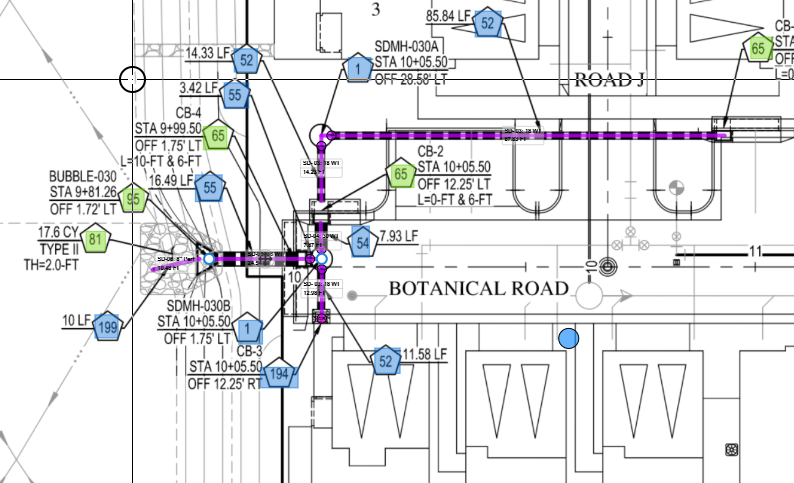
Even the three dots here next to the layer names...yea i didn't notice that until Rulon pointed it out...
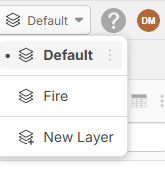
I'm pretty sure I see the world in a Windows 95 Color Palette.
👍1Thanks for the screenshots! That helps a ton 🙂 I'll forward this to the dev team.