





 Feature Requests
Filter Pages to show only those with Markups
Pages View (left pane showing the list of all the sheets in the plan) :
Add a filter button/toggle on top of the Pages Window Pane to show only sheets containing ">=1" zzTakeoff markup elements.
My plansets are often 200 pages (or more) but I only takeoff a set of 5-10 pages. If I had a quick way of toggling between the full set and a filtered set of pages w/ ANY takeoff item (Notes, highlights, segments, counts... ANYTHING) would be very helpful. Thanks!!

Did you try this button yet? Group by takeoffs.
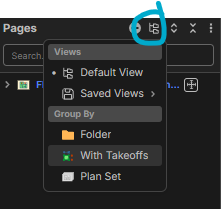

Wow! Exactly what I asked except.... A bunch of my sheets (nearly all of them) have the GREEN icon lit implying there is a takeoff item on that sheet. Not sure what it is ID'ing as a takeoff item? (And thanks for reply, btw...)

Thanks guys.
@HH That's a bug we're addressing. It's because the PDF hyperlinks are coming in as annotations and triggering it to have "takeoff data" on the page. We'll get that fixed.
10-4. I'll sit tight and watch for fix. Thank you!