











 Feature Requests
Manual Phasing Tool?
I saw an interesting tool on another takeoff software that I believe would be very beneficial to most users.
The tool was separating existing counts into phases based on your selection. So imagine, using the new "Lasso" tool to select a certain area on your takeoff and then the items inside that area get separated into a new folder using the title of whatever phase it may be. This helps tremendously when ordering products for active jobs.

I like this idea.
Currently I create a separate layer or make a duplicated sheet. And copy and paste items into those.
👍1
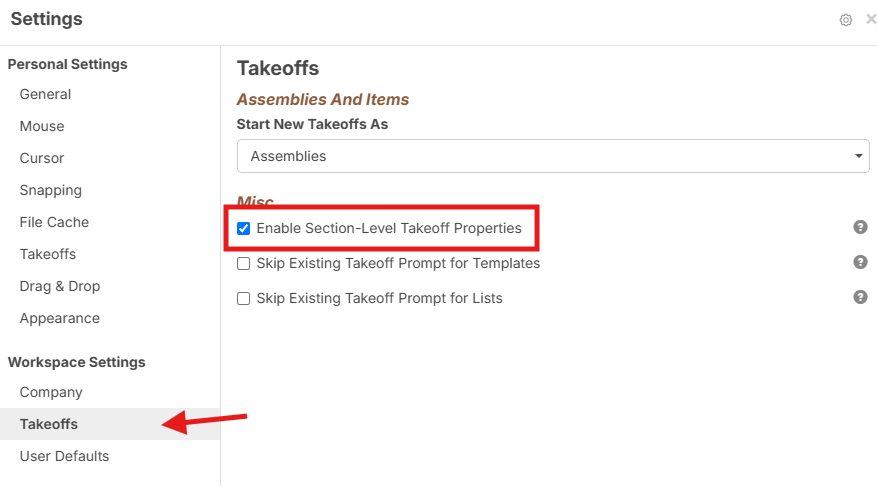
Thanks for the input guys. Have you tried enabling Section Level Properties (new in our last release)?
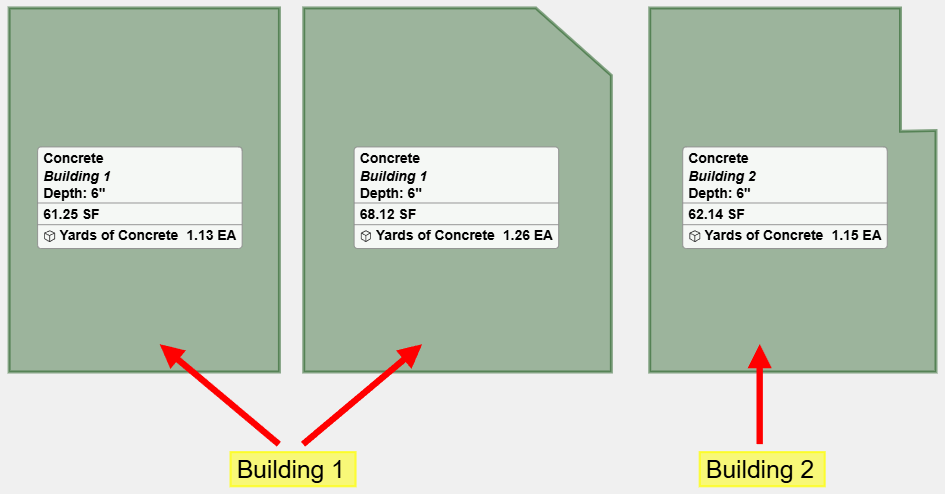
Once this is enabled you can attach Phase data to individual sections or point counts (in this screenshot it is attaching a Building # for example):
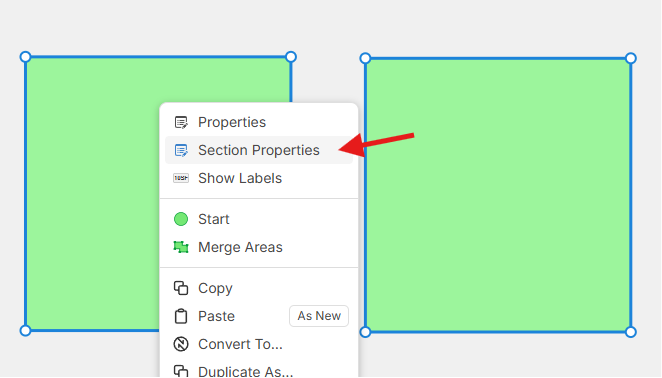
Then it allows you to select specific sections and apply Section Properties:
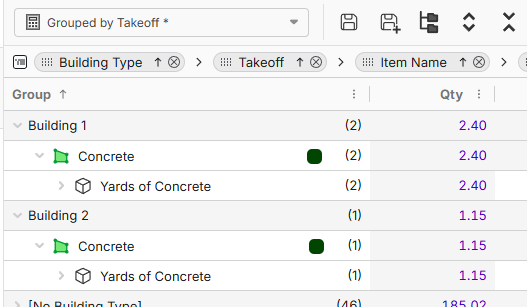
Then in Advanced Takeoff Report you can group by Building (or Phase):
Would this solve what you're after?
🤯1
I'm not sure if it worked how I imagined or if I'm following the steps correctly.
I'm more after a streamlined feature that will quickly spit out quantities of items that were already counted in a specific area I highlight (Could be a variety of odd shapes, that's why I mentioned the Lasso tool).
Which theoretically or ideally I can then move or group into a new folder that I would name Phase 1 or so on.
%22%2F%3E%3Ctext%20x%3D%2232%22%20y%3D%2233%22%20text-anchor%3D%22middle%22%20dominant-baseline%3D%22central%22%20font-family%3D%22Arial%2C%20sans-serif%22%20font-size%3D%2226%22%20font-weight%3D%22600%22%20fill%3D%22%23fff%22%3EJ%3C%2Ftext%3E%3C%2Fsvg%3E "john")
Why not generalize this concept as lasso/multiselect items and change a common property across all items? Same functionality on the takeoff summary and reports...minus the lasso.
I think what Shane is trying to say, is an after the takeoff is complete.
Say you have a plan page, already completed with different items already on it.
He wants to be able to select a section, call it "Phase 1", and all the items for that section are copied/moved to another folder.
👍4ETA of this feature?

Hey Shane, no updates in this area yet. For your workflow, is there a reason why the section custom properties don't work? You should be able to select a section of the page after takeoff has been completed (with different takeoffs), update a common custom property to "Phase 1", and if you are grouping by that custom property, your Advanced Takeoff/item reports will be moved to a grouping named "Phase 1".
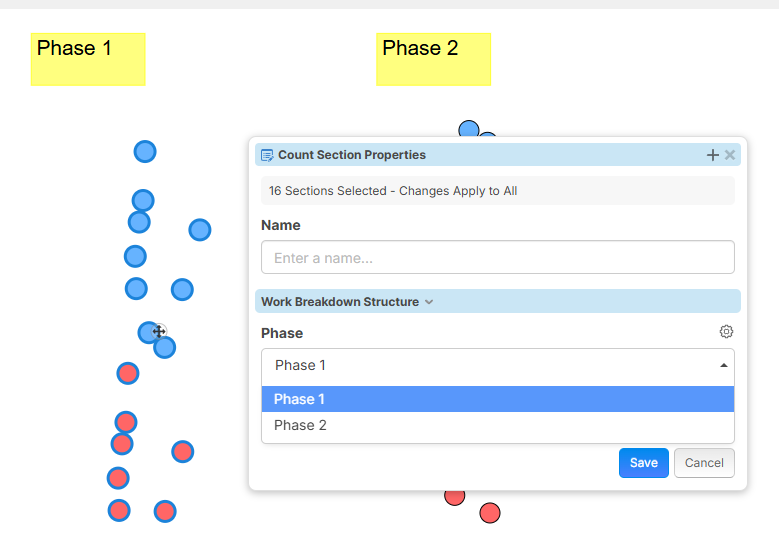
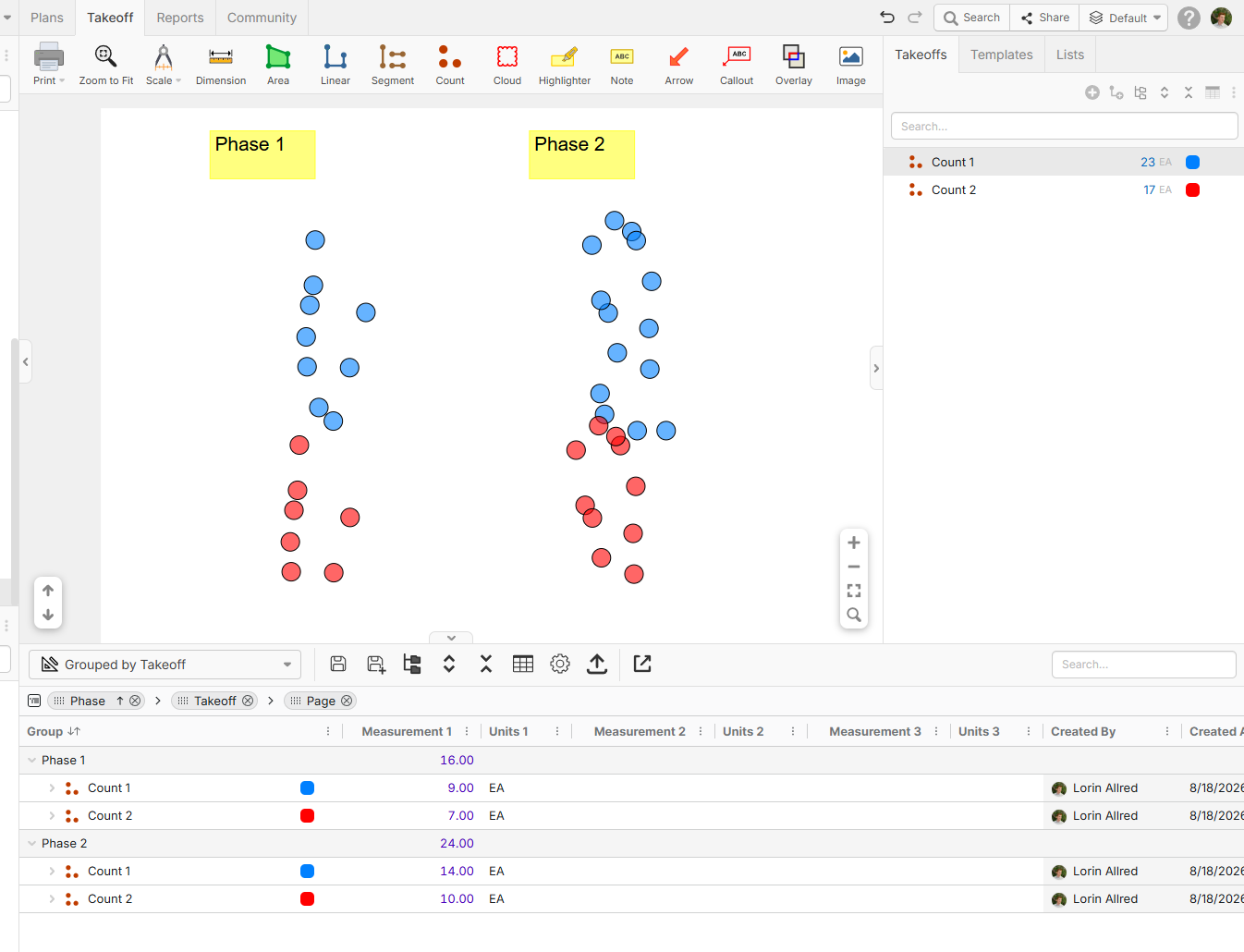
You can also use a lasso to select sections by holding "Alt" while using click to drag.
If this workflow doesn't work, what workflow would? The main difference I can see between Casey's response and the current approach is actually duplicating the takeoff into a folder in the takeoffs sidebar, but that could have its own set of issues (if you want to update a property on the takeoff, you would need to update it in each phase for that takeoff instead of once, and the takeoff would show multiple times in an advanced takeoff report if you were grouping by any WBS properties).
👍1Lorin,
Where do i then find the group i named phase 1? Is it not working because the items i grouped are already in a folder?
After making the group "phase 1" where do i find that?
The intent is to have an extremely quick list of the items i highlight. Without having to group them differently, change the folders there in or change the group by format.
Can you implement something that just tells you the counts in the area we want to highlight without all of the extra steps?
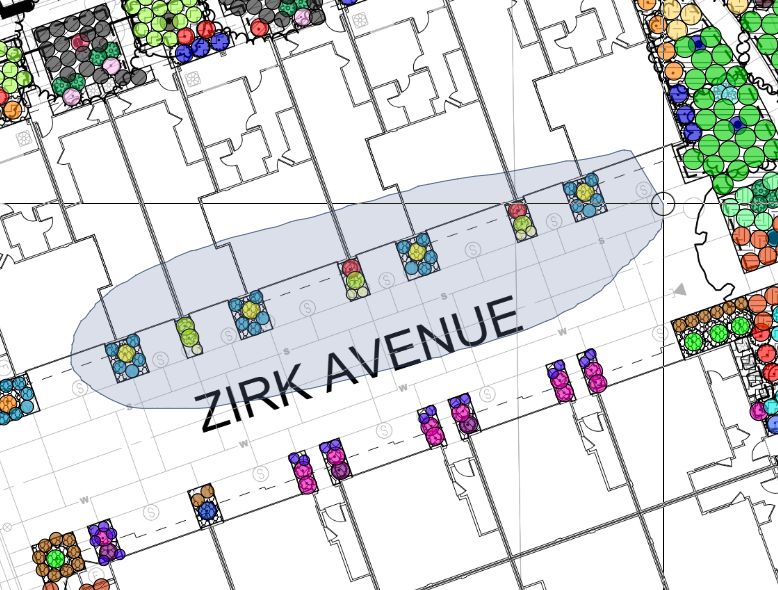
Ideally, id like to see a pop up show the counts that are in the area highlighted
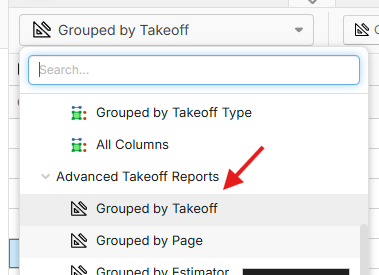
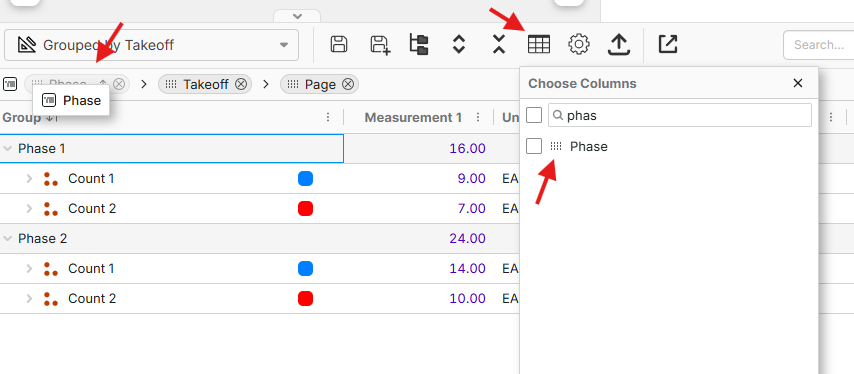
👍1Hey Shane, once you set the section properties in your selection - like Phase 1, etc. you can either use the Reports tab or the worksheet at the bottom of the page. You can open the "Grouped By Takeoff" report, then open the columns for the report, and drag the column for the custom property you used to assign to the section properties before the "Takeoff" group. It is a little bit more effort than a simple select and get a count of what's selected, but if you ever need to utilize that for a reporting standpoint, it's easily accessible.
As an alternative, with our release of Dev Tools, you could build a script/UI Component that you start from the toolbar, where it prompts you to select an area on the page, and based on what you selected, it gives you a count of the individual takeoffs in your selection. I used Claude to build a simple UI component where I can select an area, and based on what I select, it gives me the count of takeoff sections per takeoff.
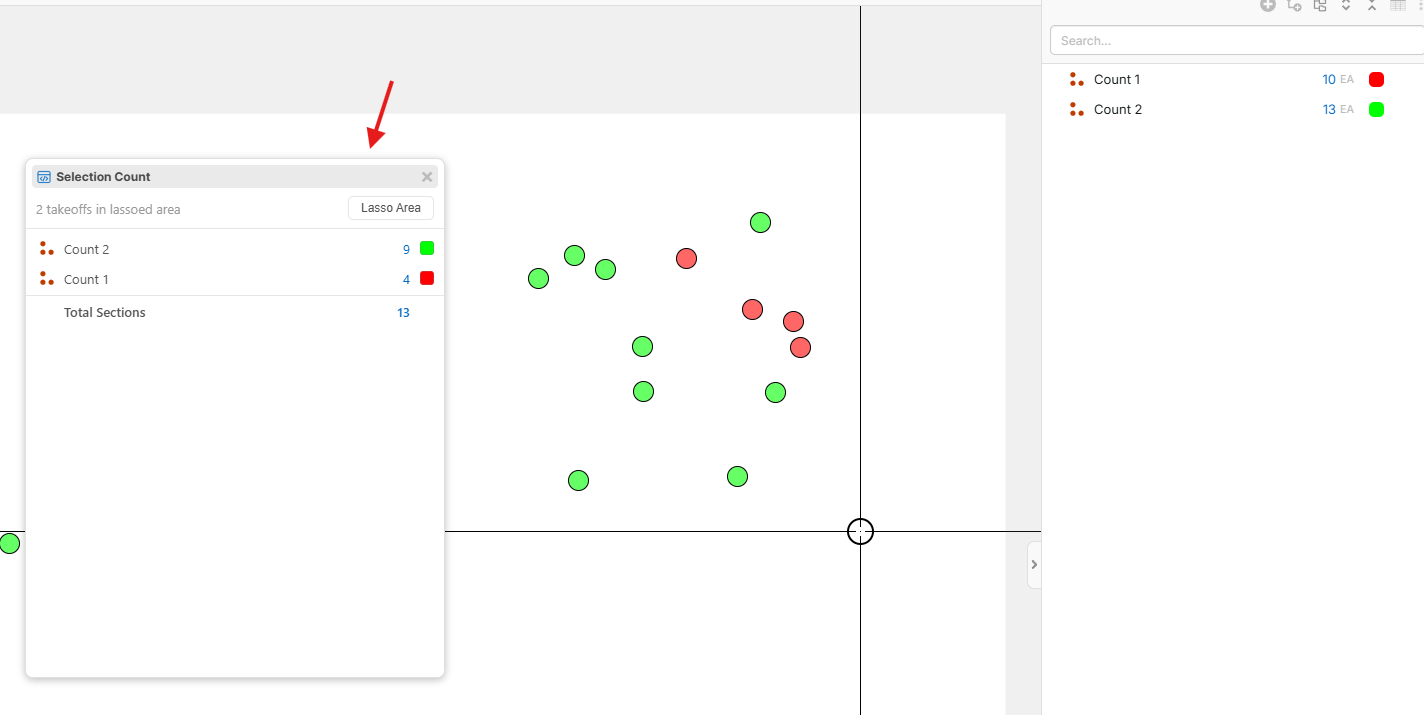
I don't think we are on the same page, Lorin. I read, re-read, and re-read again your instructions over and still couldn't figure this out. The intent or idea is to have a simple pop up show the counts in any given highlighted area when you highlight them.
I believe what you are explaining works, but probably it really only makes sense in the developers mind.
The way i see it as a user/consumer, its easier and faster to copy all of the items for a phase and paste it into a new folder, then deleting the original counts.
Id really like to see something much more streamlined. Currently it could take our purchaser almost a whole day to reorganize the bid counts into phased format. Do you see ZZtakeoff building this feature in the future or is this the workaround that's going to be available?

I'm with Shane here, the section breakouts are not useable for even me as a semi-advanced user. It needs to be visual on the page such as group-by or beable to turn on/off the sections like how OST has the area feature the people love....you have to clearly know if you are adding to the section or not when dropping new takeoffs.
🎯1👍1Our workaround is to use custom properties and duplicate the crap out of the same line (which kind of sucks but thats where we are) and break out that way as your doing your takeoff..........now if you have to change it after the fact your F'ed tho.

@Lorin I'm hip with the school of thought but as I've seen posted a few times it's counterintuitive to use the "grey folders" for me for none other than the fact I can't view/hide like I can with simple folders or just creating whole new layers, but then how do you view all for one scenario and then view some for another scenario (when visual is necessary for ...)
I personally haven't used the "Enable Section-Level Properties" but I just turned it on to see how I can utilize it as a tool.
I believe I may have done something simiilar in the past of what @Shane mentions of treating 1 layer as the "master container" and just create the other layers for phases/buildings/areas/etc and the ctrl-shfit-paste onto the same page per each layer (or just duplicate layer, if I've put some strategy into it - which I most likely haven't). Either way, a little cumbersome. Would be nice for some sort of container'ing that could be initiated not as a QTO type but as an annotation type tool???
👍1What if we used layers as visual containers for pages and used "portals" as visual containers for phases?
https://www.youtube.com/watch?v=l-MmJaJc_Bw
Check this video out. This is a clip from the software "Bobyard". Around the 10second mark is where they show the feature I am trying to explain. (You can put it in slow-mo to see it better, since they just briefly show it) They highlight an area and the counts in that area pop up on the screen with a "count breakdown"
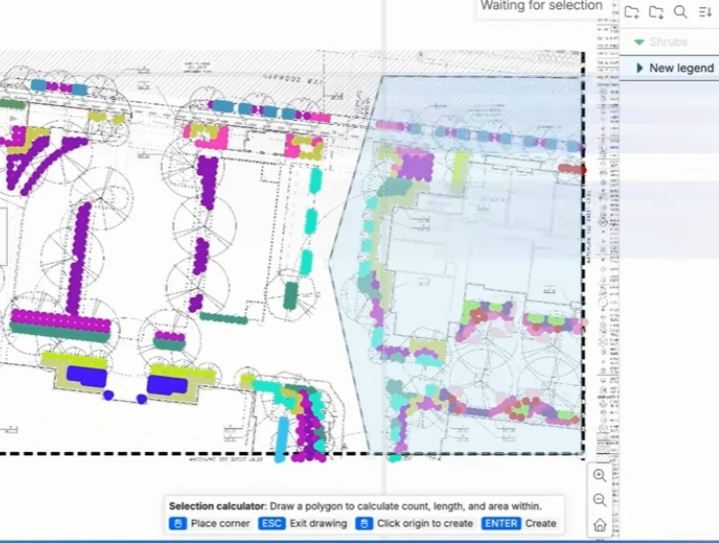
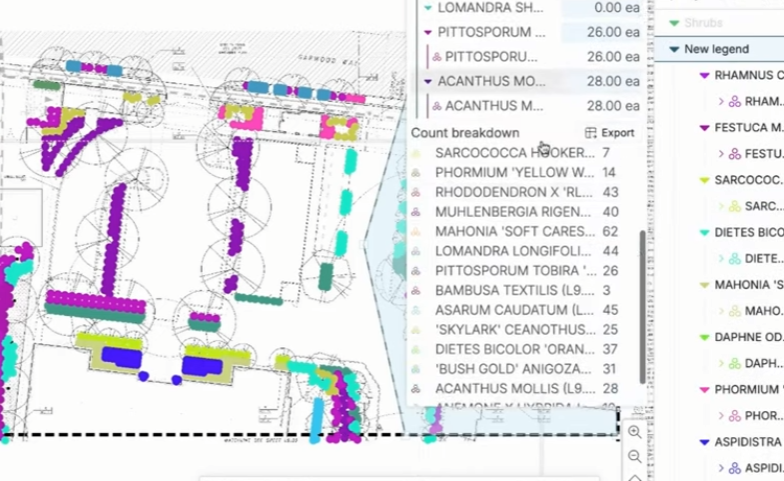
Thanks for the feedback and video, guys! I'll follow up with the team on this. Perhaps we could build a tool into the app for a "selection legend" or something.
@Kyle, we are planning some improvements soon to make the section properties easier to view visually.
@Chaz, we're planning to allow you to view multiple layers at once. I'll also mention the show/hide on the gray folders.
👀2🙏1