











 Feature Requests
Metric & Imperial
Hi
Working in Canada, we use metric and imperial daily. Our government mandates metric use when they build. Our suppliers cater to US and work in Imperial. I would like to be able set my scale with the metric measurements on the drawings and get an imperial output. Planswift does this. Right now i have a set of metric drawings loaded into ZZ that are scaled to 1:50. No dimensions are noted on it. if I plug in the metric 1:50 scale... I only can get metric out. This does not work for me.
Also... More metric preset scales would be nice. Can you add?
1:30
1:40
1:75
Thanks
B.

Hi Beau! For the output in imperial, are you after mostly the measurements such as Square Feet, or is it particularly for Quantities of material?
Regarding additional pre-set scales, we have added those, and they will come out in our next release, which we expect to deploy tomorrow.
%22%2F%3E%3Ctext%20x%3D%2232%22%20y%3D%2233%22%20text-anchor%3D%22middle%22%20dominant-baseline%3D%22central%22%20font-family%3D%22Arial%2C%20sans-serif%22%20font-size%3D%2226%22%20font-weight%3D%22600%22%20fill%3D%22%23fff%22%3EBM%3C%2Ftext%3E%3C%2Fsvg%3E "Beau Mitchell")
Hi Heber,
How are you?! Thanks for the prompt reply back.
We are loading metric drawings into ZZ, and I am looking for my output units to be Imperial... If I am working in linear measurements then I would like to see ft.... If I am working on areas I would like to see sqft.
My current software when I dimension things, the live measurement I see is imperial.
ALL the products we work with are built, sold, are in imperial units... Until my country picks a system and forces suppliers to change... we have to use both.
Thanks for your time. If you need to jump into a drawing i am looking at let me know and I can share with you.
B.
👍1Thanks for the additional info. It is very helpful. Things are good, and we're excited to be back. We will keep adding features based on the requests coming in on this community. 🙂
Just checking in to see if this ever made it into ZZ? Its one of the main things I need to work.
Thanks
B.

Hi Beau, just wanted to respond to this. This feature has not been added yet. But the feature request is under review by the development team.
Any updates on this? literally the one thing I must have to use your software since most of my work is government.
Thanks
B.
No update yet Beau. I know it's important for applications like yours. The development team is working hard to add features as quickly as possible. We will update you here when we know more.
Thank you for your patience.

hi i am om the same boat as beau. very excited for the potential of this software but being stuck on one unit of measurement and not being able to convert and/or interchange after scaling makes this a real head scratcher
I hear you... I can't use the software as 75% of my drawings come metric.... but 100% of my materials come Imperial. I need to measure in metric and toggle an imperial output. P.S. & OST can do this. I'm surprised this is being held back so most of the world is actually metric with a couple of countries holding out for imperial. Wild
%22%2F%3E%3Ctext%20x%3D%2232%22%20y%3D%2233%22%20text-anchor%3D%22middle%22%20dominant-baseline%3D%22central%22%20font-family%3D%22Arial%2C%20sans-serif%22%20font-size%3D%2226%22%20font-weight%3D%22600%22%20fill%3D%22%23fff%22%3EJC%3C%2Ftext%3E%3C%2Fsvg%3E "Jim Conley")
Another metric vote here. I suppose there's the option of one file for metric, one file for imperial but it's inconvenient.
Thanks for your patience. This should come out in the next update.
We're planning:
1. The ability to set a default measurement system for the project: Imperial or Metric, and then have the the ability to scale a specific page in Imperial or Metric (override the project default if you want).
2. Ability to define the output units for a specific area, linear, etc. For example: if a page is scaled in Imperial, but you want an area to output in m², you could do that.
3. Item formulas to convert properly - for example, if you have a formula [Area:SF] this will calculate in Square Feet regardless of whether the page was scaled in Imperial or Metric.
If we add the above capabilities, does this solve all the needs you have for this feature?
👍2🚀2🎯2Had a customer today asking about the metric scale on civil pages within their imperial project. (this one is already on your list above)
I think your bullet points cover all of the items I'm aware of customers requesting. This will be great!
🚀1When you say next update, do you mean next major update, or is this coming somewhat soon?
@Luke We have it mostly working. I expect likely in the next minor update, but that will all depend on how testing goes. It will likely be on the Test Server within a week. 🙂
🔥2Luke it’s been 3/4 of year since this was flagged/requested. Don’t hold your breath. Obviously not an important enough market being a Canadian these days. I even followed up with the sales person on the phone/text around Jan 1 or 2. I was eager to jump on board 8-9 months ago. But not being able to scale the drawings the way I need to is a major hindrance and show stopper. Can’t wait until imperial is retired completely…. Unnecessary hurdle.
Beau, I totally understand the frustration. For Canadian work, metric drawings with imperial materials is a headache, and this feature really matters.
That said, I’ve found the ZZ team unusually responsive, and the software is already powerful enough that I’ve been able to make the necessary adjustments while waiting for this.
With Heber saying it’s mostly working now, I actually trust this is coming in the next update.
Honestly, it’s hard to name another software company this open and engaged with their customers. I’m excited to be part of helping shape this into something we all want it to be.
👍3I hear you. I’m excited too.
other software does this without asking for it. It’s a simple scaling upgrade. I digress.
We have some updates on our Test Server to allow Imperial and Metric on the same project.
If you want you can play with it and let us know if it solves what you are after.
👍1
@Beau and @Luke, have you guys had a chance to test these updates & if so, does it work as you expected?
Hi Loren,
I imported a metric set of drawings that I have already worked on.
Scale is 1:100 on the page I am looking at. I see that we can navigate to the take off properties and pick the units we want to use. That's actually a good solution and I do see that when we toggle for the take-off legend to appear that those units also match.
When I take a dimension of the drawing using the dimension tool... there is only one output available.
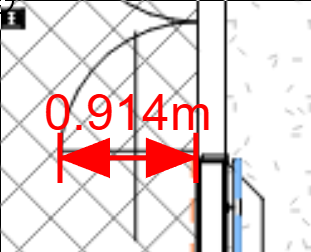
When we hover over the area take-off... it should appear in the desired unit output. It does not. (yet).
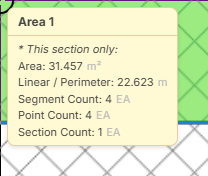
Hey Beau, what is your project measurement system? If you chose "Metric" when you created the project, the dimension tool, hover hint, & a few other things will display in metric regardless of what measurement system you scaled the page in.
If you switch the measurement system to "Imperial" in the edit project pop-up, the dimension and hover hint should show in imperial units.
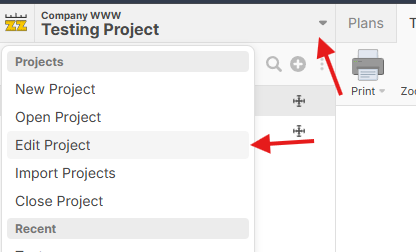
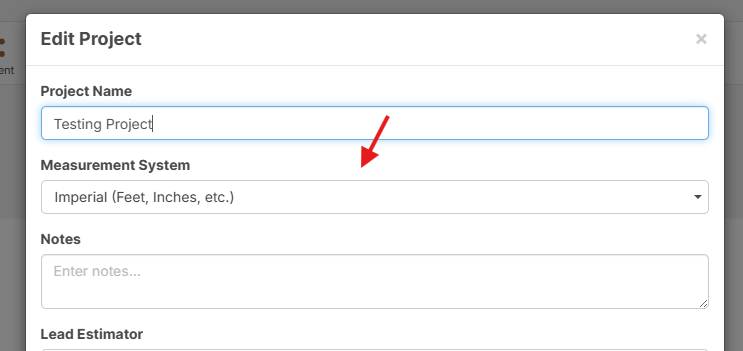
On the dimension tool, we are planning to add options to display in different measurement systems, and on the hover hint, whatever units you are using for measurement 1-3 will override.
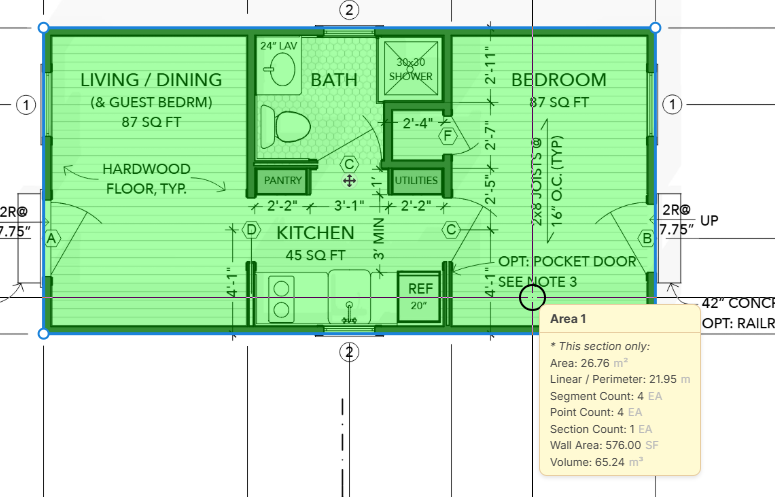
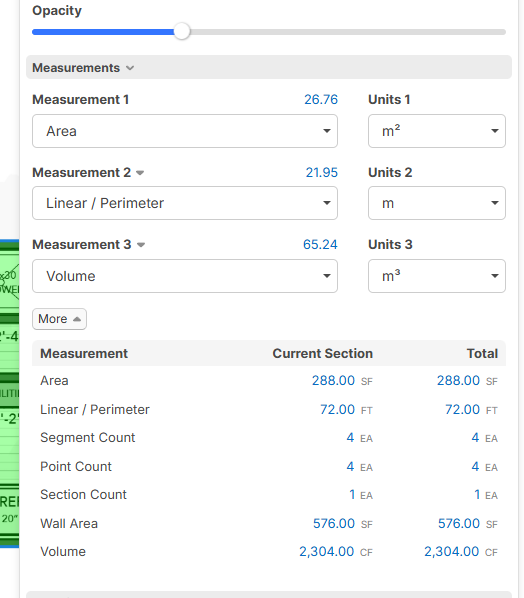
In this example, I'm in an imperial plan, but my measurements 1-3 are inputting in metric & the same measurements are reflected on the hover hint in the same units.
So import the plans with output that I wish to recieve?
For the most part, that is correct.
Hi lorin I haven’t had a chance to test it fully.
I did notice the ability to output imperial units when scaling in metric, but I didn’t realize I was able to select imperial for a metric scale set of drawings that is most likely the function I would utilize as it would allow me to have one set of templates.
if I upload a set of drawings in metric, choose imperial and verything works as if they’re imperial drawings, I’ll be a happy camper.
will auto scale work in this situation?
🙏
👍1Yes, auto scale should continue to work regardless of the project measurement system.
👍1Hi Lorin/Luke
I imported a new dwg set
1. I imported the metric drawings but instead of the metric setting I imported them Imperial.
2. The auto-scale feature detected the drawings were 1:50 and applied that scale.
3. I tested measuring some rooms and received an Imperial output.
4. under properties you can toggle between a number of metric & imperial units.
I have to say... ZZ did a job with this. It works better then I hoped in that we can toggle between a number of units that include mm cm m km miles yards, inches, & feet.
Thank you ZZ team & Lorin
Cheers,
Beau Mitchell
🚀3