











Scale Menu Toggle-to-Close Functionality [UI/UX Enhancement]
Objective:
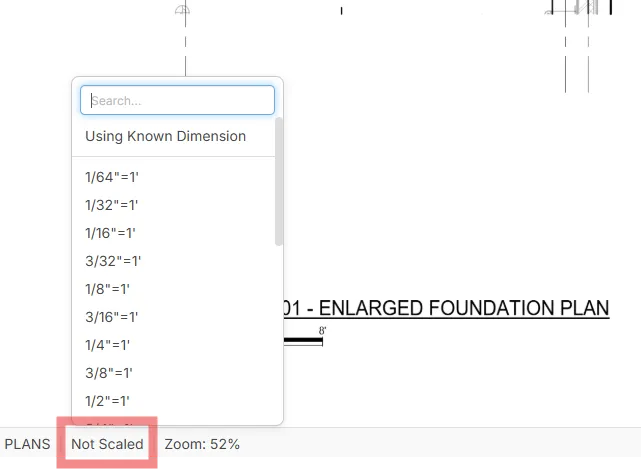
Allow users to quickly open and close the scale selection menu by clicking the scale display area (e.g., “Not Scaled”) a second time, enabling faster verification of scale details without having to click elsewhere on the canvas.
Description:
Currently, when a user clicks the scale display area, the canned scale options menu appears. However, clicking the same scale display area again does not close the menu; the only way to dismiss it is to click outside of the menu. This is inefficient when users have zoomed in to check a scale bar or dimension line that is partially hidden behind the menu.
Enhancing the control to function as a toggle would allow users to open the menu, check the scale, quickly close it without losing their zoom or position, and then reopen it as needed.
Suggested Enhancements:
- Implement toggle-to-close behavior when clicking the scale display area again.
- Enable ESC key as a shortcut to close the scale menu without affecting the zoom or selection state.
- Preserve the menu’s scroll position so reopening returns to the same spot in the scale list.
Benefits:
- Improves speed and workflow efficiency when setting or confirming scale.
- Eliminates extra clicks and prevents loss of zoom/position context.
- Provides a smoother, more intuitive UI experience in high-zoom takeoff scenarios.

Thank you for the feedback. Small details like this definitely have an impact on the overall user experience. I'll pass this along to the development team for review.


TY! Dumb I know. I know I've found some other small tweaks I'll try to start posting
👍1All good! Thanks for all your input to help us make it better 🙂