










 Feature Requests
SCALE: Page Regions
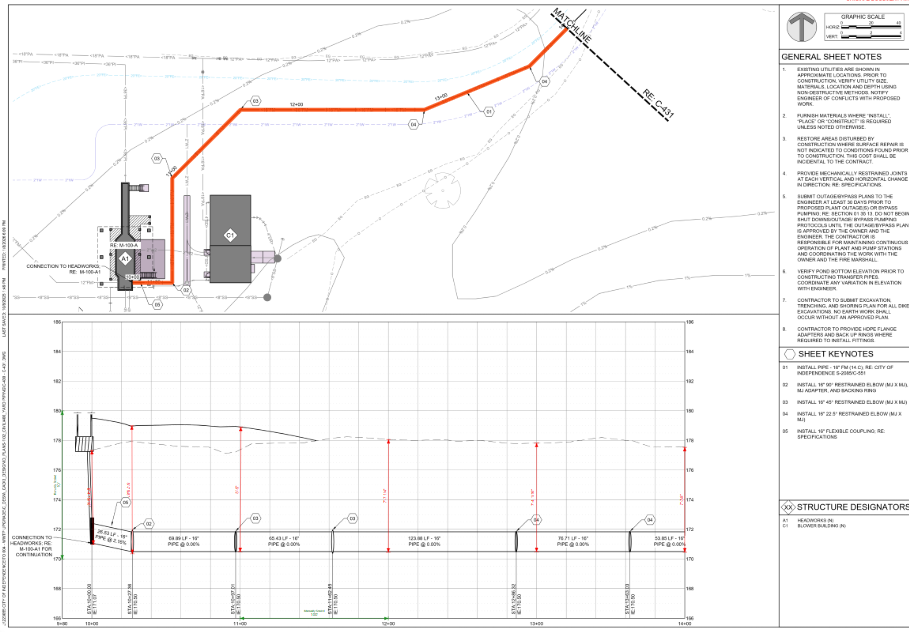
We really need to be able to scale regions of the page separately! I'm running into this a lot lately. If I scale horizonal and vertical for the section view, the plan view is wrong. If I scale for the plan, the section view is wrong. I have hundreds of sheets like this. I can snip sections to create a new page (that's what I'm currently doing) but for large plan sets this takes a lot of time. Example below:
Thanks in advance!

Hi, thanks for the feature request? How do you think this would work? How would the user set the page for a region? How would a user know the regions on the page have different scales? How would they edit them?
👍1
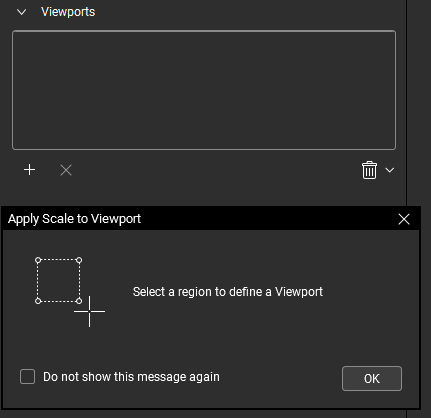
I think he means something like the "Viewport" option in bluebeam, which allows you to select a region from a page, this region will have a different scale from the page as required.
For example, I got an elevator section plan, which are 1/8" = 1', so I set this scale in my page. But in the same page I got some details which are 3/4"=1', so with a feature like viewport I could first select the option and set the scale as required, then I select the area for the details and my viewport scale will be set only inside that area, the rest of the page remains 1/8"=1'.
In the case he gave, he might set the scale for the page as required for any of the plan or sections, and create a viewport for the other scale required.
👍1
Could AI be trained/used to detect different viewports on a plansheet and automatically set them up?
👍1@Justin this is possible in theory, however we store the scale at the page level. This would require using (maybe layers?) some other grouping under a page to store the page scale (and possibly scales in 2 directions that are different, because people want this feature too). There are so many ways to do this, and we are mulling them all over. The difficulty is keeping it simple and easy, while still adding all these "automatic" features people request.
👍1
Yes, like the guys mentioned above. AI would detect the sheet scale, then if there are areas of the page with different scales we'd have the option to select that page region and scale separately. In the example above, for pipe drawings, the plan view uses only the horizonal scale while the profile view uses both horizonal and vertical scales - so the plan would scale at 1"=20' and I'd select the profile region to set a custom scale to X: 1"=20', Y: 1"=2'. For detail pages, which AI doesn't normally detect, you'd select each detail or region and set the scale.
If AI could be trained to do it all automatically, that would be icing on the cake!
I see your point about the complexity since we want multi-directional scales also. I don't know much about what happens in the background, but theoretically it seems like you could set up the page scales in a parent-child relationship on the back end, where if the page only has one scale nothing changes, but if there are multiple scales or scale regions the code would convert to a parent-child relationship with the parent page acting as a "folder" which would hold duplicate child pages with respective scales. Now that I say this, it's basically layers but, on the back end.
On the front end I want to see:
- "Add Separate Y scale" in the custom scale options.
- "Add Scale from Selection" in the Scale dropdown list.
- "Set Custom Scale" option in the dropdown menu, when I select a region of the page.
Very thoughtful @Shane, thanks for the feedback here.

Great discussion — I'm another voice interested in this feature. Shane's parent-child concept is elegant and feels like the right mental model. From my perspective in heavy civil, the most common use case is exactly what he described: plan-and-profile sheets where the horizontal scale is consistent but the vertical scale differs between the plan view and the profile view. That's probably 80% of the multi-scale sheets I encounter day to day.
One thought to add: if the viewport/region approach does get built, it might be worth considering whether regions could carry metadata beyond just scale — things like a label or description (e.g., "Profile View," "Detail A") that could show on hover or in a legend. That way, when you hand a takeoff to someone else on your team, they can immediately see which scale applies where without having to guess. It would also make QC easier — you could glance at the region labels and confirm the scales are set correctly before you start measuring.
Either way, even a basic version of this — manual region selection with independent scale — would be a huge workflow improvement. Looking forward to seeing where this goes.
👍2
Just checking to see if there's been any updates to this issue?

@Chaz, no updates yet. The current workaround is to still crop as a new page & scale the cropped page.
Ok, thanks @Lorin
@ Stephen Daves - UPDATE - I thought adding a new layer would allow a diff. scale - but it doesn't. I'd say its the new page option then.
@Stephen Daves - I like the Layer work around. Just make a new layer and call it "Profile Scale" then scale all of your profiles on that layer. Use default to scale all the plan view stuff...
Sure, we don't see all the take-off on a single page, but we can get the info from the reports....
👍1Hi team,
Have you given any more thought to this issue? It would sure be helpful to be able to scale regions of a page separately.
Y'all are doing a great job, keep it up!
👍1