











 Feature Requests
Set default sizes for text and takeoff lines
Hi ZZteam,
Is there a way we can set a default line size and text size for takeoffs? I almost avoid making notations on takeoffs because they almost uniformly are about 10 times the size/thickness I need them to be. And when I need to add a lot of callouts and arrows and notes it can be pretty time consuming to go into each one individually and resize it to what is useful on the drawing page.
Thanks y'all!
Gillian
%22%2F%3E%3Ctext%20x%3D%2232%22%20y%3D%2233%22%20text-anchor%3D%22middle%22%20dominant-baseline%3D%22central%22%20font-family%3D%22Arial%2C%20sans-serif%22%20font-size%3D%2226%22%20font-weight%3D%22600%22%20fill%3D%22%23fff%22%3EKP%3C%2Ftext%3E%3C%2Fsvg%3E "Kory Podgaysky")
When I start using notes, I typically do one, adjust everything to my liking, then copy and paste that one to every other spot that I want to add notes just so it's all consistent and I don't have to change them individually.
👍2
That's what I end up doing too, I just wish there was a better way.

I believe what you are after will be solved in our upcoming release. We are working on the ability to define your default settings each tool in the toolbar. You will be able to also set up a dropdown of presets / templates that are in a dropdown on each tool in the toolbar so you can easily click & go. For example, a preset for "Green Arrow", "Blue Arrow", "Blue Cloud", "Roof Area" (sloped), etc. Similar to templates on the right sidebar, but quick access on the toolbar & includes annotations (and allows setting the default for each).
👍2%22%2F%3E%3Ctext%20x%3D%2232%22%20y%3D%2233%22%20text-anchor%3D%22middle%22%20dominant-baseline%3D%22central%22%20font-family%3D%22Arial%2C%20sans-serif%22%20font-size%3D%2226%22%20font-weight%3D%22600%22%20fill%3D%22%23fff%22%3EJ%3C%2Ftext%3E%3C%2Fsvg%3E "Jes")
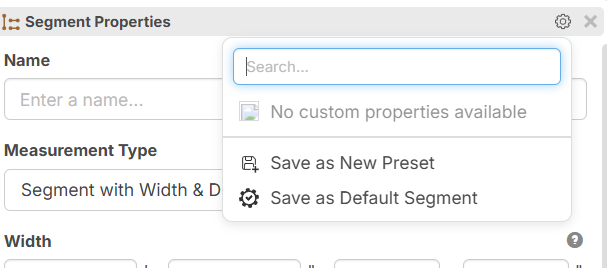
@Jes Yes, lots of new options in this update. I notice that icon next to "No custom properties" is not loading right. We'll get that fixed.