%22%2F%3E%3Ctext%20x%3D%2232%22%20y%3D%2233%22%20text-anchor%3D%22middle%22%20dominant-baseline%3D%22central%22%20font-family%3D%22Arial%2C%20sans-serif%22%20font-size%3D%2226%22%20font-weight%3D%22600%22%20fill%3D%22%23fff%22%3ESH%3C%2Ftext%3E%3C%2Fsvg%3E "Steven Holden")
Totals & OHP Percentage
Hey Guys,
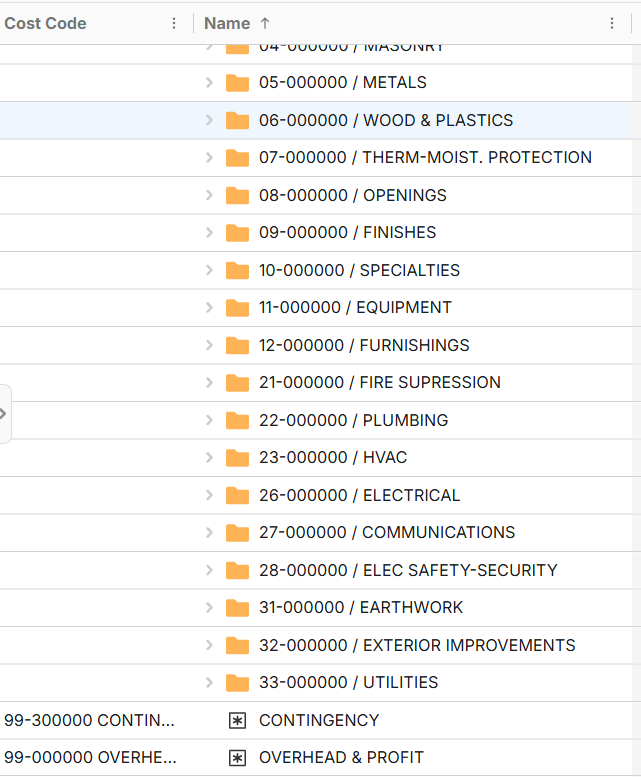
New GC user. I was able to get my full cost code list imported and separated by each division. We mainly do takeoffs for a few material items we supply and to double check sub numbers/quantities. Is there a way to do the following:
- Total of all estimate costs
- Apply x% OHP/markup to these costs as its own line item.
- Total the estimate costs and the OHP/markup line
Previously used spreadsheets for estimates. Just looking for a more collaborative/cloud estimating workflow.
Per sales rep, I was told post here and try the MCP.

Hey Steven! Thanks for the feature request! Right now, we don't have an easy built-in way to total up and reference in a formula for use in an item (like in your screenshot), but it may be possible with a formula approach using our SUM function, etc. We have a video going over the SUM formula here: https://www.youtube.com/watch?v=m_rzEZDhuTY Note: The SUM function currently only sums its children, not all descendants, so you would need to account for that in your formula
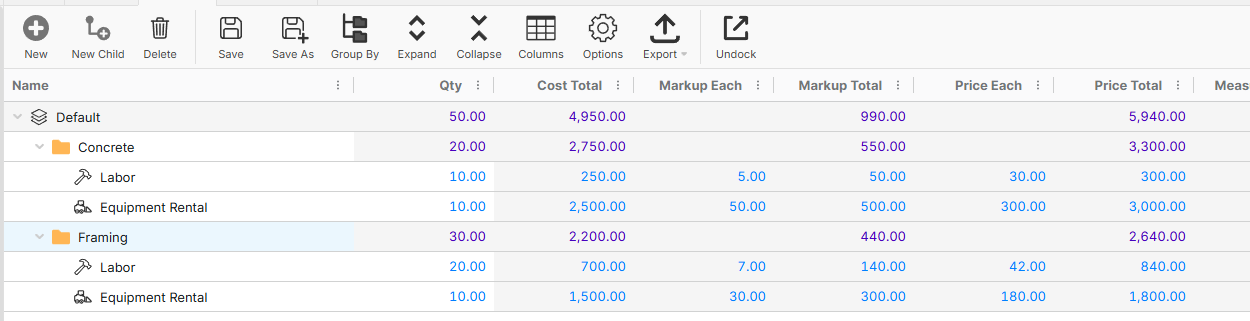
As an alternative, one of our recommended approaches is to use a common grouping field, like "Layer", that groups all items in your project, and then use the built-in markup and price total (which get aggregated to the grouping row). In the example below, the total of estimating costs would be the "Cost Total", OHP/Markup would be "Markup Total", and the total of both would be "Price Total". If you want to adjust the markup in 1 place, and have it adjust across all items, you could create a custom property that applies to the project (or folder), and then, using the formula engine, reference that property as the markup in all items.