











 Feature Requests
Turn search results into annotations
It would be useful to be able to search a term and then maybe right click to annotate with highlighter (or choice of any annotation type) automatically the results.
For example search "MDF" and it already highlights the results. I would right click the result and get a menu of annotation options to replace the search highlight with. At the very least, just turn the existing search highlight to an annotation highlight that shows up in the annotation reports.
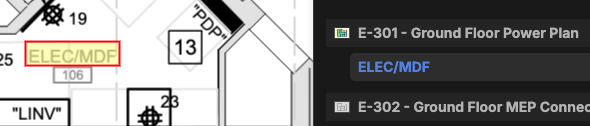
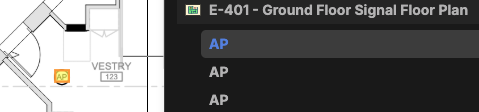
It might also help with takeoff in some circumstances where the desired takeoff items are searchable. An example, "AP":

I realized I should have put this in "Feature Requests" Can a mode do that or should I delete it and put it there myself?

Hey Brandon, Thanks for the feature request! I'll relay it to our dev team.
Side note - I moved the post into "Feature Requests" 🙂
👍1
i really like this. I also was thinking it would be great to be able to customize your own dropdown list of frequently searched terms. i
%22%2F%3E%3Ctext%20x%3D%2232%22%20y%3D%2233%22%20text-anchor%3D%22middle%22%20dominant-baseline%3D%22central%22%20font-family%3D%22Arial%2C%20sans-serif%22%20font-size%3D%2226%22%20font-weight%3D%22600%22%20fill%3D%22%23fff%22%3EJL%3C%2Ftext%3E%3C%2Fsvg%3E "John L")
Yes this is something that bluebeam does very easily and would be great to have here. A way to select the results of a search, or even a "select all" then the option to highlight all selected
%22%2F%3E%3Ctext%20x%3D%2232%22%20y%3D%2233%22%20text-anchor%3D%22middle%22%20dominant-baseline%3D%22central%22%20font-family%3D%22Arial%2C%20sans-serif%22%20font-size%3D%2226%22%20font-weight%3D%22600%22%20fill%3D%22%23fff%22%3EJ%3C%2Ftext%3E%3C%2Fsvg%3E "Jes")
Yep definitely would like to see enhancements to search like this