











 Feature Requests
Visibility Settings of Take-off Items is Clunky??
Not sure if this should be under Feature Requests or Bug Reports but I feel that the recently added visibility options for take-off items are a little clunky?
I definitely appreciate having more control and being able to turn on/off the visibility of multiple take offs at once, but it just feels a little clunky.
For example, in Planswift I would do a bunch of take-offs and then when I wanted to review my work, I would turn all the visibility off and then one-by-one turn on certain items to review. In ZZ I can turn everything off, but then if I want to turn on certain items one-by-one I get a "Cannot change visibility: This item inherits its hidden state....." message depending on folder structure.
I would then have to go back to that folder and click on/off the items I want one-by-one.
It's quite possible I'm missing something that's right in front of me, it wouldn't be the first time I'd be wrong, but I wanted to see if I'm the only one having an issue with this.
TIA!
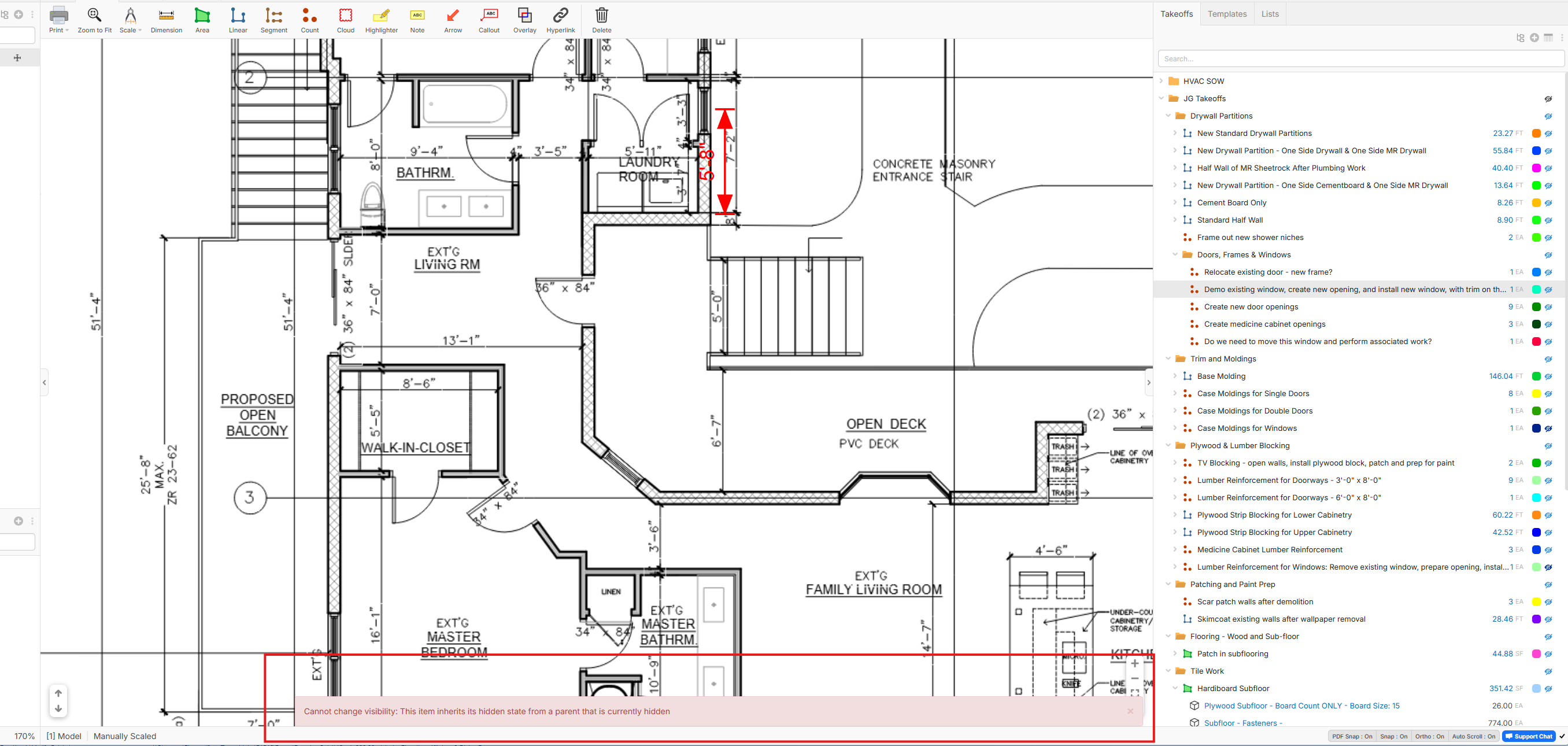

I have been having this same problem as well. I would also like to turn everything off and then turn on select ones one by one for certain instances. I would love a fix to this!
👍3
After Using "Hide All" on the Page you were working on Go to the Left Pages Section if you expand the Sheet you are working on you can turn on the Takeoffs one at a Time

Hi Sam,
When I try that I still get the same "cannot change visibility" message at the bottom of the screen.
%22%2F%3E%3Ctext%20x%3D%2232%22%20y%3D%2233%22%20text-anchor%3D%22middle%22%20dominant-baseline%3D%22central%22%20font-family%3D%22Arial%2C%20sans-serif%22%20font-size%3D%2226%22%20font-weight%3D%22600%22%20fill%3D%22%23fff%22%3EKP%3C%2Ftext%3E%3C%2Fsvg%3E "Kory Podgaysky")
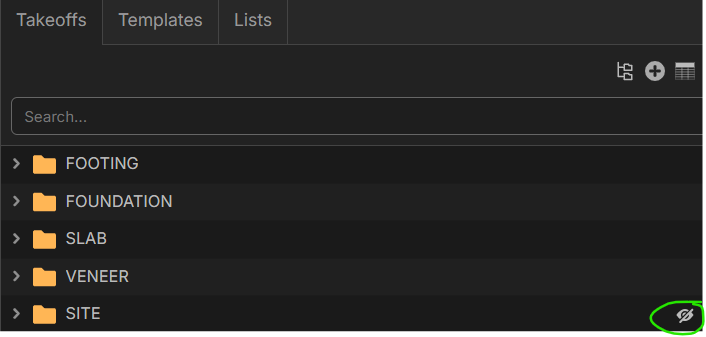
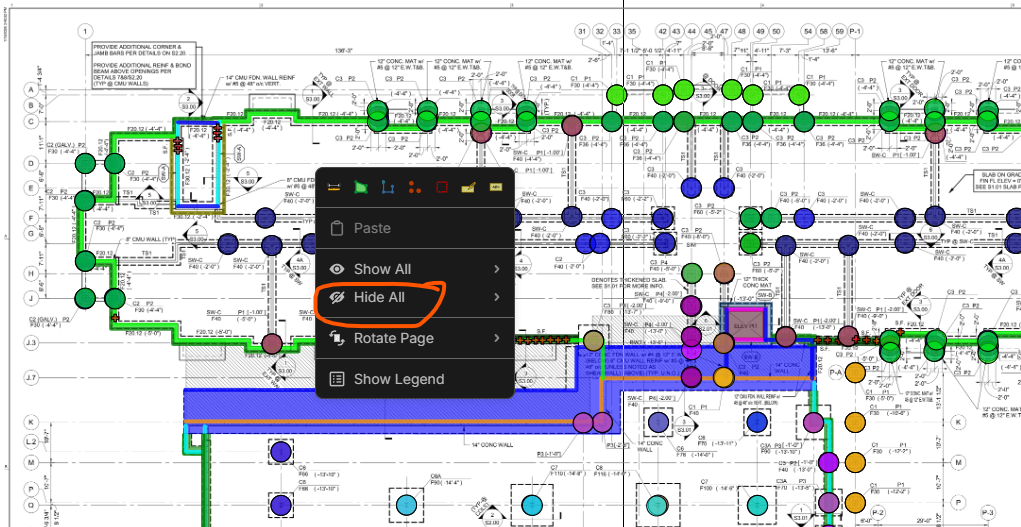
If you hide all using the eye on the folder and then try to unhide on the page, it doesn't work. If you have everything showing on the page, right click, and use "Hide All", you can then go to the left pages section and unhide items on that page one at a time.
If you are getting the "cannot change visibility" message, it's looks like it's because you have hidden all takeoffs at the folder level as shown below. Unhide there and then it should behave as Sam mentioned.
%22%2F%3E%3Ctext%20x%3D%2232%22%20y%3D%2233%22%20text-anchor%3D%22middle%22%20dominant-baseline%3D%22central%22%20font-family%3D%22Arial%2C%20sans-serif%22%20font-size%3D%2226%22%20font-weight%3D%22600%22%20fill%3D%22%23fff%22%3EKC%3C%2Ftext%3E%3C%2Fsvg%3E "Kelly Cole")
Ahh! I see. Right click within my plan page to find "Hide All"... not within any of the folder structures.
%22%2F%3E%3Ctext%20x%3D%2232%22%20y%3D%2233%22%20text-anchor%3D%22middle%22%20dominant-baseline%3D%22central%22%20font-family%3D%22Arial%2C%20sans-serif%22%20font-size%3D%2226%22%20font-weight%3D%22600%22%20fill%3D%22%23fff%22%3EJS%3C%2Ftext%3E%3C%2Fsvg%3E "Jordan Sinner")
I agree with the original post. We like to be able to hide all items and then select specific items to turn back on and focus on. Can we please add the feature of "hide all" or "see all" to prevent going 1 by 1 on each line item with the eyeball button?
Answering my own question as a temporary workaround, I suppose we can just make a generic folder and put all the line items in there, then click the folder on/off.
👍1%22%2F%3E%3Ctext%20x%3D%2232%22%20y%3D%2233%22%20text-anchor%3D%22middle%22%20dominant-baseline%3D%22central%22%20font-family%3D%22Arial%2C%20sans-serif%22%20font-size%3D%2226%22%20font-weight%3D%22600%22%20fill%3D%22%23fff%22%3EVT%3C%2Ftext%3E%3C%2Fsvg%3E "Victor Tengowski")
Jumping in here to say it might be useful to have an 'isolate' option that hides all other takeoffs except for the selected takeoff.
👍1