











 Q & A
Q & AAdjust decimal places
Hi Team,
is there a way to adjust the decimal places?
in Planswift i used to use the naming convention for reinforcement, or stud lengths etc as the mm via a custom property x1000 then 0 decimals, that would, which i would drag that property into the name for clarity for example N16.200 would be [Reo].[Spacing mm] but now when i try i use SKU, so [SKU].[Spacing mm] but result is N16.200.0<<< unwanted Decimal.
Same applies with height or stud length instead of wall type 1 "WT1 - 3000H" I get "WT1-3000.00H" or similar. In PS we could chose our decimal rounding.
Any solutions are welcome because i'm currently typing the names, combined with a few other things slows me down significantly
Cheers

Hey Thomas, we currently allow you to adjust the default number of decimal places in your company settings. Does this accomplish what you're after?
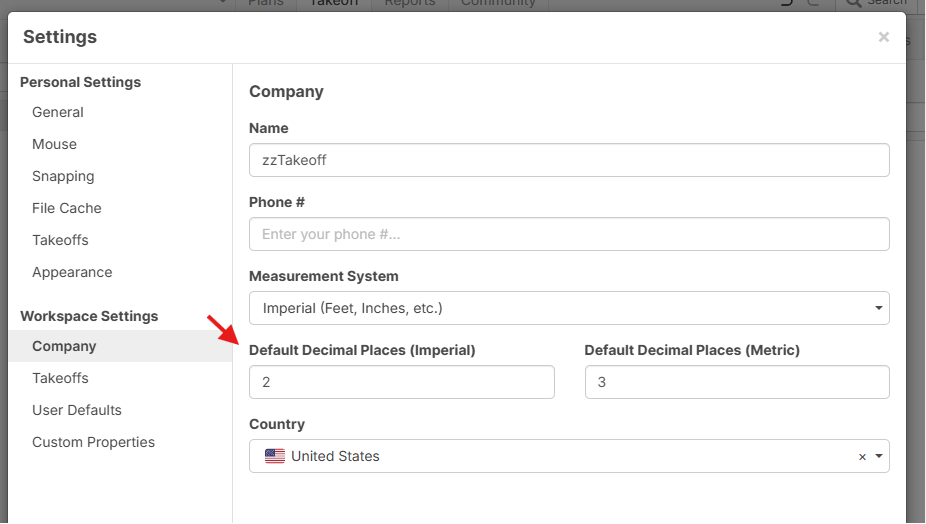

Thanks I'll try,
however i still need decimals for measurements etc, just the naming i remove them
Gotcha.. I think this setting also changes the decimals for the measurements. I'll send this to dev to see what they come up with.
Side note - is "[Spacing mm]" a formula? The 0 decimals should only show up if you are trying to compute the value via a formula.