











 Q & A
Q & A
Auto collapse in reports
I have a custom report saved to group by folder, and can't figure out why it automatically expands every line each time I open it.
Any help would be appreciated :)

Hey Noah, your report expands to the "Default Expand To". If you click "options", you should be able to change which grouping your reports expand to.
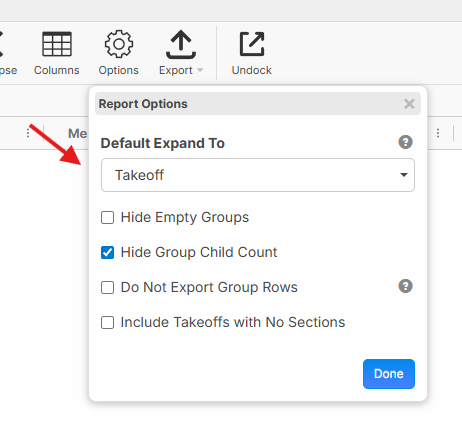

I needed this, so thanks for posting @Noah, and thanks @Lorin for answering!
@Lorin, can this feature be made so that it defaults to every job?
When I opened another project, the expansion defaulted to something else that I haven't set.
Hey Justin, did you save your report after you made this change? The Default Reports do not save report settings or columns that are added/removed. We should also load the last report you had opened, along with the expand/collapse settings (if its a team report or my report). If not, it may be a bug.
I did save it as a Team report. The other project that I opened was formatted relatively close to the "main" project that I am working in. I had it defaulted to none. I would expect that any job/report that I open would also retain this state, as we have in the pages and takeoff panes.
👍1Gotcha. We'll dig into this. We had another user chat in saying they were experiencing the same thing.