











 Q & A
Q & A%22%2F%3E%3Ctext%20x%3D%2232%22%20y%3D%2233%22%20text-anchor%3D%22middle%22%20dominant-baseline%3D%22central%22%20font-family%3D%22Arial%2C%20sans-serif%22%20font-size%3D%2226%22%20font-weight%3D%22600%22%20fill%3D%22%23fff%22%3ED%3C%2Ftext%3E%3C%2Fsvg%3E "dan")
5h 33m
Auto Folder Collapse
When opening zzTakeoff each time, all folders and takeoffs are expanded. Is there a way to have them all collapsed when we open the program each time? That way we can expand the folder we are looking for instead of collapsing every folder we aren't looking for.

Todd Kaberline zzTakeoff5h 15m
Hi Dan, there is a collapse all preset for folder in templates and takeoffs. see image below:
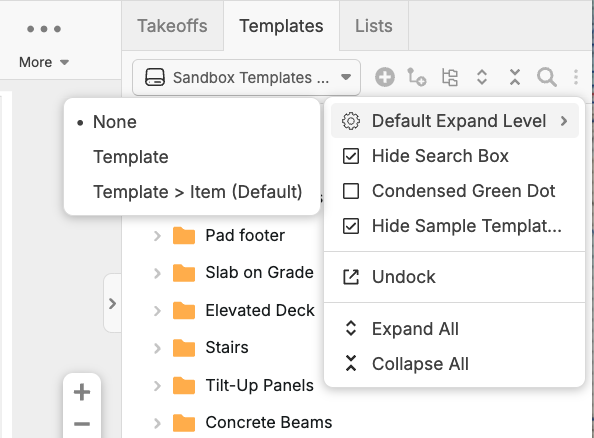
Just click on the three dots on the right, set the default expand level to none
Hope this helps
You must be logged in to post replies. If you don't have an account you can signup here.