











 Q & A
Q & A%22%2F%3E%3Ctext%20x%3D%2232%22%20y%3D%2233%22%20text-anchor%3D%22middle%22%20dominant-baseline%3D%22central%22%20font-family%3D%22Arial%2C%20sans-serif%22%20font-size%3D%2226%22%20font-weight%3D%22600%22%20fill%3D%22%23fff%22%3EVT%3C%2Ftext%3E%3C%2Fsvg%3E "Victor Tengowski")
225d 18h
Can we get a 'move' hot key?
Instinctively I'm hitting 'm', but that that is mapped to magnifier. I'm not sure about anyone else, but I use the move command way more than magnify and wouldn't mind if it was remapped to move.

Stephen Daves zzTakeoff225d 14h
Hi, you can hold Alt and drag to move items on a page. On a mac it is option and drag.
👍2
Heber Allred zzTakeoff225d 5h
You can also use arrow keys to move the selected objects a specific distance.
👍1
Kyle Bonde - Vertical GC 224d 12h
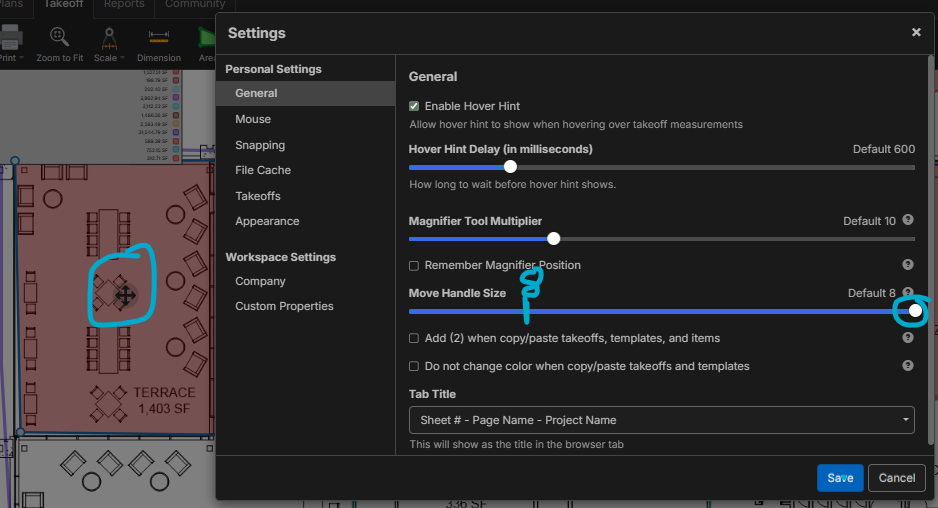
I'm starting to use the ALT key and works great. Another thing that helped me was making the "Move" handlebars bigger, as 8 is a horrible default that needs to be taken to the zCouncil to up the default.
You must be logged in to post replies. If you don't have an account you can signup here.