











 Q & A
Q & ACSI Master Format Divisions
Our projects are organized most often by the 50 Division CSI Master Format. Is there a way to add more Divisions and/or Folders to the "Division" section. When we start a new takeoff there are only 16 Divisions listed in the dropdown.
Thanks!

Hey Shane, you can add/modify the existing dropdown options for the "Division" dropdown by going to the custom properties page on the settings popup, selecting the 3-dot menu on Division, and then choosing "Edit Custom Property". Once you are editing the custom property, you can add/modify/re-arrange the dropdown options to fit the CSI MasterFormat. The + button at the bottom of the dropdown options allows you to add more options, and the - next to the dropdown option removes it.
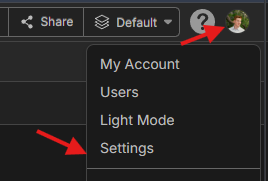
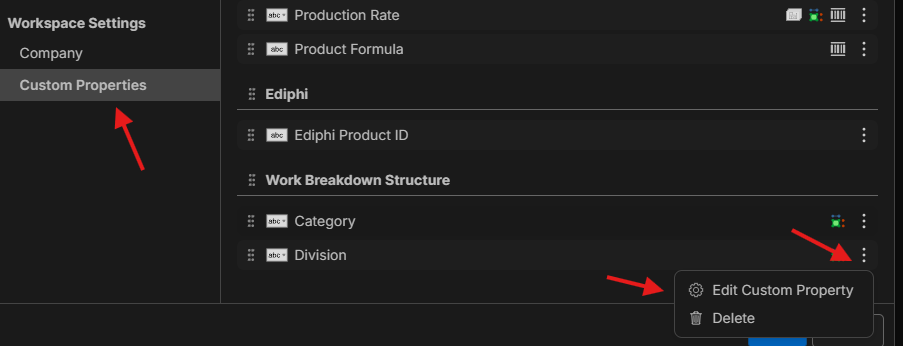
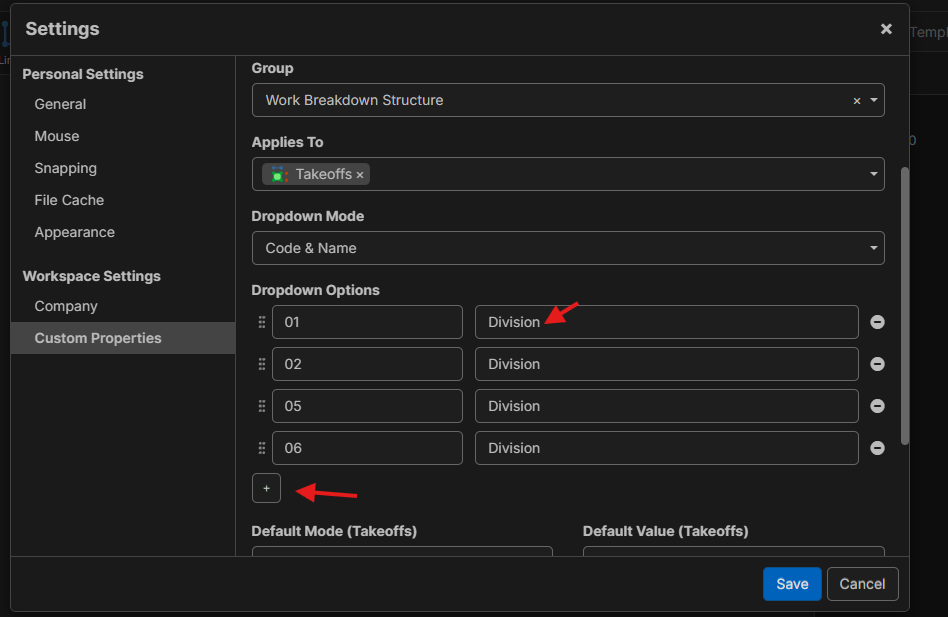
We currently don't support "tree" options where you select the division, section, and then subsection (for CSI MasterFormat) in the same dropdown, but we are planning to add them in the future.
Depending on whether you need the division or you need the section/subsection, you will need to add additional custom properties for those as well.
👍1
Excellent! That helps. Thank you.
%22%2F%3E%3Ctext%20x%3D%2232%22%20y%3D%2233%22%20text-anchor%3D%22middle%22%20dominant-baseline%3D%22central%22%20font-family%3D%22Arial%2C%20sans-serif%22%20font-size%3D%2226%22%20font-weight%3D%22600%22%20fill%3D%22%23fff%22%3ESS%3C%2Ftext%3E%3C%2Fsvg%3E "Steven Shaw")
Hi,
Anyway this setting page can give you the option of making it larger by dragging the window downwards?
Be good if you could import from Excel spreadsheet too.
Thanks.
👍1
@Steven In the future, this screen as a full page with a lot more room. There will also be a way to link custom properties to a "List" which will be easier to manage and edit the options in a grid (easier to import, etc.)
🚀2👍2