










 Q & A
Q & ACustom Property - Dropdown - Access the "name" and "value" variables?
Is there a way to access both of these variables via formulas?
- I would like to use a dropdown name initially from a QTO type and inherit the value everywhere
- I would also like to utilize the dropdown name for the QTO Name property
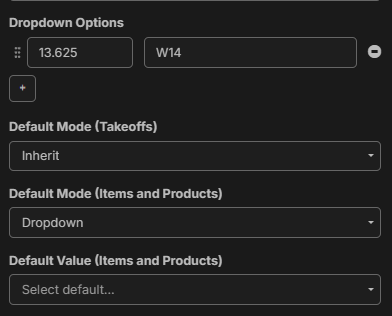


How is this possible?

Hey Chaz, currently, for dropdowns in "Code & Name" or "Value & Name" mode, referencing a dropdown property in a formula will pull the value or code. You can't reference the name yet. We are planning to expand this in the future so users can do "[dropdown property.name]" to access the name of the chosen option.
👍1
Awesome @Lorin! Ty for update. I was trying the ":" & "." methods intuitively from the UOM method but nada...
Looking forward to many great things to come and so happy with everything so far - much gratitude
🚀1
This would be great!

could you do this with lets say product ?? have it pull in a product if you use the actual SKU name

@Sergio thats a great feature request, I know others have made that one too.