











Formula Question
Hi everyone,
I have a formula question. When measuring a roof, we need to add 50mm for the eaves. How should I allow for this 50mm automatically in the formula when I use the zz take-off tools for measure the roof area?
Thank you

Measure the eaves as their own line and turn that length into the 50 mm strip. Using a sloped roof type keeps the pitch included:
1. Measure the roof as an area takeoff with a Sloped Area measurement type, so the pitch is applied to the roof area automatically.
2. Add a Linear takeoff (not Sloped Linear, since the eave is level) and draw it along the eave edges only.
3. Give that linear takeoff an item with the same units as your roof item (m²). If the 50 mm is measured down the roof surface, use this formula:
[Linear:m] * 0.05
4. If the 50 mm is measured on the plan, use this formula to include the pitch, with `Roof` swapped for your roof takeoff's name (for a roof pitch set as rise/run):
[Linear:m] * 0.05 * sqrt([./Roof/rise]^2 + [./Roof/run]^2) / [./Roof/run]
5. If the roof pitch is set in degrees, use this instead:
[Linear:m] * 0.05 / cos([./Roof/degrees] * pi / 180)
6. For one combined total, put both takeoffs in a folder and give the folder an item with this formula:
sum('qty', {kind: 'item'})
If every edge of the roof gets the 50 mm (rakes too), there's a quicker way. Right-click the roof shape, choose Offset, enter 50 mm, then delete the original shape. The pitch is applied to the new outline automatically. You'll need to run Offset again if the roof outline changes later.
%22%2F%3E%3Ctext%20x%3D%2232%22%20y%3D%2233%22%20text-anchor%3D%22middle%22%20dominant-baseline%3D%22central%22%20font-family%3D%22Arial%2C%20sans-serif%22%20font-size%3D%2226%22%20font-weight%3D%22600%22%20fill%3D%22%23fff%22%3ECX%3C%2Ftext%3E%3C%2Fsvg%3E "Claire Xu")
Thank you, Sam.
I was just wondering whether there is a way in ZZ Takeoff to measure the entire roof area and automatically include the additional 50 mm eaves overhang as part of a single calculation, rather than measuring the main roof area and then separately measuring the eaves length × 0.05 m.
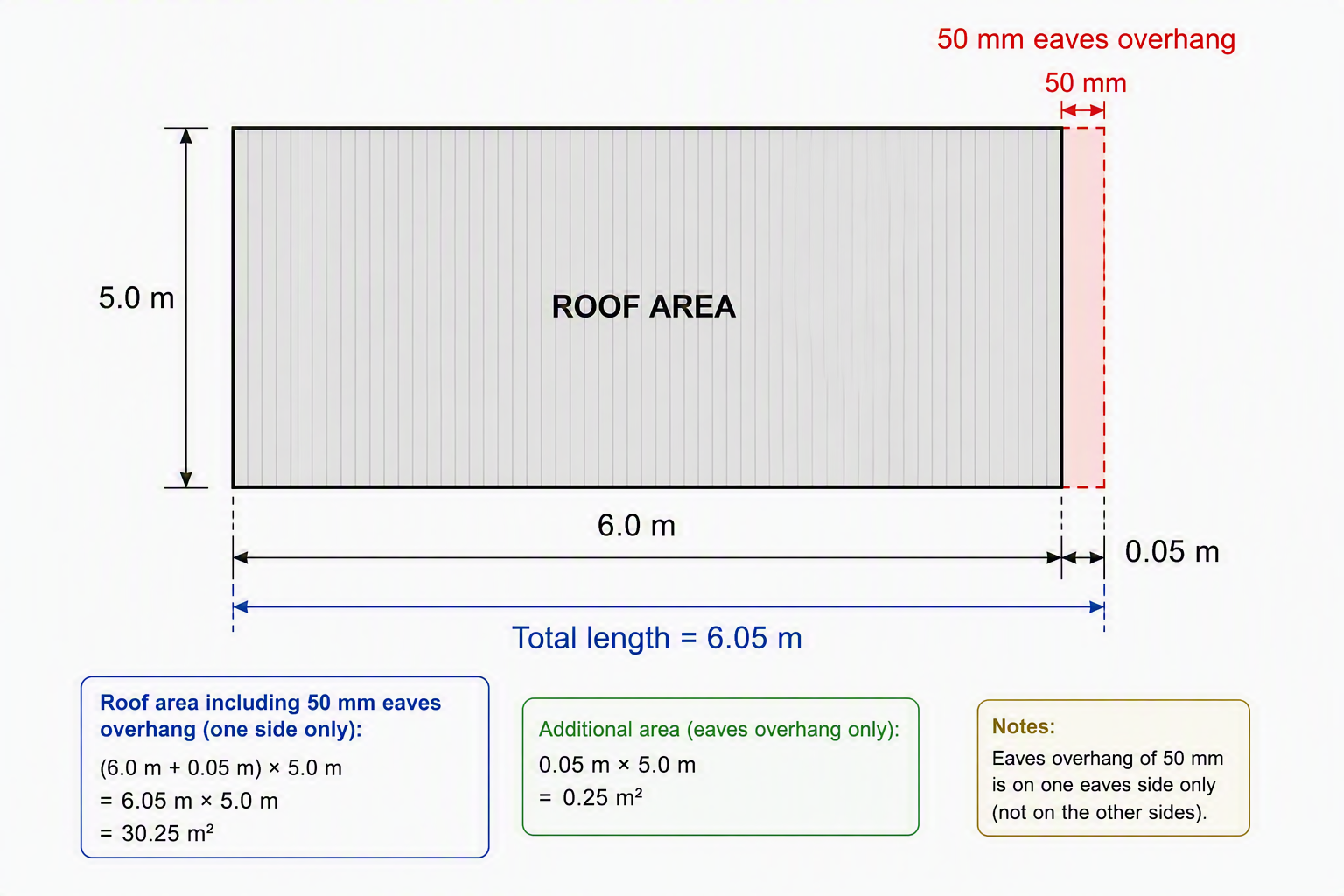
For example, if the roof length is 6.0 m, the roof run (eaves length) is 5.0 m, and the eaves overhang is 50 mm, could I simply calculate:
(6.0 + 0.05) × 5.0👍1
I think using the offset would be the best solution
Thank you, Sam.
How would I go about using the Offset function? Thanks
Can anyone provide a screenshot showing how the formula should be set up?
I sometimes get a bit lost with the wording, so if you understand what I’m trying to achieve, a screenshot example would be greatly appreciated. Thank you.
@ Claire,
Please find the video explaining how you use the offset tool to achieve what you are after.
👍2Thank you, Sam.
I can use this method for a four-hip roof where the eaves overhang applies to all sides.
However, if the 50 mm eaves overhang only applies to one side, as shown below, how would you recommend allowing for the additional area?
Thanks again
Hi Sam,
That's really helpful, thank you.