Q & A
Q & A
Help or Feature: Set default label font size or other settings for the "Auto Show Labels" during takeoffs settings.
Noticed this morning all my area takeoffs now automatically show labels. Very cool. I like this as a feature.
The text is a bit big and the labels a bit bulky. They kind of block the plan I'm looking at or where I need to continue my takeoffs at times, especially on scales where it's a large section of the plan on one page.
I've personally turned off that setting for now, but if I could adjust it to be a bit smaller when they spawn in or perhaps adjusting the default offset for their spawn position as well, that'd be perfect for me.
Thanks!

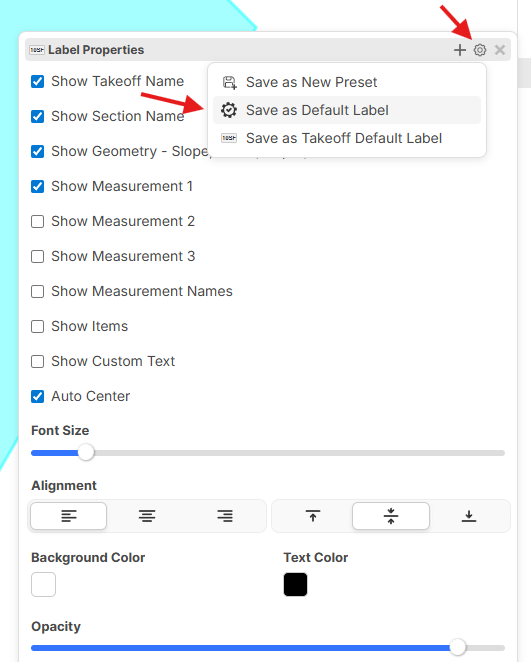
Hey ACBH, you can set the default font size on the label properties by selecting the gear and choosing "Save as Default Label" once you have set up the label properties. You can also save labels to specific takeoffs via "Save as Takeoff Default Label".
%22%2F%3E%3Ctext%20x%3D%2232%22%20y%3D%2233%22%20text-anchor%3D%22middle%22%20dominant-baseline%3D%22central%22%20font-family%3D%22Arial%2C%20sans-serif%22%20font-size%3D%2226%22%20font-weight%3D%22600%22%20fill%3D%22%23fff%22%3EAC%3C%2Ftext%3E%3C%2Fsvg%3E "Alex Castro-Frias")
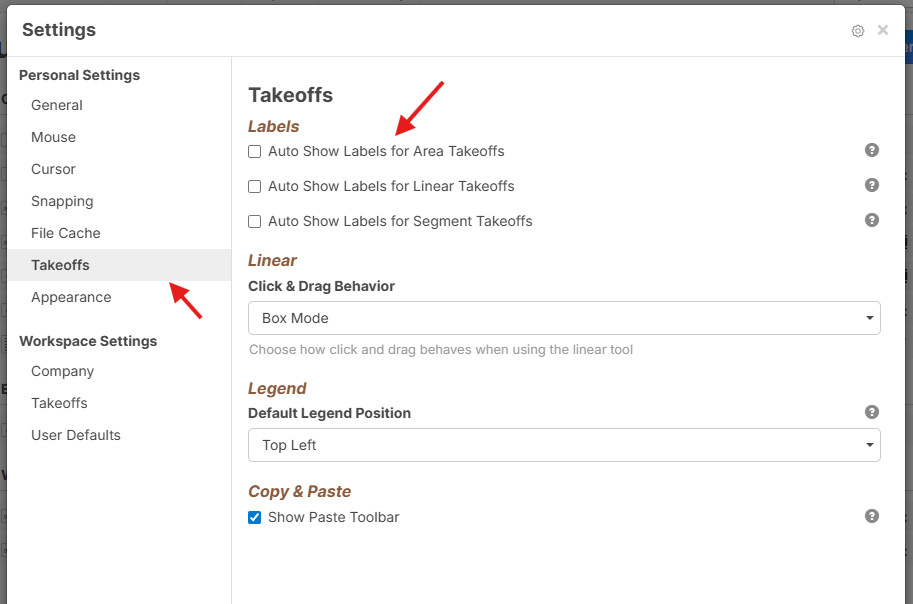
@Alex, automatic labels should be disabled by default if you refresh your page (we just deployed an update). You can also disable/enable automatic labels in the settings pop-up.