Q & A
Q & A%22%2F%3E%3Ctext%20x%3D%2232%22%20y%3D%2233%22%20text-anchor%3D%22middle%22%20dominant-baseline%3D%22central%22%20font-family%3D%22Arial%2C%20sans-serif%22%20font-size%3D%2226%22%20font-weight%3D%22600%22%20fill%3D%22%23fff%22%3ELC%3C%2Ftext%3E%3C%2Fsvg%3E "Luis Chiriboga")
Hide unused sheets in the Takeoff tab
Is there a way to hide sheets with no takeoffs in the takeoff view. The plan view has it but not the list view in the takeoff tab.
%22%2F%3E%3Ctext%20x%3D%2232%22%20y%3D%2233%22%20text-anchor%3D%22middle%22%20dominant-baseline%3D%22central%22%20font-family%3D%22Arial%2C%20sans-serif%22%20font-size%3D%2226%22%20font-weight%3D%22600%22%20fill%3D%22%23fff%22%3ESP%3C%2Ftext%3E%3C%2Fsvg%3E "Steven Powers")
Currently, I bookmark all the pages that I take off. That is the only work around that I am aware of right now, but this would be great. Especially since our focus is just architectural drawings I would like to hide all the MEPs and structural. But definitely the ability to filter on only pages that have takeoff on. It would be great as well.
👍3%22%2F%3E%3Ctext%20x%3D%2232%22%20y%3D%2233%22%20text-anchor%3D%22middle%22%20dominant-baseline%3D%22central%22%20font-family%3D%22Arial%2C%20sans-serif%22%20font-size%3D%2226%22%20font-weight%3D%22600%22%20fill%3D%22%23fff%22%3EB%3C%2Ftext%3E%3C%2Fsvg%3E "BDIC")
We only work on the Arch drawings as well. What we do is create an Arch folder and an MEPS folder and then just dump all the MEPS into the one folder and then collapse it. Then we'll bookmark the Arch's we are working on. Takes a minute or two to set up but it cleans up the drawing set.

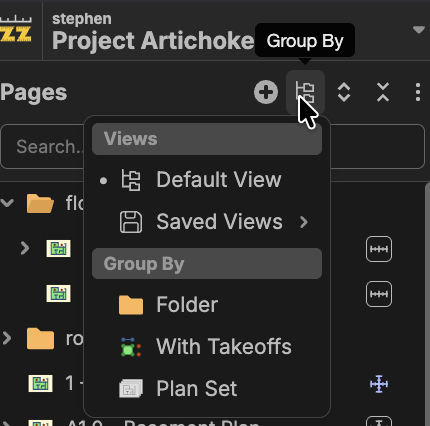
Hi, have you tried clicking Group By in the toolbar, then choosing With Takeoffs?