










 Q & A
Q & AHow are others handling QTO / Assemblies / Parts / Types?
Sorry for the long question(s), just trying to buy-in more on the estimating qty's beyond (count, area, linear) and hopefully estimate costs in the future.
I keep thinking I have a strategy and it keeps not playing out for me, so I'm asking for others insight or help.
I took the time this morning to take myself out of the construction arena and go to a built product - a bike.
PROCESS
Normally, my flow of work would be to review a new set of drawings (I may or may not know there will be a bike) so I would do one of two things once that scope is known:
- Review Plans
- Create a Takeoff Measurement:Count from Top Menu/Toolbar
- Create a Takeoff Measurement:Count from Properties/Properties Pane:Assembly/Template - "Bike"
- Review & QTO complete
- Begin identifying specifics/classifications of the bike (to better assist in adding assemblies, parts, items to the Measurement:Count) - [or assemblies?]
- I would then select some basic information or enter input that would assist in narrowing down scope. This information is populated from the "Custom Properties"
- I understand I can add any property or property group such as "Takeoff", "Item", or "Product" (there are other applications to create properties for as well "Projects", "Folders", etc)
- For the time being I've kept it simple by just creating two dropdown properties under the "Bike Example" property group (these properties have no calculation or variable use, just information/description), but I would like to also like to possibly add numbers or checkboxes (which I've successfully done for other properties/groups)
- Custom Property #1 - "Ride Style" - (dropdown, dropdown mode=Name)
- Option 1: Step Through
- Option 2: Step Over
- Custom Property #2 - "Bike Style" - (dropdown, dropdown mode=Name)
- Mountain
- Cruiser
- Commuter
- Create Scope - Now that I've understood more about what is involved with the bike I need to add scope, which should include estimated MLESO items/types
- This is where I'm having the most difficulty
- I'm looking to add parts
- I'm looking to add assemblies (that have parts)
- I'm looking to add subassemblies (that have parts)
- These items can be:
- Static
- Dynamic (need input & calculations) that are unique to just the assembly or part and really only rely on the "Measurement Takeoff" as a multiplier
My questions are:
- Would I need to create "Custom Settings" for every bike, scooter, car, truck, etc? Or in the construction side of things 2-20 properties per CSI division & subcategory and any specialty assemblies within?
- How can I best use "Item List" vs "Product List"?
- How can I use a template "Measurement Type" or "Item Template" to create assemblies that I can define variables (on the fly) that do not always require calculation at the parent level?
TEMPLATES
Here's a few examples (again, with the bike) where I'm finding some disconnection and I'm trying to learn a new or better way "The zzTakeoff Way"...
The below example I would use each of the following as:
- Bikes folder = container for everything bikes
- Assemblies folder - Any assemblies that usually are associated with some or all bikes
- Templates folder - Quick QTO tools for common assembled packages of bikes
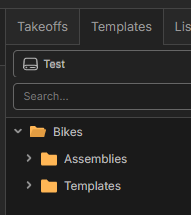
- Under the Assemblies I have
- "Frame" as a Measurement:Count Template - I would use this to just click directly on the plans when I can see there are some Frame assemblies needed and there is no bike (I would expect assemblies & MLESO parts/items to be under this QTO template. I wouldn't ever expect any of those assemblies/parts/items to be associated with any measurement type (linear, count, area)
- "Frame" as an assembly of MLESO items/parts (again, some of these items/parts would be static and some dynamic (requiring input/calculation on-the-fly) with no specific parent input unless invoked)
- The "Wheels", "Brakes", & "Chain" for now are just MLSEO items/parts that could be standalone assemblies because there is some variables/calculations (again, some would be static and some dynamic (requiring input/calculation on-the-fly) with no specific parent input unless invoked)
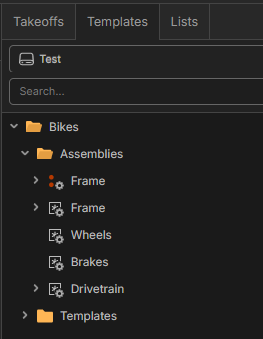
- The "Drivetrain" is an assembly that has:
- "Chain" - a material part/item (some calc's or info may be within)
- "Crankset Assembly" that has multiple parts/items and another subassembly "Pedals" (actually, I realized I didn't build it out in this screenshot)
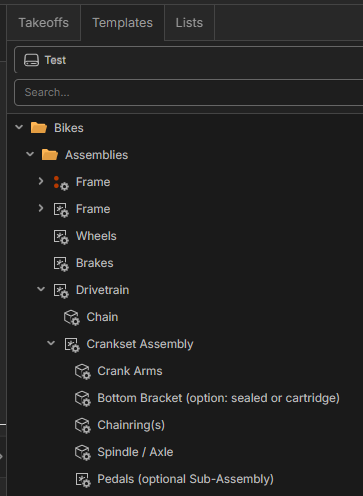
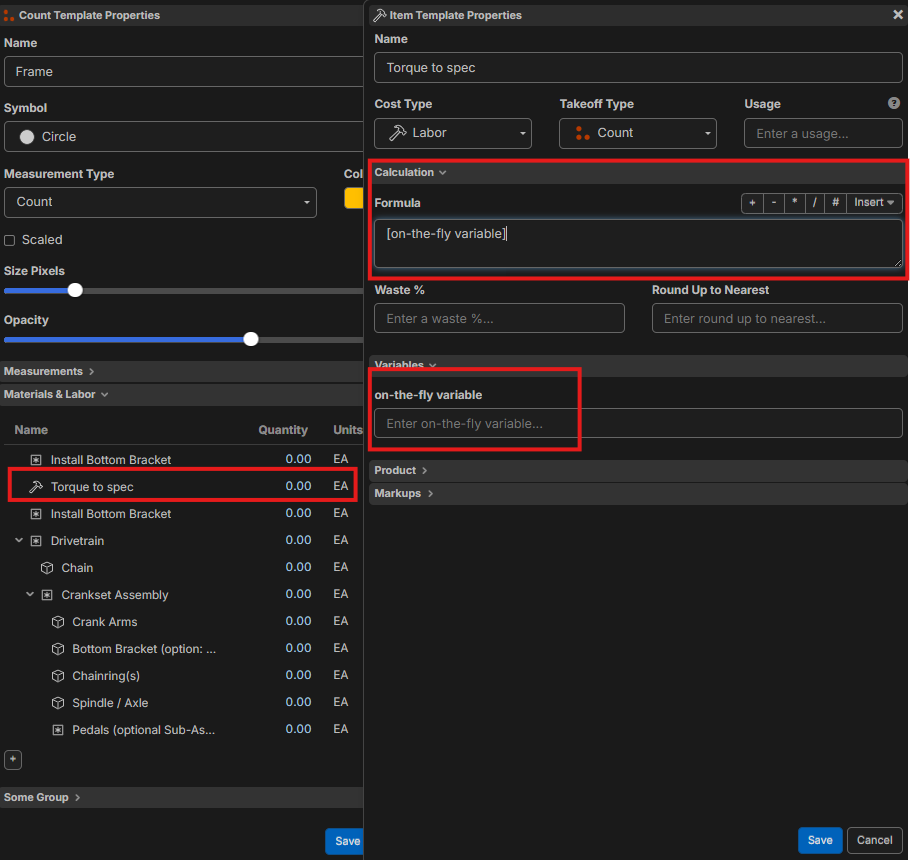
I've found adding MLESO items/parts and sub items/parts somewhat of a workaround but I'm wanting to create inputs/calculations within some of these items/parts and the only way I know to do this is creating variables on-the-fly via calculation input, but that means that in order for the variable(s) to exist, then it must be a part of a calculation or just a standalone variable (otherwise I'll need to create in custom properties).
Am I understanding this correctly?
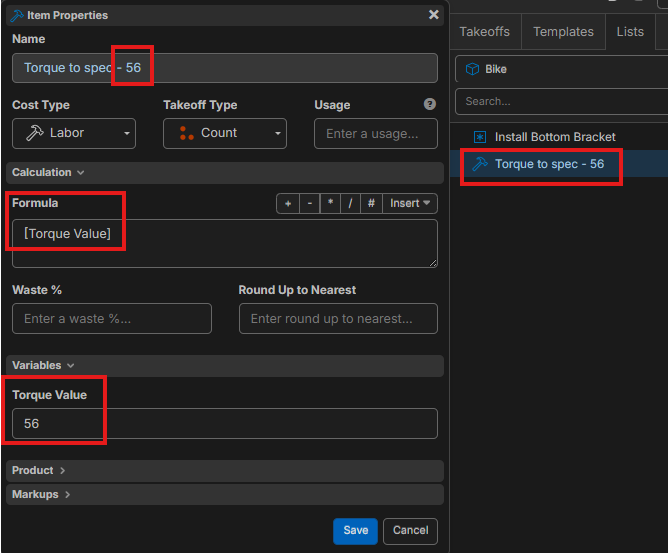
I've discovered that a takeoff item or template can include many parts/items and subitems
I've yet to fully be able to manipulate variables within each of these items, again w/o creating custom properties or just creating a single variable at the "Formula" input.
I'm also not sure how to get this particular formula to output as the EA within this template?
LISTS
- I've created some lists but aside from static MLESO items I can't figure out how to utilize them as much.
- At first, I thought the "Item List" was a container or collection for "Products" or individual MLESO items/parts

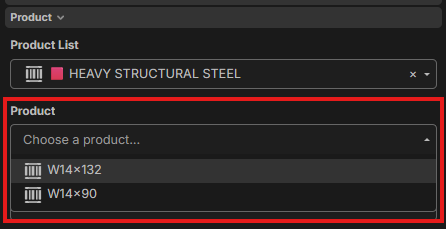
- I think my understanding now is that Item List can assist in narrowing down or classifying the MLESO items/parts or "Products" such as

OK, good talk...

Maybe it would be easier if you built one Template per Type. (e.g., "Mountain Bike Template") and use Variables only for things that change within that type (e.g., "Frame Size").
@stephen thanks for the response. I’m ok with creating a template for each. How would I have variables for each of these templates w/o creating a flood of custom settings or invoking by creating [string] within formula?
You could name the custom properties based on the category name of what they provide (Modifier) instead of the specific kind of thing they are within an item (like not using Spoke Count for Mountain Bike Template).
Wouldn’t this lead to an almost unmanageable list of “Custom Properties” groups and the individual parts within?
My suggestion was to use less of them. Naming them based on Category, means there are less, vs naming them for the specific kind of thing, means there are more.