











 Q & A
Q & A45d 9h
How do I hide all takeoff items except 1
When reviewing, I often need to isolate a single material to verify quantities; however, if begin by turning off an entire group, I cannot make any sub items visible. How do I fix this? Surely I wouldn't have to individually hide each and every item on the sheet before making the intended item visible.

Lorin Allred zzTakeoff45d 8h
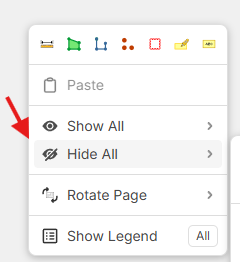
Hey Shaun! We're aware of this limitation, and it is something our DEV team is looking into. As a workaround, you can use the right-click "Hide All" on a page, then in the takeoff sidebar, show the specific takeoff you want visible.
%22%2F%3E%3Ctext%20x%3D%2232%22%20y%3D%2233%22%20text-anchor%3D%22middle%22%20dominant-baseline%3D%22central%22%20font-family%3D%22Arial%2C%20sans-serif%22%20font-size%3D%2226%22%20font-weight%3D%22600%22%20fill%3D%22%23fff%22%3ESH%3C%2Ftext%3E%3C%2Fsvg%3E "Shaun Holzbach")
Shaun Holzbach 45d 8h
Thank you!

Sam Romeo zzTakeoff45d 2h
He Shaun are you looking for an isolated function, where the selected takeoff remains visible whilst everything else is hidden. I think that is a great idea.
👍1 You must be logged in to post replies. If you don't have an account you can signup here.