











How do I hide all takeoff items except 1
When reviewing, I often need to isolate a single material to verify quantities; however, if begin by turning off an entire group, I cannot make any sub items visible. How do I fix this? Surely I wouldn't have to individually hide each and every item on the sheet before making the intended item visible.

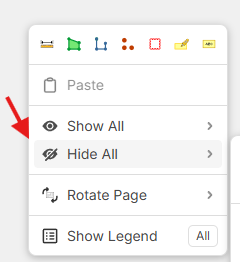
Hey Shaun! We're aware of this limitation, and it is something our DEV team is looking into. As a workaround, you can use the right-click "Hide All" on a page, then in the takeoff sidebar, show the specific takeoff you want visible.
%22%2F%3E%3Ctext%20x%3D%2232%22%20y%3D%2233%22%20text-anchor%3D%22middle%22%20dominant-baseline%3D%22central%22%20font-family%3D%22Arial%2C%20sans-serif%22%20font-size%3D%2226%22%20font-weight%3D%22600%22%20fill%3D%22%23fff%22%3ESH%3C%2Ftext%3E%3C%2Fsvg%3E "Shaun Holzbach")
Thank you!

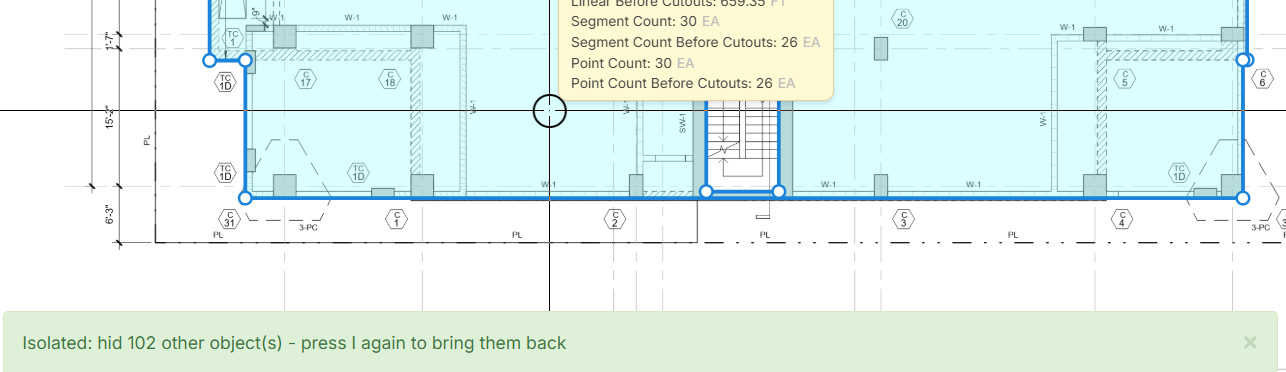
He Shaun are you looking for an isolated function, where the selected takeoff remains visible whilst everything else is hidden. I think that is a great idea.
👍1
Hey guys, just wanted to ask if this eye limitation has been added or is there is a workaround? Kind of hard to hide a lot of takeoffs if I just need one open. Thanks!
@Jes this looks amazing! Can you please teach me how you did it with Claude? We are fairly new in Zz.
%22%2F%3E%3Ctext%20x%3D%2232%22%20y%3D%2233%22%20text-anchor%3D%22middle%22%20dominant-baseline%3D%22central%22%20font-family%3D%22Arial%2C%20sans-serif%22%20font-size%3D%2226%22%20font-weight%3D%22600%22%20fill%3D%22%23fff%22%3EJ%3C%2Ftext%3E%3C%2Fsvg%3E "Jes")
@Charina You literally just tell Claude what you want it to build for you...and it does it. But prepare for it to give you some pushback initially where it tells you it can't do this or that, until you knock some sense into it and it realizes it can.