











 Q & A
Q & A%22%2F%3E%3Ctext%20x%3D%2232%22%20y%3D%2233%22%20text-anchor%3D%22middle%22%20dominant-baseline%3D%22central%22%20font-family%3D%22Arial%2C%20sans-serif%22%20font-size%3D%2226%22%20font-weight%3D%22600%22%20fill%3D%22%23fff%22%3EBR%3C%2Ftext%3E%3C%2Fsvg%3E "Brendon R")
91d 9h
How to Stop Areas Merging into one area
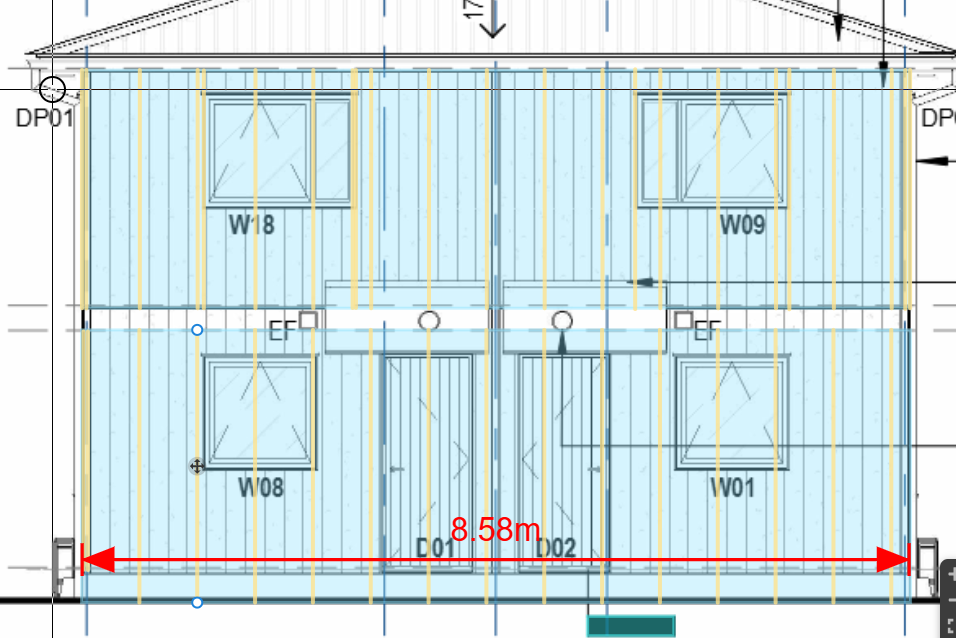
I was using the Joist Tool to calculate the cavity battens.
I wanted to keep the Ground Floor and Level 1 as separate take-offs because there is a control joint at the mid-floor junction.
I completed the Level 1 area first using the Joist Tool, and it worked perfectly. However, when I then draw the Ground Floor area, the software automatically merges the two into a single area.
At the moment, my workaround is to leave a small gap between the two areas (as shown below) so they remain separate.
Is there a setting or option that prevents adjacent Joist Tool areas from automatically merging?

Sam Romeo zzTakeoff91d 9h
@ Brendon
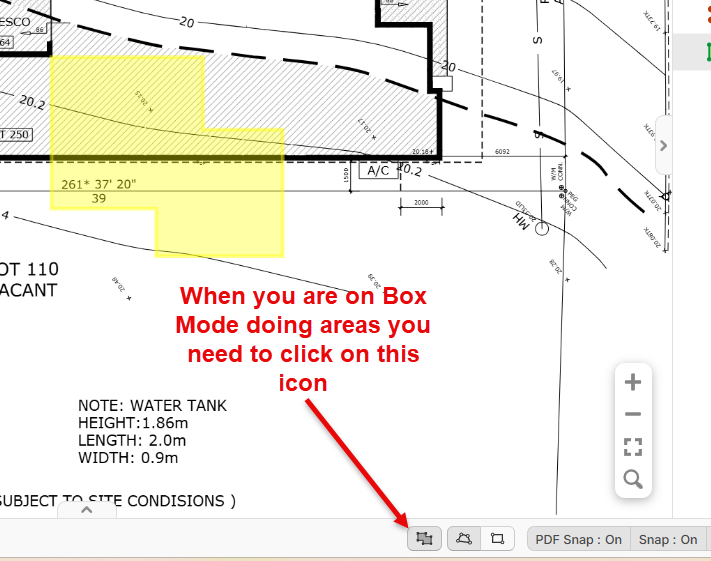
When you are doing a Takeoff in Box Mode you need to Toggle of the Merge icon in the Bottom Left of the Screen
You must be logged in to post replies. If you don't have an account you can signup here.