











 Q & A
Q & Aif statement formula help
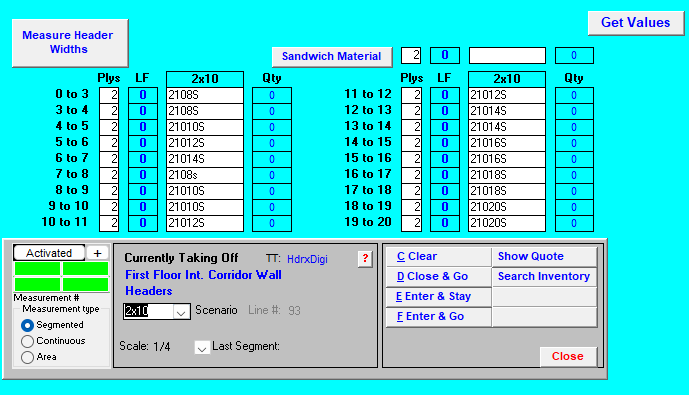
I am trying to create a formula to figure my window/door headers & misc. beams while we wait for the beam & joist/rafter tool to come out (hopefully soon...?). While the estimating software that we are switching from is very old/outdated, it did exactly what you needed it to do without all the fancy stuff. For example when doing a takeoff on the headers, we would use our point & click digitizer puck on our paper blueprint and take the LF of the window or door opening. Based on the size of the opening (far left column in the picture is refering to the size of the openings, so 0' to 3', 3' to 4' and so on) and it would generate our headers depending on the width and the number of plys that we input. We could change the "Plys" box and set it to whatever ply we needed and it would give us the correct number of headers reflecting the plys.
I was wondering if it would be possible to create an 'if" formula replicating this. So for example, if the segmented LF that we measure on zztakeoff is greater than 0' but less than or equal to 3' then it would generate a header qty depending on the product that I want to use whether it is dimensional lumber or engineered lumber.
I'm not even sure if this is something that can be done within zztakeoff but I figured I'd ask to see if someone has tried doing something similar.

I think we can do this, do you have time today? email me at todd@zztakeoff.com
I have built this before.
🚀1👍1%22%2F%3E%3Ctext%20x%3D%2232%22%20y%3D%2233%22%20text-anchor%3D%22middle%22%20dominant-baseline%3D%22central%22%20font-family%3D%22Arial%2C%20sans-serif%22%20font-size%3D%2226%22%20font-weight%3D%22600%22%20fill%3D%22%23fff%22%3EJO%3C%2Ftext%3E%3C%2Fsvg%3E "Jon Ocasio")
@todd I just sent you an email!
Hi Jon I emailed and texted you for a zoom mtg... Never heard back from you.
I will make a YT video and post my answer there.
@todd Sorry for the confusion, I responded to your text earlier asking if we could set a zoom meeting up for tomorrow but I wonder if you didn't receive it. However, a youtube video will work tremendously nonetheless!
%22%2F%3E%3Ctext%20x%3D%2232%22%20y%3D%2233%22%20text-anchor%3D%22middle%22%20dominant-baseline%3D%22central%22%20font-family%3D%22Arial%2C%20sans-serif%22%20font-size%3D%2226%22%20font-weight%3D%22600%22%20fill%3D%22%23fff%22%3EA%3C%2Ftext%3E%3C%2Fsvg%3E "Angela")
Now that the beam tool is out, is there a better way to do this? I'm able to use the beam tool to get all my lengths, but it will tell me to use 2 4' headers. In reality, I would convert that to a 8' piece or if I have multiple 16' piece. I want to be able to pick the length from multiple options without having to measure all the openings, then going back and doing a different measurement for each of them to get quantities. I imagine there is a if then statement formula I can rig up, but I haven't mastered formulas yet. so I haven't been able to do that yet.
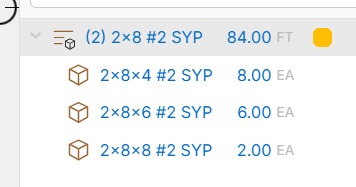

Hey Angela, if you are using the beam tool, you can right-click on the sections and use the "Cut from Length" property to reassign those sections to a 2x8x8. One thing to note: when you cut from length, we aggregate the total length of board feet divided by the length you are cutting from.
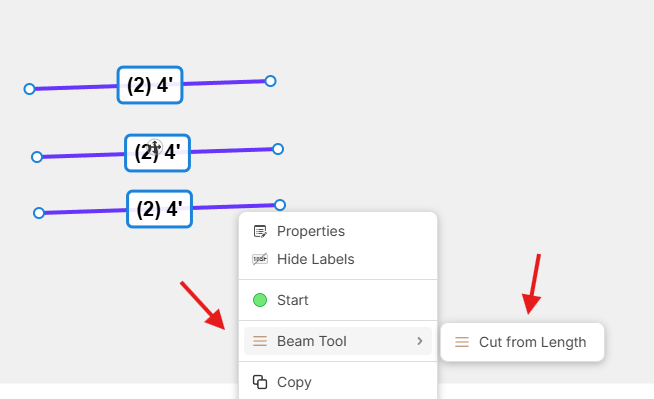
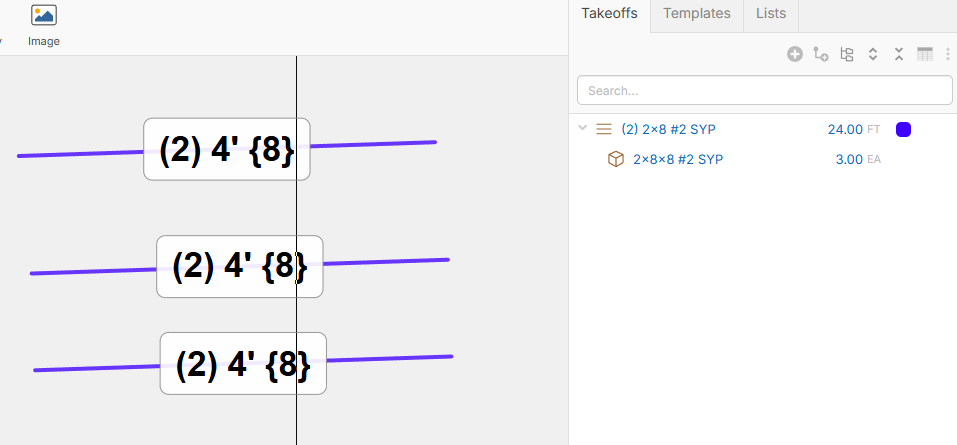
This works! I didn't know there was the option with the right click. I still have to do all the 4' lengths individually to change to 8' individually, but this will work for now. I saw the option to choose a cut from length when I was used the beam tool, but that only works if I will be cutting all the pieces from the same length.
Thank you :)
👍1%22%2F%3E%3Ctext%20x%3D%2232%22%20y%3D%2233%22%20text-anchor%3D%22middle%22%20dominant-baseline%3D%22central%22%20font-family%3D%22Arial%2C%20sans-serif%22%20font-size%3D%2226%22%20font-weight%3D%22600%22%20fill%3D%22%23fff%22%3EA%3C%2Ftext%3E%3C%2Fsvg%3E "Adjo")
Hello, is there a formula that can be used to make the cut from length only even numbers?

I am using the beam tool, but I am working on a large project. Isn't there a more efficient way to do this than individually?
If you select all the beams you want to cut from the same size, you can do the cut from length to all of them at the same time. It's still a bit tedious because you have to go through and select all the beams that you want at the same length. I don't know a better way unfortunately, but I would love an easier way as well. Or tell it what sizes I have available and it creates a optimized cut list from that.
🚀1❤️1That's actually what I was looking for: tell it what size I have available and create an optimized cut list from that, but it seems like we are not there yet. Thank you for taking the time to help.