











Is there a formula to get a text property from a sub item?
Is there a formula to get a text property from a sub item?

seems like you can reference the name property with [Sub Item Name/name]. Similar to referencing any sub item property [sub item name/qty] for example.
I am trying to get it to work in a formula situation.
In the example below it is just copying name to name, but it break as soon as I change the name of the sub item, it breaks the reference at the same time.
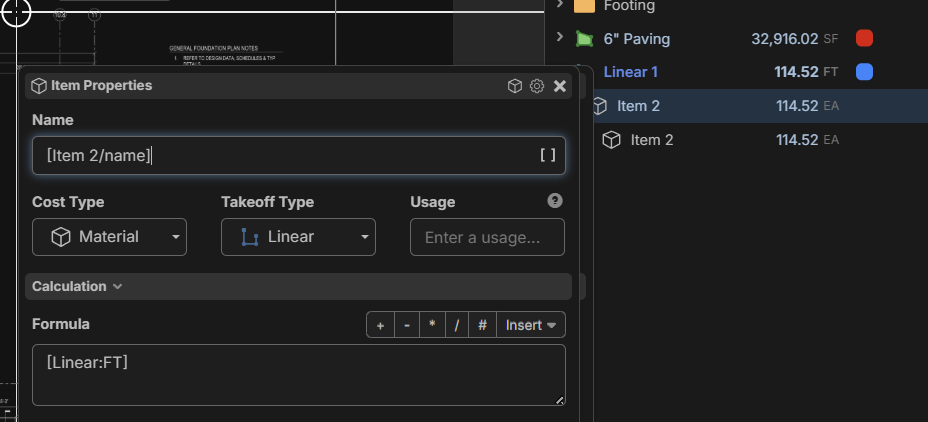
Doesn't look like I can get it to compare the sub item name in the IF function.
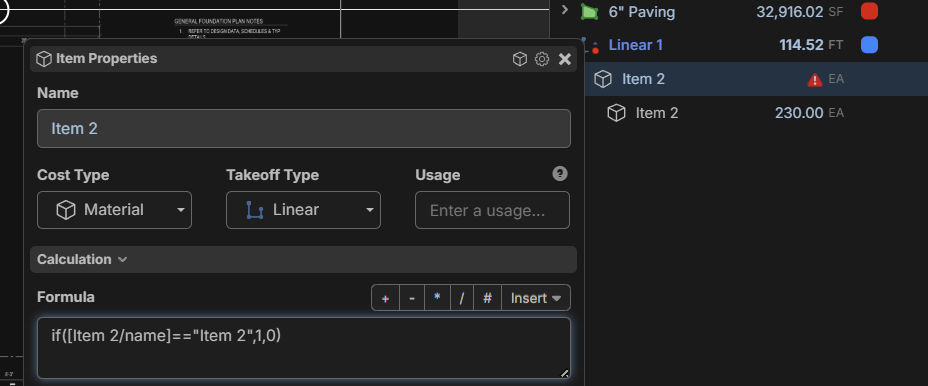
What text property are you looking to copy and what are you trying to do with it?

you might try putting quotes around the variable. it worked for me if a different situation as I did not know you needed to do that and by trial and error it worked for me.if("[item 2/Name]" ==
Ohhh I tried putting quates around the name =="item 2" and that didnt work. I didnt think about putting them around the variable. Neat!

Just wanted to add that you can also set an "Alt Name" and reference the takeoff/item from that alt name.
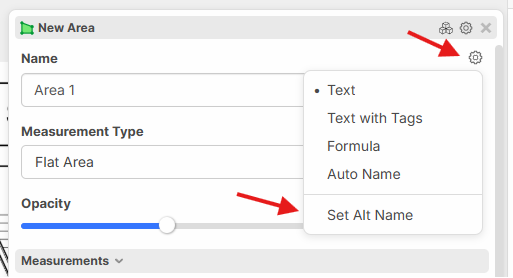
I haven't played around with the Alt Name yet. What is the normal use case for this feature?
A good use case is if your takeoff name is in text with tags mode. For example, if you want to show the type of light switch in the name of the takeoff, but you need to reference the takeoff in another formula, instead of trying to re-create the text with tags name, you can set an alt name of "switch" and reference the takeoff from the alt name.
ohhh that is great! Thank you!