










 Q & A
Q & A180d 17h
Is there a way to turn off auto merging when using box mode?
Sometimes I'm trying to double up on the area.

Stephen Daves zzTakeoff180d 15h
Hey, I can't think of a way do do what you are asking, however you could click the existing area, press Ctrl + C, put your mouse in the top left of the existing area, and press Ctrl + V .
%22%2F%3E%3Ctext%20x%3D%2232%22%20y%3D%2233%22%20text-anchor%3D%22middle%22%20dominant-baseline%3D%22central%22%20font-family%3D%22Arial%2C%20sans-serif%22%20font-size%3D%2226%22%20font-weight%3D%22600%22%20fill%3D%22%23fff%22%3EVT%3C%2Ftext%3E%3C%2Fsvg%3E "Victor Tengowski")
Victor Tengowski 180d 15h
@Stephen I guess I wasn't super clear- I meant that sometimes there are quantities I want the ability to overlap slightly. Clouded below might illustrate it better:
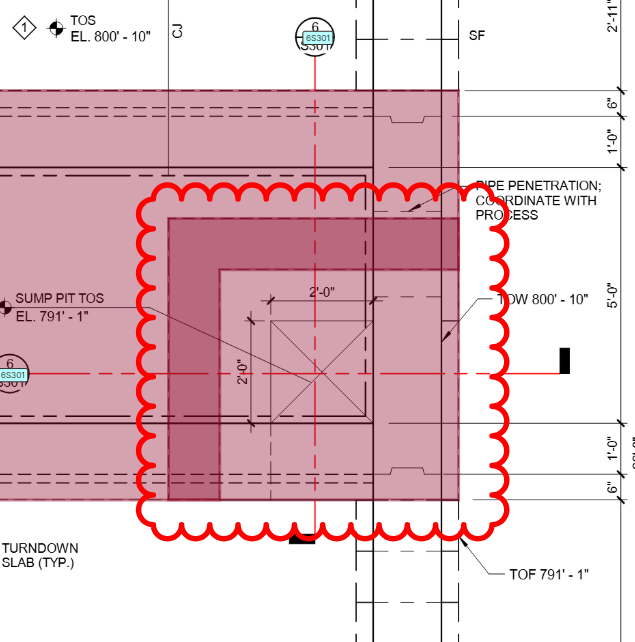
These are two slabs on grade at different elevations.
Stephen Daves zzTakeoff180d 14h
One way to do that is to start the takeoff on the existing section, then click the eye icon button to hide the area, then do your takeoff, then show the area again with the eye icon button.
You must be logged in to post replies. If you don't have an account you can signup here.