











 Q & A
Q & ALinear Openings
When using linear with wall area how do you subtract openings ie window or door openings subtracted from the total wall area?

Hi Tony! What is your ideal scenario? Do you want it to actually break the line and have a gap in the linear for the openings, or would you prefer some kind of point count that subtracts wall area for each count based on the opening size?

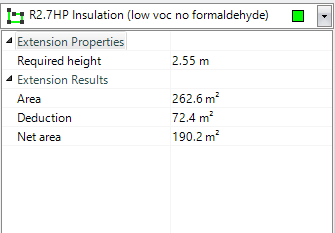
Hi Heber, actually both scenario if possible. My current program does this now and it is great. Visually it shows a dotted break in the solid line for the opening and also deducts you m2 of that opening size from the total of wall area. You start the cursor at one end of the opening and run it along the wall line to the other end of the opening, when you stop you then enter the height of the opening manually. I have attached two screen shots to explain.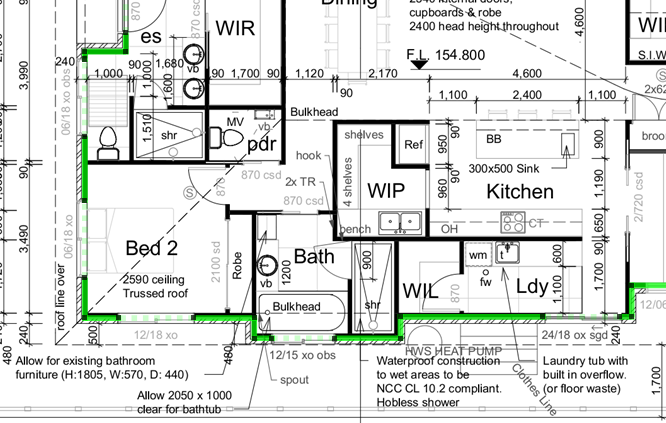
%22%2F%3E%3Ctext%20x%3D%2232%22%20y%3D%2233%22%20text-anchor%3D%22middle%22%20dominant-baseline%3D%22central%22%20font-family%3D%22Arial%2C%20sans-serif%22%20font-size%3D%2226%22%20font-weight%3D%22600%22%20fill%3D%22%23fff%22%3EJ%3C%2Ftext%3E%3C%2Fsvg%3E "Jes")
Bumping this thread because I've been loving the new Duplicate As feature to instantly create a linear takeoff from the perimeter of an area takeoff, and naturally the next thing I'd like is functionality to deduct for openings from the inflated linear takeoff total that this conversion creates.
I suppose the solution for that is to add the ability to create takeoff objects with negative values.
I already tried adding points by all the openings and then using the Break & Delete command, but quickly realized that on large 20k sqft floors like the project I'm currently working on, this adds a very time consuming 3rd step to what is normally a 2 step process for me.
A temporary workaround I've been doing with the new feature is just using count and/or drawing segment takeoffs on the openings and placing these into a "Deduct from Linear" folder, which I then manually calculate later in Excel.
I did successfully modify the formulas of assembly items to generate negative quantities for these openings, which works well, but for reporting purposes - and for the goal of eventually doing everything straight out of zz - it would be much cleaner to have built-in functionality to subtract from the project's actual linear takeoff totals.
Didn't know until a few hours ago that in the latest update you can now manually enter negative linear takeoff values.
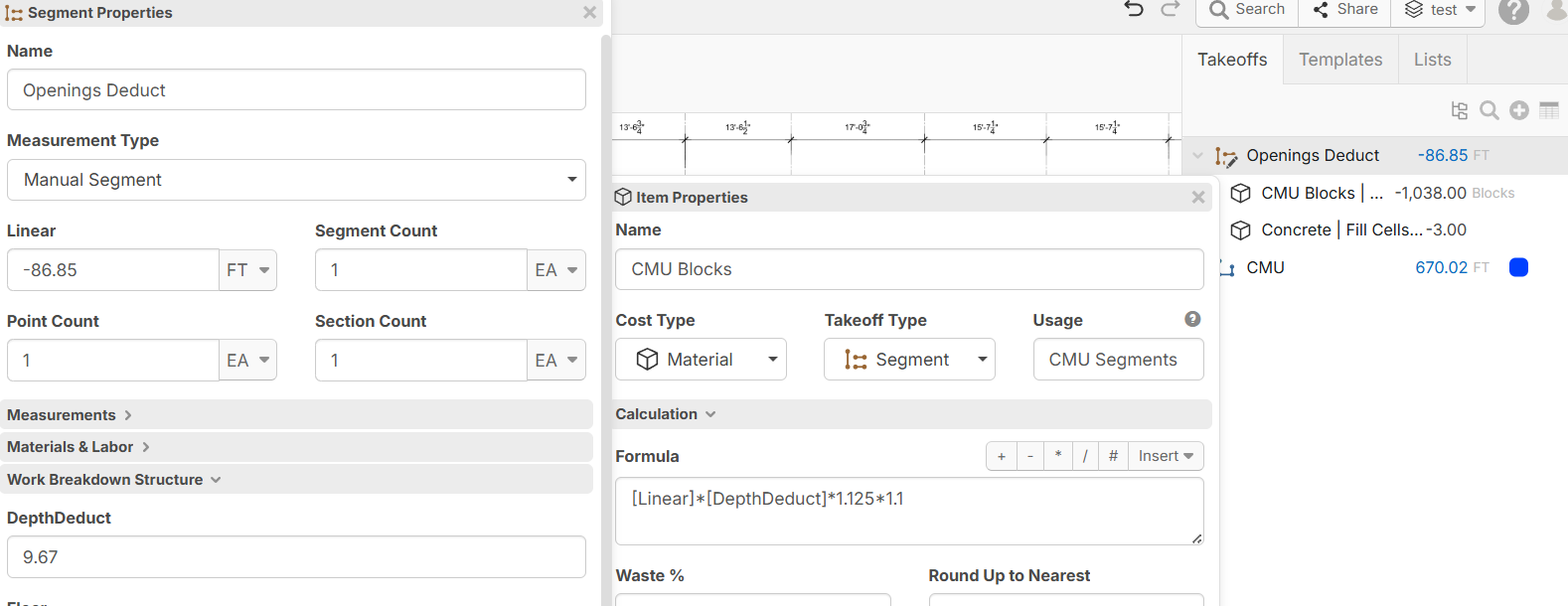
So my new workaround (unless functionality is added to change actual takeoff objects into negative values in the future) is the following:
After I takeoff the openings on each floor, I can put the linear feet of each opening type into manual linear/segment takeoff objects using the new Manual Linear/Manual Segment option, along with a custom property I added at the bottom to enter the height/depth deduction of each opening type.
Once that is applied, my items automatically subtract the correct number of quantities (I haven't tweaked the formulas yet, this was just proof of concept).

Is there presently a way to subtract openings visually?
%22%2F%3E%3Ctext%20x%3D%2232%22%20y%3D%2233%22%20text-anchor%3D%22middle%22%20dominant-baseline%3D%22central%22%20font-family%3D%22Arial%2C%20sans-serif%22%20font-size%3D%2226%22%20font-weight%3D%22600%22%20fill%3D%22%23fff%22%3EP(%3C%2Ftext%3E%3C%2Fsvg%3E "Palak Patel (IN)")
We follow the same process suggested by Jes, but clients sometimes question the negative value in the Estimate report.
Palak yeah it would be nice if we could get it to subtract from the actual linear total, but this is how I'm handling it in the meantime:
Convert openings takeoffs into an item using the button top right in properties

Go down to calculation and add *-1 to make it a negative value
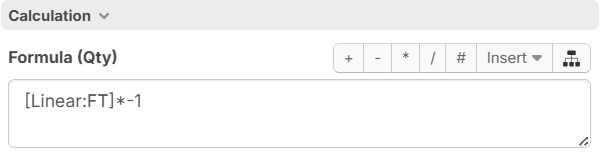
Now it will come up as a negative value on the takeoff panel & on your takeoff report and you can copy and paste it into your Excel template and then perform the deductions over there to clear it from your linear total

