











 Q & A
Q & ALinear Take Off (Wall Area) with Different Height
Hi everyone,
Is there a way to do a single linear takeoff and, at the same time, have multiple heights?
For example, if I have two segments within one linear takeoff for wall area, can I assign different heights to each segment
Instead of having multiple linear take of like what I did here.
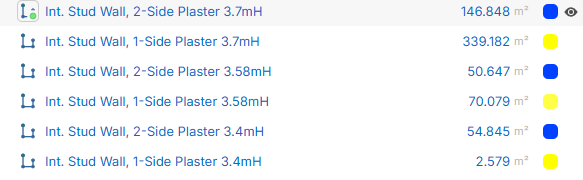
Also, is there a way to incorporate deductions for openings (e.g., doors and windows)?

Hi, there is a break apart linear feature that allows you to click a point on the linear and split it into 2 takeoffs. Currently I dont see a way to have multiple heights on the same wall linear takeoff.
For deductions, you can build a custom formula or assembly that includes a subtraction field. For example: (Linear Total * Wall Height) - (Door Count * Door Area). You then use a "Count" tool to mark the doors, and the software automatically deducts that total from your wall area.
👍1💯1https://www.zztakeoff.com/community/product-updates/new-update-overlays-duplicate-project-break-apart-linear-rotate-point-counts-etc

Appreciate the response, Stephen.
Where can I create that custom formula that you have mentioned?
There is a formula box on the Items you add to the takeoff. If you double click the Item in the Takeoff sidebar (or right click and choose properties) you can edit the Formula there. This will usually be something like ([../Linear Total] * [../Wall Height]) - ([../Door Count] * [../Door Area]) . There are many ways to do this with zzTakeoff so maybe you could describe what you are trying to do in more detail, and how you are used to doing takeoffs in general.
💯1%22%2F%3E%3Ctext%20x%3D%2232%22%20y%3D%2233%22%20text-anchor%3D%22middle%22%20dominant-baseline%3D%22central%22%20font-family%3D%22Arial%2C%20sans-serif%22%20font-size%3D%2226%22%20font-weight%3D%22600%22%20fill%3D%22%23fff%22%3ESI%3C%2Ftext%3E%3C%2Fsvg%3E "Silva Cost Consulting, Inc.")
I used Timberline back in the day (now Sage I believe), and they had a feature called a pass. You can take off a series of items say walls of 100' x 10', then add a pass, say 200'x15', then it would combine the quantities into one item, say exterior wall. If you needed to add more to the exterior wall, there was a button to add another pass. It was usefeul for concrete footings as well. Various lenghts, widths and depths of footings using various passes, would give one total CUYD of concrete. Perhaps this is something to explore in ZZ.