











 Q & A
Q & AMultiple Plan Revisions
I've being looking onto the Revisions option lately and making some tests to get used into their functions.
A question that I have due to these tests is that if the software can handle only 1 revision per page or is it possible to have multiple revisions per page?
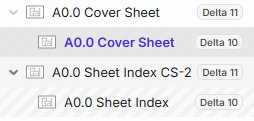
If you see the following is one of the tests I have being doing. In this project the revisions are named Delta X (X being the varable number, in this project the revisions go until Delta 37).
In the case of the two pages shown the original versions were at Delta 9, and then revised at Deltas 10 and 11, but at the moment I added Delta 11 my Delta 9 doesn't show anymore, so that's the reason of my question.
I'm worried the Delta 9 page was deleted.
Please let me kow if there is any way to show multiple revisions so I can keep track of all the revision history and not only the current and previous revisions.
Thanks ahead.
%22%2F%3E%3Ctext%20x%3D%2232%22%20y%3D%2233%22%20text-anchor%3D%22middle%22%20dominant-baseline%3D%22central%22%20font-family%3D%22Arial%2C%20sans-serif%22%20font-size%3D%2226%22%20font-weight%3D%22600%22%20fill%3D%22%23fff%22%3EKP%3C%2Ftext%3E%3C%2Fsvg%3E "Kory Podgaysky")
It should continue to save all old versions as a child of the newest versions.
Edit: just tried it on a revision and mine behave as expected. All previous versions remain as child of latest version


@Isaac do you see the revisions like Kory?

No, for some reason when I uploaded and configured the Delta 11 revision, the Delta 9 revision disappeared.
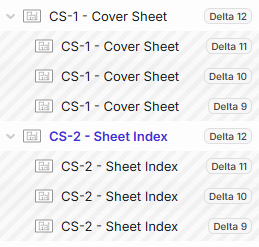
Thank you. After checking the video and making a couple more tests I was able to do it correctly.
One last question.
Is there any way to configure how my outdated versions will be seen by default. I mean, anytime I update a revision for a page, I might be able to the outdated version automatically to turn to a grayscale view. I know there is the watermark, but is there any option to make it personalized?
You could create a page that is a watermark, then overlay this page with 50% opacity.
👍1