











 Q & A
Q & AOptimizing for kit size of material
Let say the following: (Let's exclude waste/overage for simplicity sake unless you want to go all out)
Takeoff = 1100 square feet
Product covers 100 sq ft per gallon.
1 gallon kit costs $10
10 gallon kit costs $100
Ideally I purchase 1 @ 10 gal + 1 @ 1 gal for a $90 cost.
How do I make that happen? Has anyone done this? I am thinking that I might need to build the various kit size costs into their own variables and then write a formula that does the math. The major downside of this that I see is that when I have a price increase it will not be as easy as matching sku's and doing an update. I will have to manually go into each material and adjust the formulas which has implications in both efficiency as well as accuracy.
Any help/discussion is appreciated.

- Takeoff: 1100 sf
- Coverage: 100 sf / gal
- Required: 11 gallons
Pricing:
- 1-gal kit = $10
- 10-gal kit = $100
If pricing is linear (same $/gal), then:
1 × 10-gal ($100) + 1 × 1-gal ($10) = $110, not $90. Let's say this is a typo mistake
Price increase = edit formulas everywhere. Don't do this; Cost = (TenGalQty * $100) + (OneGalQty * $10). You don’t solve this inside the material price.
The right way is: You solve it in the quantity logic.
Step 1: Calculate the required gallons once
RequiredGallons = TakeoffSF / CoveragePerGallon
In your case:
1100 / 100 = 11 gallons
This variable is reused everywhere.
Step 2: Calculate kit quantities (logic only, no prices)
TenGalQty = FLOOR(RequiredGallons / 10)
RemainingGallons = RequiredGallons - (TenGalQty * 10)
OneGalQty = CEILING(RemainingGallons)
Result:
10-gal kits = 1
1-gal kits = 1
Still zero pricing involved. That’s important.
Step 3: Treat each kit size as its OWN material (this is the trick)
Instead of one “magic” material, you create two normal materials:
Material A
- Description: 10-gal coating kit
- SKU: Supplier’s 10-gal SKU
- Unit: Each
- Quantity: TenGalQty
- Unit price: $100
- Description: 1-gal coating kit
- SKU: Supplier’s 1-gal SKU
- Unit: Each
- Quantity: OneGalQty
- Unit price: $10
Now your total is: (1 × $100) + (1 × $10) = $110
Why does this completely solve your price-increase concern?
When prices change:
- You update SKU prices
- NOT formulas
- NOT logic
- NOT quantities
Exactly like any other material update.
ZZTakeoff is actually very well suited to this if you structure it cleanly. I will walk you through
- Automatically buys 1 × 10-gal + 1 × 1-gal
- Keeps pricing tied to SKUs
- Avoids formula edits when prices change
- Stays transparent for audits and purchasing
Back to your example:
- Takeoff: 1100 sf
- Coverage: 100 sf / gal
- Required: 11 gal
- Result:
- 10-gal kits → 1
- 1-gal kits → 1
- Cost:
- $100 + $10 = $110
Logic Driver Material (NO COST)
Material: Coating - Gallons Required (Logic Only)
Unit: Gallon
Cost: $0
Takeoff source: Area (sf)
Formula (Quantity)
[Area] / [CoveragePerGallon]
CoveragePerGallon = 100 (this formula is to calculate required gallons only, no SKU, no pricing, no risk)
10-Gallon Kit Material (SKU-DRIVEN)
FLOOR([Coating – Gallons Required] / 10)
Pricing stays normal and updateable, and Quantity auto-calculates
1-Gallon Kit Material (SKU-DRIVEN)
CEILING([Coating – Gallons Required] - ([Coating – 10 Gal Kit] * 10))
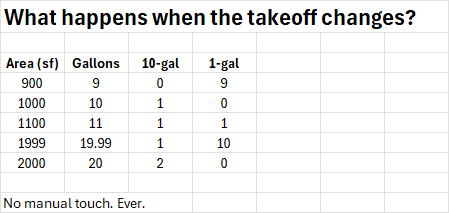
And when you want to go “all out” add waste factor, which is easy in ZZTakeoff, or RequiredGallons * (1 + Waste%), or (Area / CoveragePerGallon) * (1 + WasteFactor)
You were absolutely right to worry about price maintenance; that’s the trap most people fall into.
This approach:
- Solves the maths
- Keeps SKUs clean
- Scales long-term
- Survives price rises without rework
I have enjoyed doing it, and I hope this helps. cheers!
❤️3%22%2F%3E%3Ctext%20x%3D%2232%22%20y%3D%2233%22%20text-anchor%3D%22middle%22%20dominant-baseline%3D%22central%22%20font-family%3D%22Arial%2C%20sans-serif%22%20font-size%3D%2226%22%20font-weight%3D%22600%22%20fill%3D%22%23fff%22%3ERE%3C%2Ftext%3E%3C%2Fsvg%3E "Russ Eisenberg")
Steve - Yes my pricing was a typo....I was rushing trying to get it typed up as I had to rush out the door, so thanks for realizing that.
Also, thank you so much for this. It is amazing. It is going to take me a little while to digest this but hugely appreciated.
👍1