










 Q & A
Q & APrevent Variables from deleting if not used in Formula
I use multiple variables not related to the quantity of the item. Need to stop the automatic deletion of my custom variables if it is not used in the main formula.
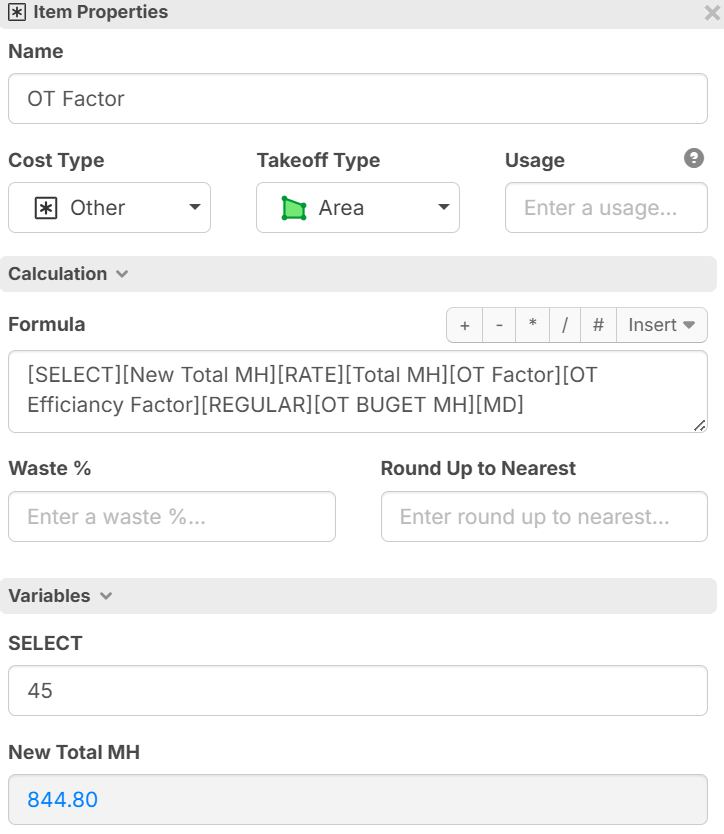

These variables are item specific

If I understand your question correctly, custom variables at the moment will disappear if you delete the tag from the formula box.
The only workaround at the moment is to create custom properties or finding a way to keep it in the formula by finding a way to cancel it out (calculate the custom property so that it doesn't effect the result.) use the latter at your own risk haha
I agree that it would be very helpful to have a way to add custom variables on the fly but not be forced to use it in the formula to keep it useful for the item you're working on.
This has come up before, there's a few feature requests pertaining to custom variables. Off the top of my head i think it would be best to either slightly change the way custom variables are added. or create a secondary way
example: a custom variable section within item properties where you can list the custom variables you want to adopt.
%22%2F%3E%3Ctext%20x%3D%2232%22%20y%3D%2233%22%20text-anchor%3D%22middle%22%20dominant-baseline%3D%22central%22%20font-family%3D%22Arial%2C%20sans-serif%22%20font-size%3D%2226%22%20font-weight%3D%22600%22%20fill%3D%22%23fff%22%3EKP%3C%2Ftext%3E%3C%2Fsvg%3E "Kory Podgaysky")

Your formula isn't doing anything with the values (add, multiply, etc, nothing is happening). If you choose to add or subtract a variable, you can use a 0 value for the variable and it will bypass. If you choose to multiply or divide use a value of 1 to bypass the value.
I used the multiply by zero because I have a parent item that contains all the variables for an assembly, but I don't want that parent item to output anything. All the variables have non zero values that get fed down to child items that actually use the variables.