











 Q & A
Q & APrinter is cutting my page
Hello!
When i print, the pages are cutting off the some of the page, even though the full page is displayed in the preview prior to printing.
Any suggestions?
%22%2F%3E%3Ctext%20x%3D%2232%22%20y%3D%2233%22%20text-anchor%3D%22middle%22%20dominant-baseline%3D%22central%22%20font-family%3D%22Arial%2C%20sans-serif%22%20font-size%3D%2226%22%20font-weight%3D%22600%22%20fill%3D%22%23fff%22%3EJR%3C%2Ftext%3E%3C%2Fsvg%3E "John Reily")
I had this happen. I changed the page size output and it went away.
%22%2F%3E%3Ctext%20x%3D%2232%22%20y%3D%2233%22%20text-anchor%3D%22middle%22%20dominant-baseline%3D%22central%22%20font-family%3D%22Arial%2C%20sans-serif%22%20font-size%3D%2226%22%20font-weight%3D%22600%22%20fill%3D%22%23fff%22%3EVT%3C%2Ftext%3E%3C%2Fsvg%3E "Victor Tengowski")
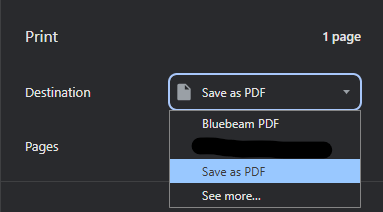
I've also had this happen. Specifically, when printing to pdf via Bluebeam. I found if I use the standard 'Save as PDF' instead it does not cut the page.
%22%2F%3E%3Ctext%20x%3D%2232%22%20y%3D%2233%22%20text-anchor%3D%22middle%22%20dominant-baseline%3D%22central%22%20font-family%3D%22Arial%2C%20sans-serif%22%20font-size%3D%2226%22%20font-weight%3D%22600%22%20fill%3D%22%23fff%22%3EJ%3C%2Ftext%3E%3C%2Fsvg%3E "Jes")
Yeah I noticed when trying to print directly to printer when PM wanted to see some area takeoff I did, I was having a heck of a time getting the print preview to match what my screen was showing

Hey Jes, another option is to click Share in the top right, and you can send the PM a text using zz to access the project on their phone for free!

I'm having the same issue and I need to PDF my takeoffs - I'm on a Mac.

Hey Karen, thanks for reporting. Which browser are you trying to print from? If you are not using Chrome to print, could you try that and see if it works? Our supported browser is Chrome.
👍1
Hey Karen,
I also noticed that if I have an A4 doc in beginning of the print, it will size all the pages to the A4, cutting the edges as we experienced.