











Problem
When you miscount something and you move on to the next thing and you go back to change the count number, you cannot change the count number. It’s frustrating to not be able to change the number and have to recount everything.

HI Xander, to restart a takeoff that you have previously worked on look in the takeoff's tab at the right of your screen, if you don't have a takeoff tab showing to the right of the screen, it might be collapsed, look for the arrow at the midpoint, you can hover to the left of the takeoff's name, and a big green dot will appear, clicking on this will restart your takeoff so you can add more to it, you can also click that takeoff and then hit the N key on your keyboard to restart it
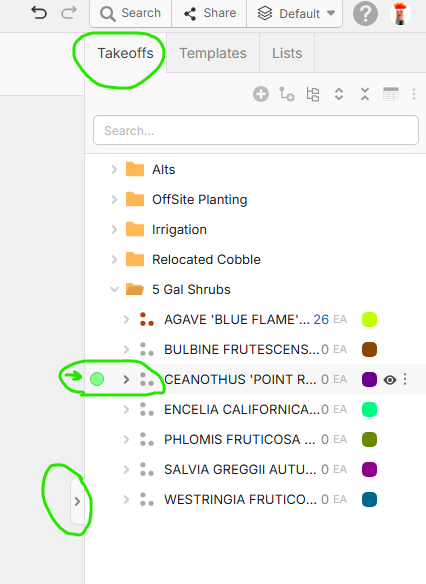
Click here for the basics of starting, stopping and restarting your takeoff (except we have a Large green dot now instead of the small one as our default)
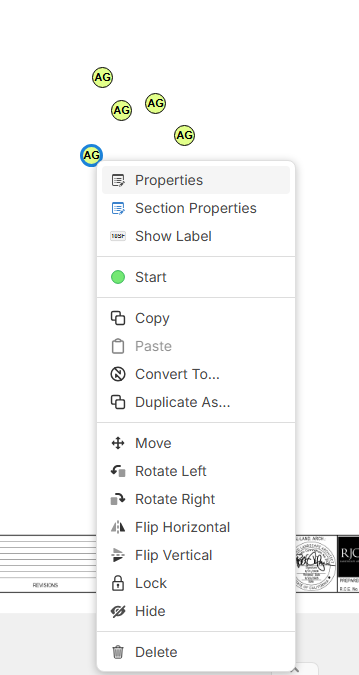
If you find that you have too many counts from your previous takeoff, you can go back and click on the one on the page that you want to delete and either hit the delete button for it, or you can right click on a single count on the page and there is a delete option in that menu
If there is a different issue where the program is giving you an error or now allowing you to restart your takeoff, please chat into support with a screenshot and we'll look into it, thank you!