











 Q & A
Q & AProducts
My company is new to zzTakeoff so we are trying to learn/familiarize ourselves with it but at the same time we are trying to create our templates and formulas so that we can start using it how intended.
I am trying to create a formula for my exterior wall sheathing and I would like for the formula to automatically change the panel SF based on the product I choose from within my product list.
For example, If I use the 7/16" 4x8 OSB from my product list, I would want the formula to take my [Wall Area:SF] and in this case automatically divide it by 32 based on the 4x8 product that I selected. If I change the product to something that is 4x9, I would want it to automatically reflect this in my formula. Is this something that can be done in zz?

I think you can add a custom property applicable for items. If you go to the setting tab (click in your user icon). The last option "Custom Property". There you can add a New Property and configure as required (for the example given you can guide by the following I made)
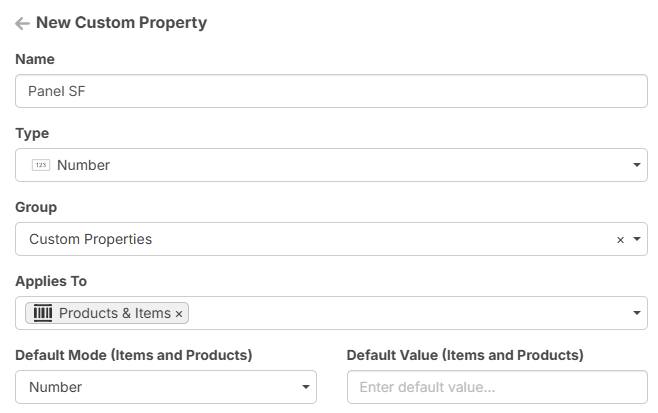
Now if you go to your products properties you should find a "Panel SF" property and add the number required (if you prefer a formula to add the width x length, you can configure the default mode as Formula instead of number in the new property panel).
Once you added the "Panel SF" you wanted per product, you configure the formula in your item this way: [Wall Area:SF]/[Panel SF]
Let me know if this worked for you or you have any questions.
👍3%22%2F%3E%3Ctext%20x%3D%2232%22%20y%3D%2233%22%20text-anchor%3D%22middle%22%20dominant-baseline%3D%22central%22%20font-family%3D%22Arial%2C%20sans-serif%22%20font-size%3D%2226%22%20font-weight%3D%22600%22%20fill%3D%22%23fff%22%3EJO%3C%2Ftext%3E%3C%2Fsvg%3E "Jon Ocasio")

Glad you are set @Jon let me know if you have any more questions.