





 Q & A
Q & A Jason Ramsey
 Report - Unit Price Column
In reporting, if I'm using the unit price column, it looks like for areas it just gives a SF unit price. This is the case even if the takeoff measurement is in SY, or acres for instance. Is there a way to configure the Unit Price column to provide numbers based on the takeoff UOM?

Hi, can you share a screenshot of the whole zztakeoff screen where this issue is happening? I'm not sure exactly how to answer without more context.
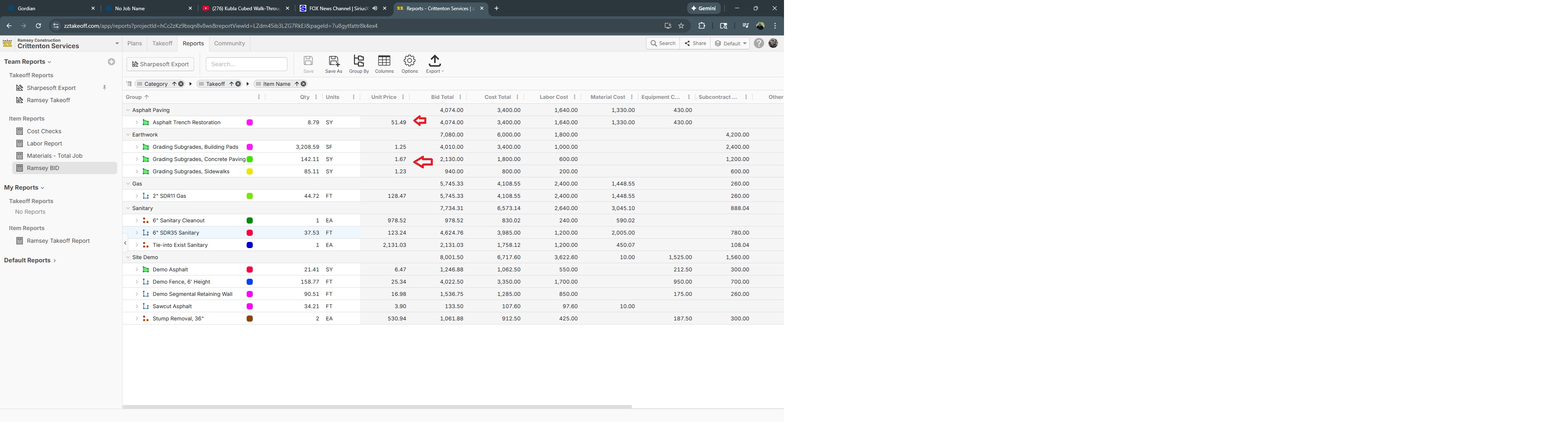
Sure thing! See below at the red arrows for instance. In this report, the column directly to the right of those arrows is the takeoff item total. Those takeoff items are in SY, however the Unit Price column is spitting back SF unit prices.
Could I see the formula you use to calculate Unit Price?
It's a stock report column. I was unaware you could change a formula involved with that. How do I go about that and are there ways to add additional custom columns if that's the case? All of that would be incredible helpful!
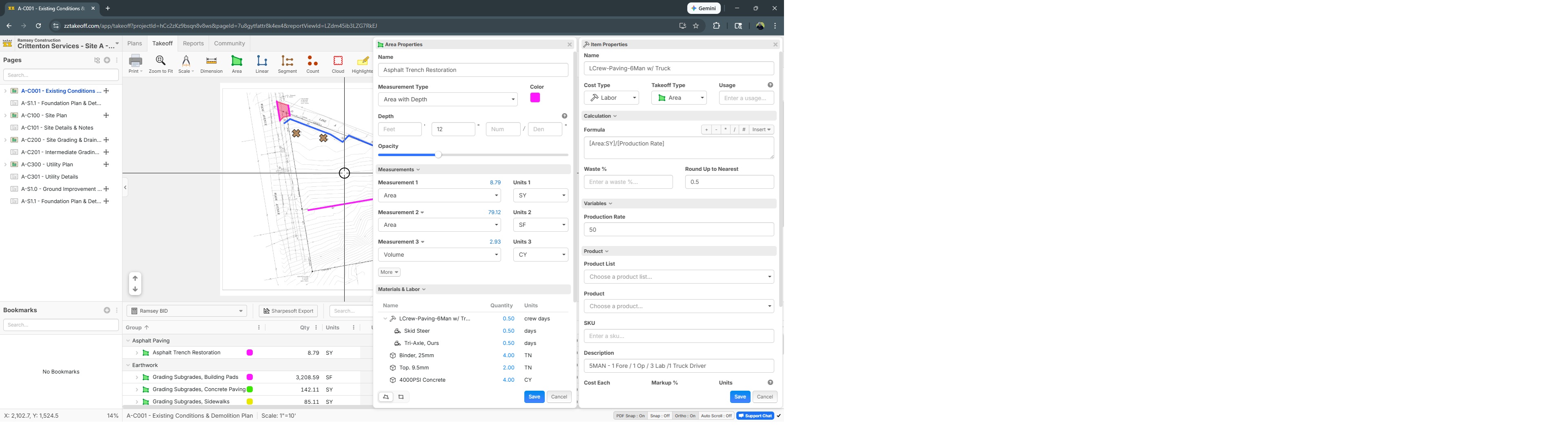
I know you can change formulas at the assembly level. That particular takeoff has 6 different assembly calculations inside of it, the simplest Labor formula involved with it is [Area:SY]/[Production Rate]. See below, not sure if that's what you're looking for?
You could add a custom calculated column that aligns with your specific Unit of Measure and show that instead on the report ignoring the built in Unit Cost.
Stephen, I didn't know you could create custom calculated columns, how do I do that? I thought you could only filter and/or rename etc.
Open the Takeoff in zzTakeoff, then click Support Chat in the bottom right. Then click Articles at the top and search for "Custom". There are several videos teaching how to create them. If you have any questions after creating them let me know!
Thanks, I'll take a further look when I get a chance. I spent some time last night searching through videos and did not see anything dealing with Custom column formulas in reports. You can rename, turn off/on, you can re-order, sort, filter. I do not see where you can alter with the mathematical calculation of a column.
You can use a custom formula by changing the type of the input box. There is a gear icon to the top right of input fields in Properties.
Stephen, I apologize, I don't think I'm being clear, or perhaps I'm not understanding you. The dimensioning formula is correct. Take a look at the first screenshot above. For example, the very first takeoff shows Asphalt Restoration 8.79 SY, this is correct dimensioning and correct UOM. The total price of that dimension is $4,074.00, this dollar amount has checked out correcty. If you divide the dollar amount by the 8.79 SY, you get 463.48, but the unit price column is showing 51.49. Unsurprisingly if I multiply that number by 9 (the SF conversion), it comes out exact, meaning it's defaulting all area measurements to SF.
I do not see a way to tell ZZtakeoff to display the Unit Price by UOM.
Hi, I opened your job to test out this row you mentioned, and I don't see Asphalt Restoration 8.79 SY as Qty, I see 79.12 as Qty. 4074.00/79.12 == 51.49 Unit Price. Is there another row on this job that is not working as you would expect?
Stephen, I was going through it with Todd yesteday and we probably switched the UOM to SF to test it. So in that instance, even when you switch from SY to SF in the takeoff, the unit cost remained the same in the report when it should've changed. In that first screenshot, all of those SY takeoffs are doing the same thing (Grading, subgrades for instance).