











 Q & A
Q & AReports Quantities
Can someone help with the reports tab?
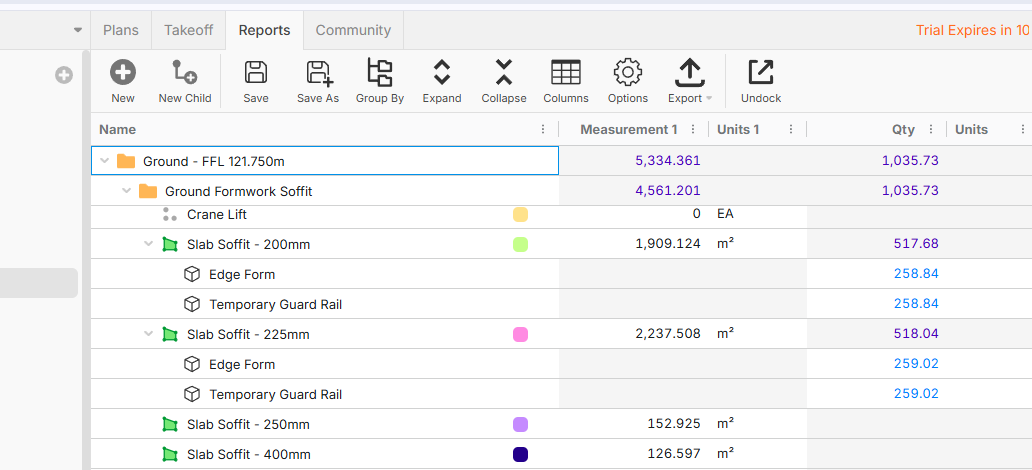
My slab soffit (meas1) is correct in m2, but the Qty is the sum of its children (I don't know why), when i export it, i now have 2 columns with different values that need to be reconciled (All the way down 5 Levels)
In my mind, Qty should be the same as measure 1, and if you want a child sum, that can be somewhere else... and the Units don't populate in the Qty/ Units from the children either (or carry from Meas1/ Units)
This is my first job in ZZ, and this doesn't make sense to me.
P.S - Also the descriptions didn't transfer from the Swift import
Please assist (ASAP Submission today)
Thanks

Hey mate, it all good don't panic, hopefully I can help you.
I’m guessing you’ve exported the report Grouped by Folder and that’s why you’re seeing this behaviour.
When you group by folder in ZZ:
- The parent (folder) shows Measure1 (your slab soffit m² it is correct)
- The Qty column becomes the sum of all child items underneath
So:
- Measure1 = your actual takeoff area
- Qty = rolled-up quantities from things like edge form, guard rail, etc.
That’s why the numbers don’t match, they’re coming from two different logics.
Quick tip (this will help straight away)
You can control what you see in the report:
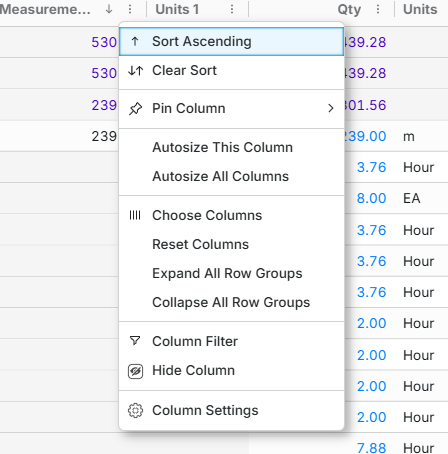
- Go to the vertical 3 dots on the right side of the report the Measurement1, Units 1, Qty, Units...etc.
- Left click it
- "Choose Columns" and choose what you actually want to display
For example:
- Keep Measure1
- Remove or hide Qty (if it’s confusing at folder level)
- Adjust Units as needed
This usually cleans up the export straight away.
Let me know how you go or if you leave in Australia call me on 0407761533 Brisbane time. I will be around for another couple hours.
Good Luck mate!

Thanks Steve,
I'm from Melbourne, but live in Europe now (for now)
I tried what you suggested, however the issue remains, I need both values.
E.g Slab soffit is good, but i also need the child quantities (guard rail, edge form etc) having them in separate columns doesn't work for me...
In this case i moved them over manually,
In Planswift (which I've used forever) Qty controls all the values,
I don't understand why (or know how to change) the measurement value to be the Qty value, Instead of Qty being a sum of the child values....
👍1
Default Takeoffs dont have an editable Qty value. On your report, the takeoffs have a Measurement, and the items use that measurement to make a Qty value (thats why its blue, its a calculation at the row level). Then finally the folders are summing values (purple numbers) to show you totals of the children that have values for each column.
👍1