











 Q & A
Q & A%22%2F%3E%3Ctext%20x%3D%2232%22%20y%3D%2233%22%20text-anchor%3D%22middle%22%20dominant-baseline%3D%22central%22%20font-family%3D%22Arial%2C%20sans-serif%22%20font-size%3D%2226%22%20font-weight%3D%22600%22%20fill%3D%22%23fff%22%3ETB%3C%2Ftext%3E%3C%2Fsvg%3E "Timothy Burton")
Sectors, Areas & Levels
Is there an ability to assign sectors, areas and levels to takeoff and then be able to sort by these?

Yes, you can add custom properties to the takeoffs and then on the Reports tab you can group and sort by these properties. I would recommend watching a video on custom properties, you can click Support Chat in the bottom right of zzTakeoff when viewing you plans, then click Articles, and type in custom properties.
%22%2F%3E%3Ctext%20x%3D%2232%22%20y%3D%2233%22%20text-anchor%3D%22middle%22%20dominant-baseline%3D%22central%22%20font-family%3D%22Arial%2C%20sans-serif%22%20font-size%3D%2226%22%20font-weight%3D%22600%22%20fill%3D%22%23fff%22%3EMH%3C%2Ftext%3E%3C%2Fsvg%3E "Mark Henry")
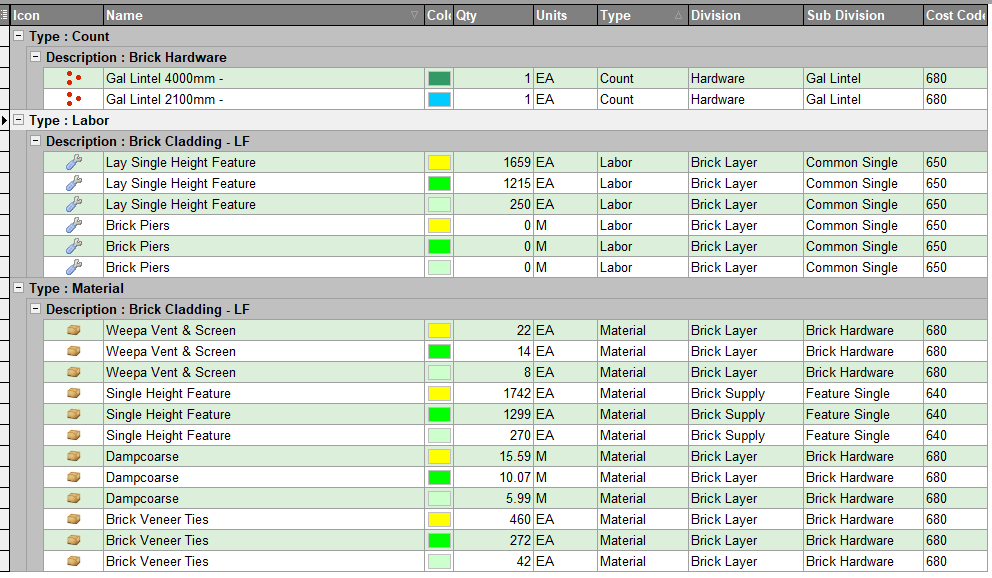
I'd suggest adding "Cost Centres" to your individual items. I use a combination of three. Cost Centre Number (640 Brick Cladding, 650 Brick Laying, 680 Brick Hardware), Division and a sub Division. Then when you build your assemblies, these items then can be sorted to your hearts content - in your reports in those relevant areas. This image is of PS but from what I have seen ZZ allows the same. (I'm in the middle of moving across)

@Tim
Tim works at HP with me so I have to chime in, thanks for posting! @Stephen that is a major issue that anyone and their brother can add custom fields that impact all takeoff files everywhere so please be careful when your throwing that out while your team addresses access rights, that should be a admin only task to impact enterprise stuff.
Here is a 7min video of best practices......I do a good job for the first 4min, then major fail trying to add levels that hopefully zzTO team will help address in the future. Note Tim that we could add level no problem right now to everyone's list, but if we keep doing this our takeoff is going to be a cluster F, so I'm trying to avoid adding any more fields without a epic reason that everyone needs it.