











 Q & A
Q & ASeparate out takeoffs by area
I have a late request to separate my bid into 4 parts - basically parts of a plan. I've done the entire takeoff as one (ie., I need to separate out 4 different areas of the plan that have similar items (10' walls, 2x4 lights, etc). Is there an easy way to point these out on a plan and see the amount of each takeoff item by area?
%22%2F%3E%3Ctext%20x%3D%2232%22%20y%3D%2233%22%20text-anchor%3D%22middle%22%20dominant-baseline%3D%22central%22%20font-family%3D%22Arial%2C%20sans-serif%22%20font-size%3D%2226%22%20font-weight%3D%22600%22%20fill%3D%22%23fff%22%3EJ%3C%2Ftext%3E%3C%2Fsvg%3E "Jes")
I don't know if this is an easy way but to handle stuff like this I currently duplicate the default layer, and then delete the extra stuff I don't want on that layer.
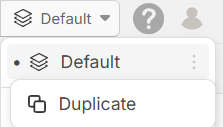
So in your situation I would duplicate the default layer 3 times. Then you'll likely be using the new Duplicate As tool (and Convert To) to clean up and adjust all your takeoffs the way you want them in each layer.
Then when you are finished, you can go to your reports and filter everything by layer to see your 4 separated areas individually.
If anyone knows a better solution, please share
👍1
There are a few ways to approach this, but the simplest option is usually in the Reports tab.
If your drawings don’t overlap between the areas you’re trying to separate, you can break the takeoff out by page. That will let you see quantities per page and then easily total them back together if needed. It may split things a bit more granularly than you originally planned, but it’s quick and reliable.
If the areas you need to separate are on the same page, it’s a little tricker and I for sure want to find the easiest way to do this without manually breaking apart each takeoff. Would be neat if you could highlight everything you wanted to break out and add a custom property to break it out but I’m unsure if that’s possible. I’ve played with layers a bit but I definitely don’t like that the default layer is called default and stuck there because if I create another layer now it needs a name too
🎯2👍1%22%2F%3E%3Ctext%20x%3D%2232%22%20y%3D%2233%22%20text-anchor%3D%22middle%22%20dominant-baseline%3D%22central%22%20font-family%3D%22Arial%2C%20sans-serif%22%20font-size%3D%2226%22%20font-weight%3D%22600%22%20fill%3D%22%23fff%22%3ES%3C%2Ftext%3E%3C%2Fsvg%3E "Scott")
Thank you both!

@Scott,
What tool you coming from? This is still my number one ask from zzTO to get this ability like "areas" in OST. I'm less concerened about the OST "Zones" feature, but know they are both important, ideally this one magical future tool does both areas/zones in one feature. I know zzTO is working on this.
@zzTO this is one topic we should get right and love to do a quick session on this, perhaps invite anyone else who wants to join? My other big dream is to use zzTakeoff for one project for all the drawing sets.......right now we have to make a separate project for each drawing set which is sad.
👍1Bluebeam, but I was a GC previously and while we back checked some numbers and did a tiny bit of self perform we didn't do a ton of takeoffs. I own a demo sub now and bid with unit costs; our work is simple but I'm using this 100 times more than I used anything previously.
I love zz, but this one was a somewhat unusual client request and was hoping there was an easy answer.
👍2Copy that, yeah being a GC our clients want crazy breakouts all the time.......that is freaking hard to do after the fact, as it appears you are finding too.
👍4