












Sloped Areas
I was wondering if someone could explain how this tool determines the direction of the slope in correlation to the area shape.

There is no "direction" for the slope on areas, since mathematically it makes no difference to the total area. It does make a difference on a linear or segments, so for those it assumes a straight slope in the direction of each segment.
It took me a bit to wrap my head around it, too. The best way that helped me think of it is imagine in your example ten 10'x10' squares each sloped. Then no matter how you arrange them, it's still the same surface area.
👍1@Eric Sure, the "Sloped Area from Elevation View" is for when you are drawing the area from a side view instead of from the top. Our system compensates to calculate the appropriate slope since from a side view vs top view calculate total area differently.
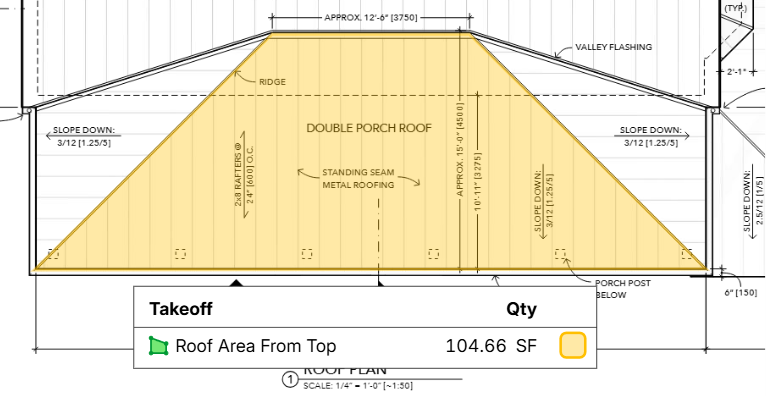
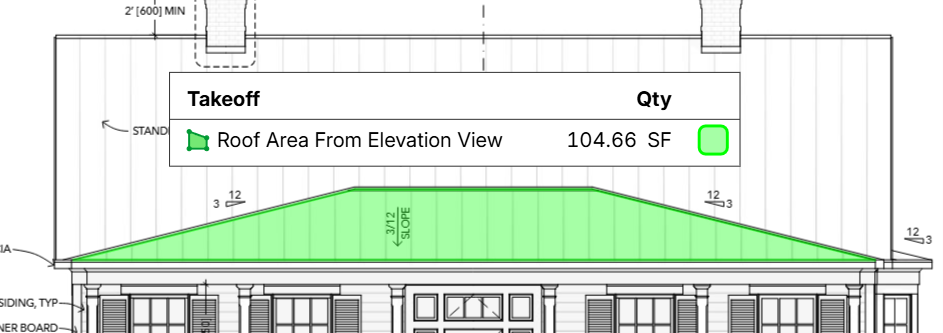
In the following images, you can see the same area taken off from the top view and from the elevation view. The SF numbers match because I used "Sloped Area from Elevation View" on the 2nd image.
From Top View
From Elevation View

how interesting!
It calculates the perspective area to the vanishing point!
Very cool function!
🚀1
Hi,
I have tried this for a 30 deg roof so used 30 deg sloped area from the top and then 30 deg sloped area from elevation and the result areas are hugely different.
Im not sure what Im doing wrong?
👍1Im back with an update.
My own fault as expected - I had used a test pitch of 30 deg even though that was not the actual pitch.
Tried again with the actual pitch (measured using the pitch tool) which was 36.4 deg and now both areas are almost identicle.
This will be very handy.
👍3