










 Q & A
Q & AzzTakeoff Shortcut Pin to Taskbar
Hi Team,
Is there a way for the zzTakeoff screen shortcut/application to be pinned to the Windows Taskbar?
I was hoping to have zzTakeoff permanently pinned there for quicker access, similar to some other desktop applications.

For Windows 11 (Chrome)
Since the manual shortcut strings were being blocked or failing to launch, this built-in Chrome "Install" method is the most reliable way to get an icon on your taskbar that actually opens the site.
- Open Chrome and go to zzTakeoff.com.
- Click the three dots (⋮) in the top-right corner.
- Go to Save and Share > Install page as app.
- A popup will ask for a name. Keep it as "zzTakeoff" and click Install.
- The website will pop out into its own window (no browser tabs/address bar).
- Look at your Taskbar at the bottom of the screen. You will see the zzTakeoff icon.
- Right-click that icon on the taskbar and select Pin to taskbar.
For macOS (Safari)
Apple introduced a feature in macOS Sonoma (and newer) that turns any website into a "Web App" in your Dock.
- Open Safari and go to zzTakeoff.com.
- In the top menu bar, click File.
- Select Add to Dock...
- You can keep the name as "zzTakeoff" and even click the icon to change it if you have a custom image.
- Click Add.
- The zzTakeoff icon will now appear in your Dock immediately. When you click it, it will open in its own dedicated window, separate from your main Safari browsing.
For macOS (Chrome)
If you prefer using Chrome on your Mac:
- Open Chrome and go to zzTakeoff.com.
- Click the three dots (⋮) > Save and Share > Install page as app.
- Click Install.
- A folder (usually called "Chrome Apps") will pop up in Finder showing the new zzTakeoff app.
- Drag and drop that zzTakeoff icon from the folder directly into your Dock.


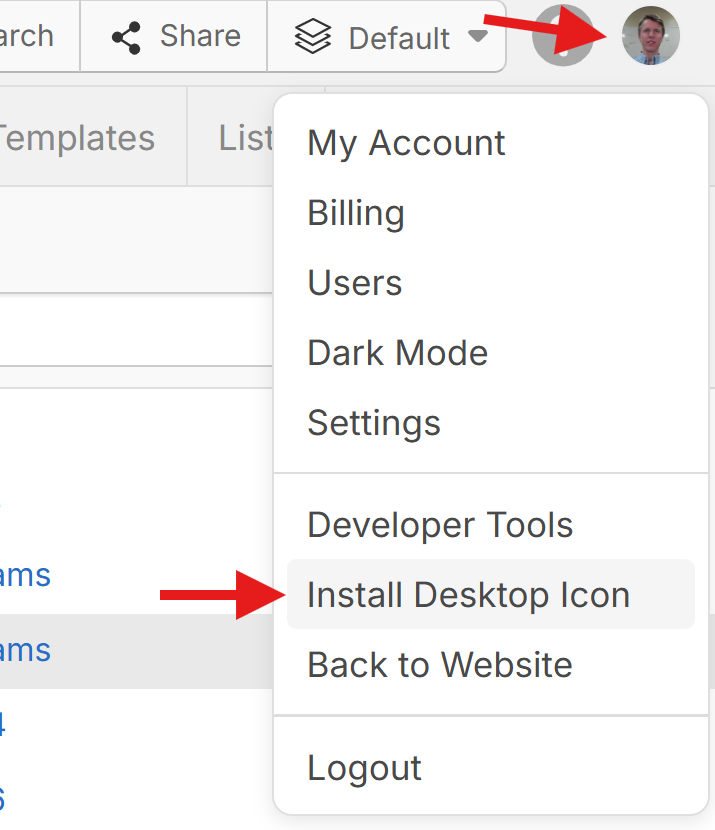
We also have an option for "Install Desktop Icon". Then you can drag & drop that icon from your desktop onto your taskbar.
I tried with what I got @Heber but is not working, 
I will try with what Sam advise to>
👍1
I thought I wanted it. I've tried both. They work but personally I prefer zz living inside my default browser. Mostly because it's easier to navigate multiple tabs open. ZZ and non. I deleted the Chrome app because it was forcing the web app on me when I clicked on zz hyperlinks inside forum post emails etc.
👍3lI will stay with what I currently have. I tried both Sam’s and Heber’s options, and unfortunately neither is working on my web version. I’m 100% sure I followed everything exactly as requested by the gurus, and I also have the correct zzTakeoff app installed.
No biggy boys, last thing to worry about. Thanks for all your hard work.
👍1