











 Inside Track
Properties at Takeoff Level or Item Level
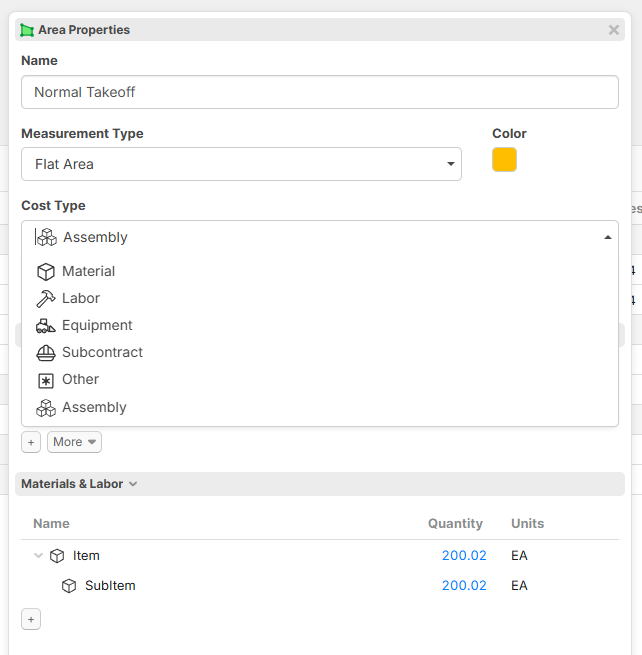
Sometimes it feels like this (below) when we're trying to decide whether specific properties belong at the takeoff level or at the item level. In an attempt to simplify certain use cases in zzTakeoff, we're working on some changes that would allow a takeoff to also be an item if the user chooses (without the need to separately add child items to get material quantities). For example, attaching a Price Each and/or SKU directly to a takeoff (causing it to become both a takeoff & item at the same time). This works great for users who don't use assemblies (with child items) because they can just apply a Cost Each (such as per SF) and get a price.

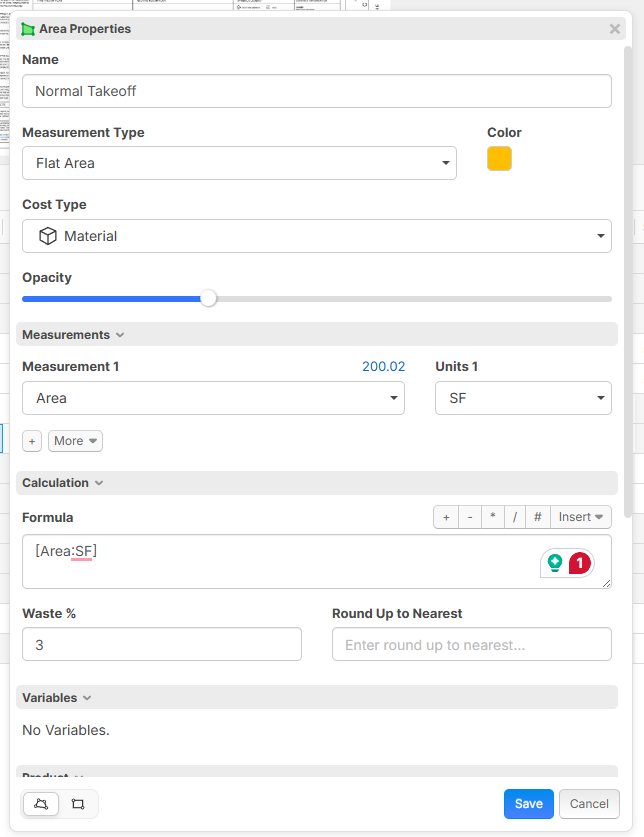
We're experimenting with the idea that when you start a takeoff (such as an area), by default the Cost Type is Assembly which is the current behavior (assuming the Cost Total and Price Total will be calculated by totalling up child items). But if you want to treat the takeoff directly as a Material you can change the Cost Type to "Material". Then the "Materials & Labor" panel would disappear (which is only needed to add child items), and you would just see a Cost Each and other Item properties directly at the takeoff level, etc.
An area with Cost Type "Material" selected. Now the takeoff is operating also as an item (and would not allow applying child items to it).
What are we trying to solve?
1. Some of our users don't use assemblies. Some users want the takeoff measurement itself to be a window, door, bush, etc. (instead of just a measurement) and having to add a child item to represent the materials adds an extra step for these users. In our original architecture, we originally wanted to force all items to be children of the takeoff, to cleanly separate the geometric measurements from the material quantities.
2. Easy price per SF without adding a child item
When a takeoff is operating as an assembly, it would auto populate Cost Each, Price Each, Price Total, etc. based on the child Items. When a takeoff is operating as it's own item, you could then edit these properties directly.
Behind the scenes, there are various challenges that we are working through to make sure the reports can still slice/dice/group/sort all the data properly. We're experimenting to see if we can make this all work smoothly. We're open ears if you have any thoughts.

Good stuff on a Saturday afternoon @Heber
I’m a user who prefers assemblies as containers for resources or items/parts (MLESO) under a parent QTO. I would prefer if the assembly can be a standalone QTO type if need be or plug into a parent QTO container and trigger input prompts when added under a parent or suppressed if I take care of those inputs via report spreadsheet in bulk.
In my mind, there would be multiple assemblies or even just individual items under the parent QTO. I would expect those assemblies and/or parts (items) under the parent QTO item to inherit calculation or input data to create additional calculations based on either the combined parts under an assembly or just a standalone part. The complication I would run into back in PS days is being overwhelmed with input prompts (that would be clunky if the default view weren’t set to “input only” window) at the QTO level that weren’t always required. That’s when I learned to just add assemblies and parts à la carte to a QTO which triggered input boxes to come up only after asking as a child under QTO or assembly. Some off the shelf QTO templates with assemblies and parts worked out, but again the overwhelming input anxiety was always tough.
I’m also at a point where some projects do just require a simple QTO with a unit rate with little to no calculations or inputs. Which is what I feel your post above is touching on and going to solve. I’ve tried to explore some workarounds within zzQTO to accomplish the same result but spreadsheets…
So, for me what I’m looking to solve is 1 of 3 things if I were to rely on a QTO software to also estimate for me:
- ROM (back of pickup napkin #’s) - a simple unit rate at the QTO level. Ex. $4/sf * QTO.
- Unit price - more of a costbook (ex. RS Means) approach of MLESO unit prices to build up the QTO w/o MH’s, widgets, etc being accounted for. This may involve more than just a $/sf cost at the QTO level and just drop down at 1 child level from QTO parent.
- Hard bid - this would be the most granular to me as I need to rely on company in-house costing archives (work/crew/production history), quotes from vendors or in-house profit centers, and tighter control over markups. The MH’s are critical, the widgets matter lev level and need to be quantified, the of detail could get down to construction materials (lumber, nails, screws, etc). This scenario would be 2-5 levels from the parent QTO with an assortment of:
- Child individual parts (2nd level)
- Child assemblies (2nd level) that have an assortment of child parts/items (MLESO) (3rd level)
- Child QTO’s under the main QTO (2nd level) that rely on parent QTO calc’s/inputs to feed either assemblies or parts (3rd level), and there is an assembly more parts/items (4th level).
When I get the time, this is how I plan to sort out my system because it’s what works for me and how I have assortment of spreadsheets set up currently, but I’m always a student and eager to learn better, faster, stronger, more…
👍3%22%2F%3E%3Ctext%20x%3D%2232%22%20y%3D%2233%22%20text-anchor%3D%22middle%22%20dominant-baseline%3D%22central%22%20font-family%3D%22Arial%2C%20sans-serif%22%20font-size%3D%2226%22%20font-weight%3D%22600%22%20fill%3D%22%23fff%22%3ESP%3C%2Ftext%3E%3C%2Fsvg%3E "Steven Powers")
This would be an awesome option. I have found myself needing just a single TO w/out adding items. My big ask is for the ability to add a multiplier to the take off QTY. For example with painting, if we are painting both sides of the wall we want to see the TO QTY doubled. This sounds like it could a soulution.
👍4
@Heber this is a good idea. As a GC, we don't get granular on a lot of things, so this would be a slick feature. Look forward to trying it out.
👍1
I'm of the opinion that is setup great to start with and DONT over-complicate this...as its already hard to make the jump from OST. I'm a GC and love the general take on this request as it was the first thing I was initially asking for.......but now that I'm smarter we really need to take a more simple approach to this. I have made a 3 min viedo on how I wish it would act with a simple approach with the parent-child relationship. I know its not the final solution, but hope it helps make it better for all someday.
@Heber, love the opening image!
👍2
Kyle, if I understand correctly what you are putting down ... I 100% agree.
Love the thought of a toggle to roll up a "assembly" child line items into the parent line items (but still keep this as a toggle because some configurations would likely like to them separate rather than rolled up, and others like you might want them rolled up).
I'm going to put just a twist on this one.
One thing we have been playing with is using the parent / child relationship to work for resi projects to handle floor plans that repeat multiple times. The parent item is the takeoff values on the current page. The child values become the actual project quantities ie the takeoff values from the current page x a custom property we called at this point "number of repeating floors".
OST does this via a setting on the "cover sheet" there you indicate the number of "repeats" per drawing. One drawing showing a typical floor for L4-10 is 7 "repeats" . OST auto calculates the project quantities as the takeoff from that page x 7 repeats.
zzTakeoff does not have a "repeat" option at the drawing level (as far as I know) so we have been planning to use the parent / child / custom property = "number of repeating floors" as a work around. The only thing is every estimator has to remember to make sure that for every takeoff item on that page has a 7 in the "number of repeating floors" custom field. It may be a bit of a change going from OST to zz but I think its doable. Would love to hear if there are better methods to doing this floating around out there.
Maybe zz can make a drawing level floor multiplier & apply your suggestions on parent / child takeoff options & toggles.
🚀2Going a little deeper down the rabbit hold ... along with this ... we plan to use both assembles and items in both zzTakeoff and Ediphi.
It would be great to see both assemblies (with child items & logic) and 1:1 takeoff be able to integrate with Ediphi.
- zz's 1:1 takeoff right into Ediphi items.
- zz's Assembles (with child quantities & logic) right into Ediphi's assemblies
This way the bulk of the work of the takeoff can be done in zz but we wont loose the assembly quantities in Ediphi by only bringing in a summery of the the child items.
We want to have the highest definition of data possible pulled from zz into Ediphi (no compression of information from 1 point solution to the next ... is the goal). Right now every time we jump from one system to another (or one spreadsheet to another) we have to compress the information at the transaction point which creates a bunch of data silos.
👍2@Aaron, oddly had a call from our SoCal team today and was thinking this same thing for the mutliplier. I'm hopefull it will act like OST, vs doing some a painfull workflow......it needs to stay simple at the page level like OST. Here is a thread I asked for 396 days ago for the multiplier. LINK.
Also I got assemblies flowing into Ediphi too, lets nerd out on a session for that workflow......got it going well......with the big problem of access control, right now anyone and their brother can edit reports/wbs/templates in ZZTO and people are already messing with the enterprise setup I got going so well errrrr
Funny I was just going to comment on your HP Top 5 Feature Requests about some of our priorities Hensel Phelps Top 5 Feature Request Q1 2026 | zzTakeoff:
A) Repeating floor handling (reduce takeoff error risk)
Our current workaround applies a custom property (“number of repeating floors”) at the individual takeoff level. This is workable but introduces avoidable human-error risk.
Desired improvement:
- Ability to set a repeat/multiplier at the drawing or floor level
- Ability to batch update repeating floors across drawings
- Ensure quantities scale automatically without estimator intervention on each takeoff item
Goal: move the multiplier upstream in the hierarchy to improve consistency and reduce QA burden.
🚀3@Heber,
I played around in the test environment for the updated release of this. My feedback in 1min video. Hope you can make that happen!
👍1
Thanks for all the input.
@Kyle Yes, we have some sorting out for how Qty relates to Measurement 1 (if the takeoff is also acting as an item). The reason they are separate currently is because our original intention was that measurement 1, 2, 3 is geometry/measurements such as SF, SY, and Qty is qty of material (based on a formula).
We'll be tuning this up and it will get a lot better, especially when you can choose specific properties that you want as "input" properties. Eventually when viewing a takeoff or a template it will be in 2 separate modes (likely as tabs on the popup):
1. Building the template - edit the formula, all properties, visible
2. Using the template - easy inputs, all extra properties hidden except to populate needed inputs
You will be able to customize the form.
👍1Just clarifying this concept of takeoffs that are also an item at the same time will be great for some users, but not for all. Users will get best results if they use 1 of the following:
1. Assemblies - build takeoffs and add items to them. In this case the takeoff acts as an assembly and totals up it's child items.
2. Takeoff is also an Item (no assemblies) - good for more basic flow without child items. Easy ability to attach a Cost Each to get Price per SF, etc. or SKU directly to the takeoff.
The "best" method will depend on the customer and their work flow. Keep in mind the UI for all this is in flux. It will take a little time for us to polish it. In the end, I think users will really like the flexibility.
🔥4💯2This is awesome BTW! I'd challenge your workflow and think we could mix and match with no issues. Many of our people are use to #2, but now got so many situations where it make sense for #1 since we need more detail. Struggle right now is I can't see a full report without having to jump around to see what you need if you mix/match.
Now when we do self-work detail concrete takeoff, we are all about #1.
I agree that mix/match is possible, and we are forced to create it in a way that mix match is possible or all the math won't add up. 😊
Just saying that choosing one or the other will be easier for most users to follow.
Maybe we dump Measurement 1, 2, 3 and replace with Qty, Qty 2, Qty 3? Our initial idea was to keep the measurements separate than quantities, but maybe merging them will be easier for users to understand.
👍1I actually think the way this is structured is pretty brilliant, and I’d vote to keep the measurement (parent) concept. The separation between geometry and material quantities makes a lot of sense from a system and training standpoint.
The only tweak I’d suggest is allowing the measurement to auto-transfer to the child line item quantity like I show in the video above.
So conceptually it becomes pretty simple:
Parent = Measurement
Child = Quantity
That feels like a really clean mental model and easy for users to understand.
Where things start to get confusing for me right now is the reports. The “Advanced Takeoffs / Advanced Items” terminology is a bit hard to follow, and the default reports feel pretty overwhelming.
From a GC perspective we honestly don’t care about cost inside zzTakeoff. It’s our quantity engine, while pricing lives in Ediphi.
Because of that I’d almost prefer the default reports hide cost entirely and focus on measurements and quantities, with a few simple enterprise-style reports users can build from. We really need 3 levels of report, 1)Enterprise 2)Master Project 3)User. I vote to kill the default reports all together, or at least hide them.
👍1