Inside Track
Ready to Test: Auto Count, Auto Scale, Permissions & Roles, Locking, Plugins, and more.
We've been pushing hard to get a new release out. We have the latest on our Test Server if you want to play with it.
Request Test Server access here: https://www.zztakeoff.com/request-test-access
Here is a list of the highlights:
Auto-Count (new)
- Automatically detects and counts repeated symbols/objects on a page.
- Supports both image-based and vector-based detection, with its own controls and a compact popover.
Auto-Scale (new)
- Automatically determines a page's drawing scale.
- Optional AI step to verify and correct detected dimensions.
Plugins & Developer Tools (new)
- New plugin system: a plugin can bundle scripts and embedded UI components in one package (embedded UI components are in Ultimate).
- Plugin Store to browse, install, publish, and submit plugins for review, with version tracking (major/minor).
- Plugin UI components run safely in a sandboxed frame and can appear in tabs, popovers, popups, etc.
- Plugin Storage so plugins can save their own data.
- Ultimate-tier plugin capabilities.
- Dev Mode for building and testing plugins against dev-only projects without touching production.
Permissions & Roles (new)
- More granular role-based permissions across the app.
- Custom workspace roles (create/edit/delete) with a new role editor.
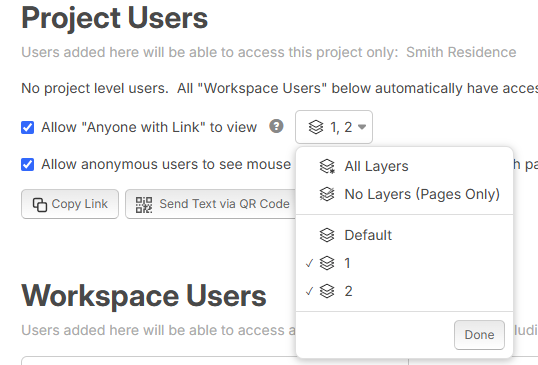
- Share specific layers with individual team members.
Locking (new)
- Lock/unlock - projects, pages, takeoffs, layers, templates, libraries, and more - to prevent edits.
- Clear owned vs. inherited lock indicators.
PDF Import & Uploads
- Rebuilt import pipeline: single-pass and multi-threaded (up to 6 threads) for faster imports, with better large-file handling.
- Direct-to-S3 uploads - files upload straight to cloud storage, faster and more reliable.
- Upgraded the PDF engine; added guards against overlapping or interrupted uploads/imports.
- PlanSwift import can bring in takeoffs as items; smarter default page names when tags are detected.
Takeoff Worksheet & Reports
- Takeoff Tree Report: insert, copy, and move rows, with keyboard shortcuts (Ctrl+Arrow to reorder).
- Copy/paste takeoffs together with their sections; drag-and-drop a takeoff onto a section to "duplicate as".
- Takeoff aggregation improvements.
Pages & Drawing
- High-res vector rendering for sharper pages.
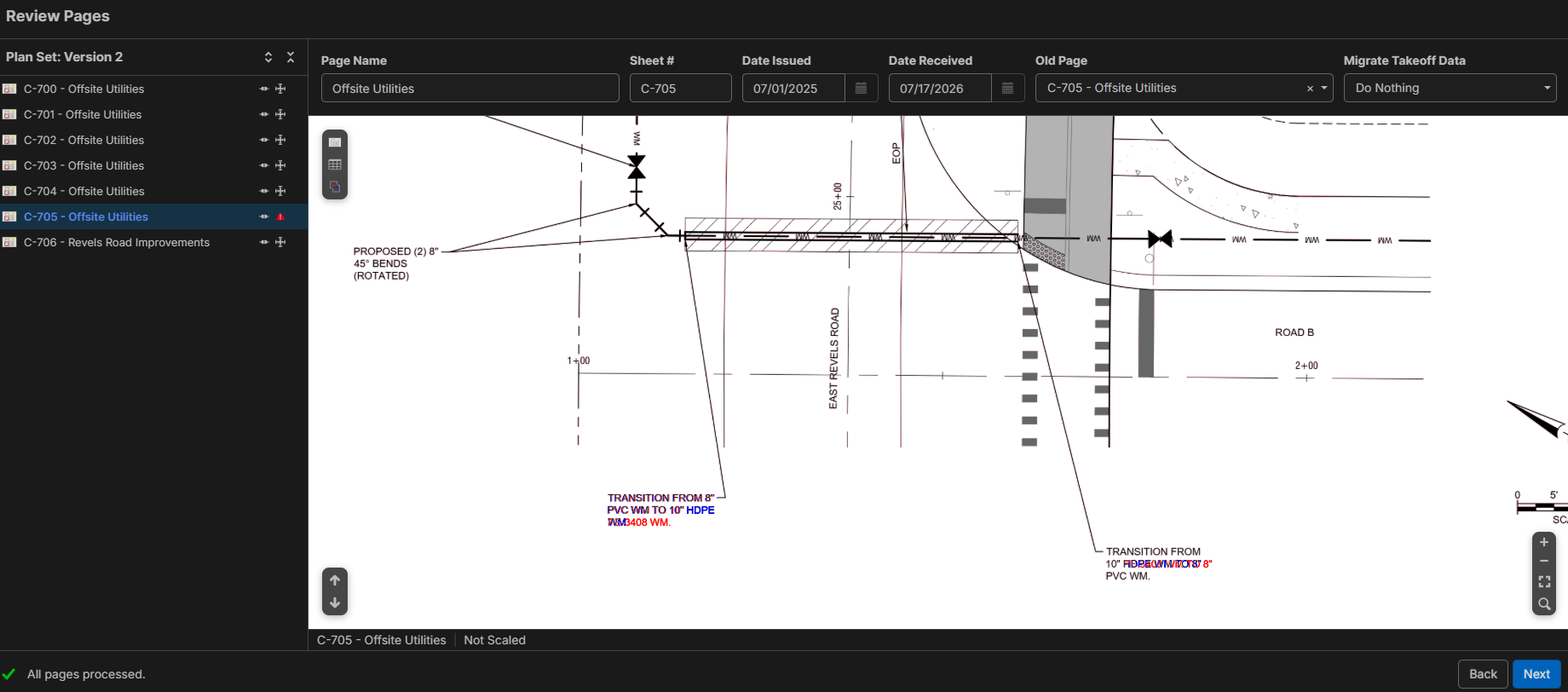
- Page Versions / Overlay or Side by Side Comparison - bring in a new version of a page and carry takeoffs across, with undo.
- Mirror pages horizontally, with automatic high-resolution re-render.
- New ellipse drawing tool and rectangle tool; dimension-length support.
- Multi-layer selection and a layers menu; the app remembers your recent layer.
Templates
- zzTakeoff Starter Pack, auto-visible to all users.
Performance
- More performance tuning, multi-threaded page rendering & uploads
Thanks for all your support. We look forward to any input you may have 🙂🚀

Auto count works great so far, but for current page only. Every attempt so far outside of that I get 0 results when I select all, including the current page.
👍1
@Luke Thanks, we'll check into that.
%22%2F%3E%3Ctext%20x%3D%2232%22%20y%3D%2233%22%20text-anchor%3D%22middle%22%20dominant-baseline%3D%22central%22%20font-family%3D%22Arial%2C%20sans-serif%22%20font-size%3D%2226%22%20font-weight%3D%22600%22%20fill%3D%22%23fff%22%3EC%3C%2Ftext%3E%3C%2Fsvg%3E "Conetoe")
@Heber. Love the AutoCount, but the I can't seem to get the AutoCount erase function to modify the image.
@Luke, I got it to work on a vent on the Mechanical pages but it struggle to find a toilet.
@Contoe Thanks for the feedback. Any video or screenshots will help. We've been using a free Chrome extension called AwesomeScreenshot which makes it easy to record and share videos (eventually, we will build our own).
👍2I uploaded a new plan set and it seems to be working as intended.
The first attempt was already preloaded plan set on the test server so possibly why it wasn't searching properly?
I love the add as an example. wasn't clear on what it was for until i selected it but perfect solution for adding more context to the search
https://www.awesomescreenshot.com/video/54661681?key=2c8da8bb844d93a554be5ddb5af5ab60
Hopefully the link will work. you can see what i am doing. I was trying to use the erase.function.
%22%2F%3E%3Ctext%20x%3D%2232%22%20y%3D%2233%22%20text-anchor%3D%22middle%22%20dominant-baseline%3D%22central%22%20font-family%3D%22Arial%2C%20sans-serif%22%20font-size%3D%2226%22%20font-weight%3D%22600%22%20fill%3D%22%23fff%22%3EBR%3C%2Ftext%3E%3C%2Fsvg%3E "Brendon R")
Doing all the development side is a bit pass my level, but could it have the ability to use a script or plugin in to Development area to create a sub trade comparison/review table?
my ideal1swf or how I do it atm. You list the scope of works then pricing comes in where you can compare and select your nominated contractor which will then transfer that into your reports.
Option to add a Tag Report when it will Take the assigns Tag or Assumptions into a report
Below is a quick example
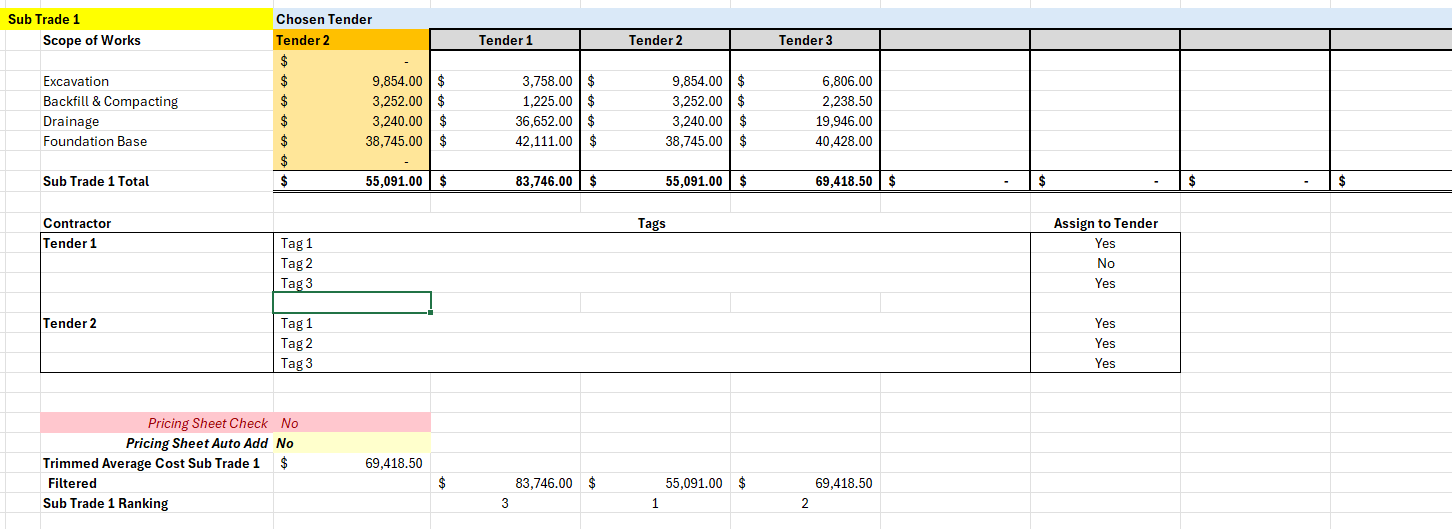
Or is this not what the Plugins are designed for
👍1
When bringing in new page versions I can see all pages overlayed or side by side just fine in the Review window. But whenever I got to the next window all pages just get grouped together with their old version instead of having a side by side comparision or overlay.
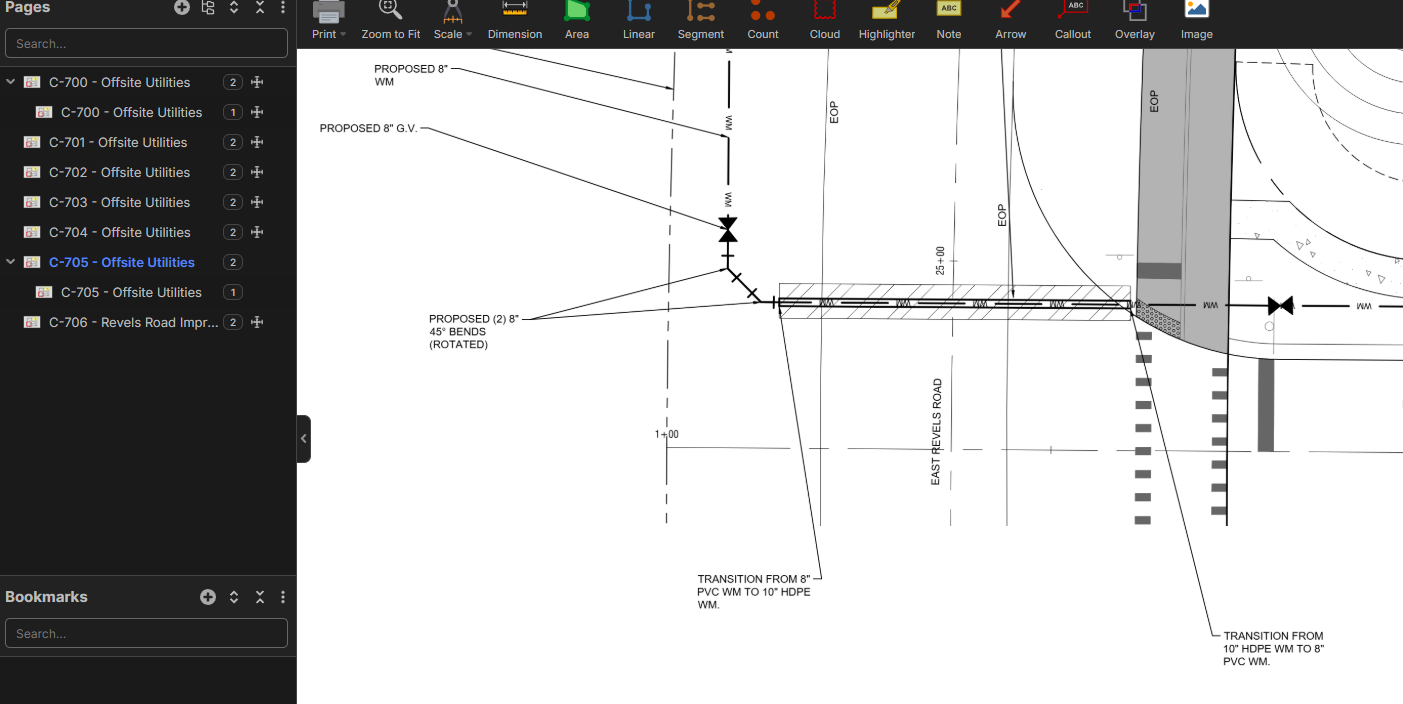

Having trouble with Auto-Scale. The scale is obvious on the page but it's not being identified... Maybe it's not recognizing this scale type?...
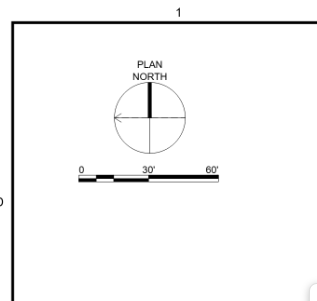

It usually looks for the word scale. So I am sure the team will find a way to capture those. But for now...
👍1We just activated zzTakeoff Ultimate licenses for all users on the Test Server so you can fully test the Plugins. If you click the profile icon in the upper right, you will see a "Dev Tools" button in the list.
After creating a plugin, you should see a "Components" section on the left. This is where you can create custom UI directly embedded inside of zzTakeoff.
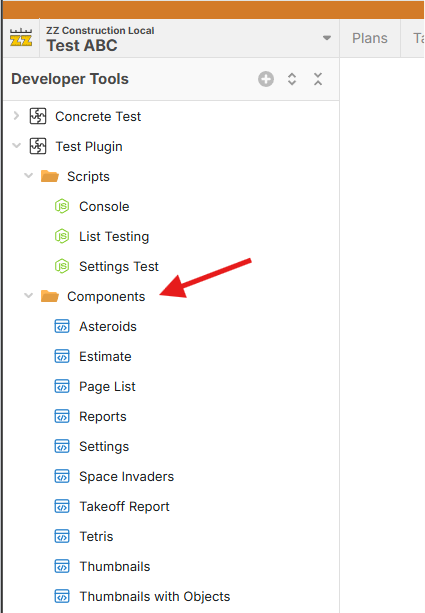
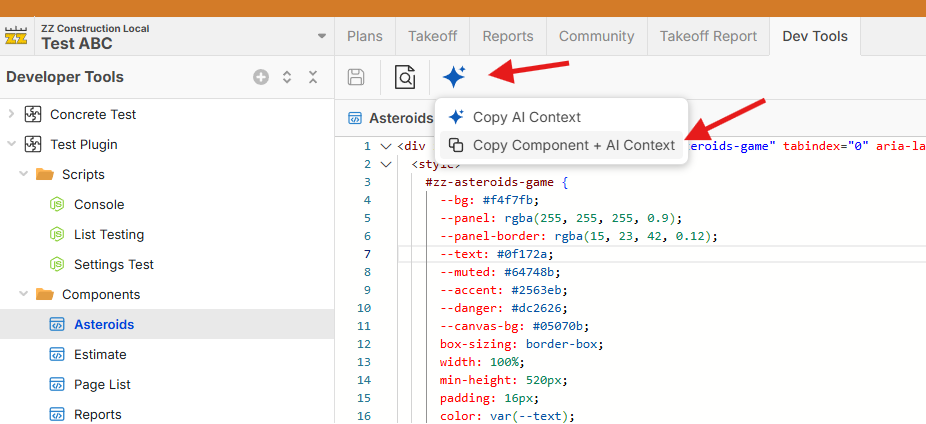
To build UI Components, you can easily copy the context into the clipboard for easy paste into Claude or Chat GPT, etc. Example: "build me a Tetris game" or "build me a report that does _____". Then paste the resulting HTML back into your component code. We'll put out a video with more examples.
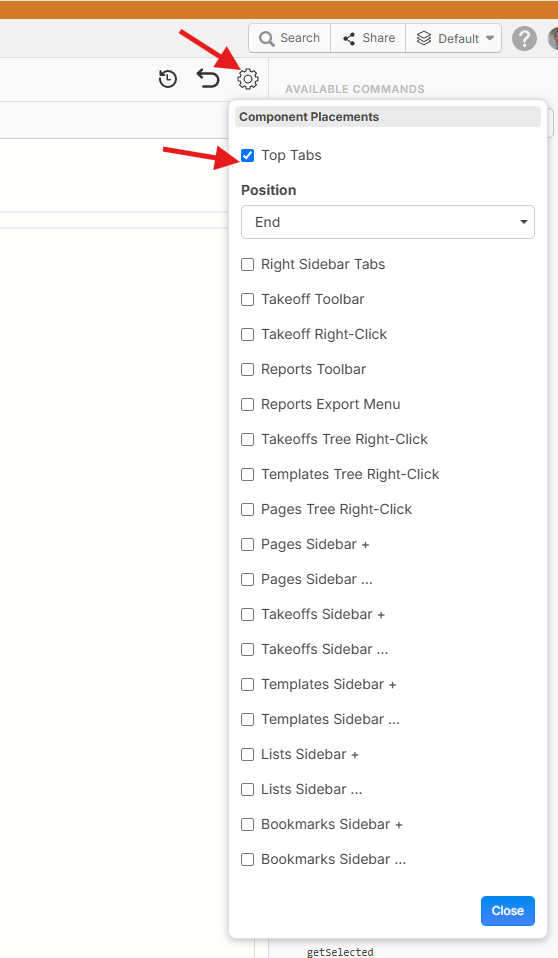
Then you can click the gear in the upper right to decide where you want this new custom UI to show up in zzTakeoff:
Now the sky is the limit. You can customize zzTakeoff in many ways now with your own UI. 🙂🚀
@Contoe We'll dig into this further.
@Brendon This is a good example of something a plugin can help with. We will put out more how to videos to help users get started.
@Ian Thanks, we'll check to see why it's doing that and put out a fix.
@Shane We'll check on this. That particular scale indicator is a little harder for the AI to recognize than specific 1/4"=1' for example, but we will do more training to make sure it can handle.
😎4🚀1Going to have an open mtg at 4:00PM Eastern to go over the developer tools and how to use them if you are interested. If you can not make it we will record and put back in this channel the link.
Here is the link
See you then
──────────
Todd Kaberline is inviting you to a scheduled Zoom meeting.
Join Zoom Meeting
https://us06web.zoom.us/j/85856559020?pwd=29aZI5h8RD2GlKkI4xf7CK2EVw6axD.1
Meeting chat link
https://us06web.zoom.us/launch/jc/85856559020
Meeting ID: 858 5655 9020
Passcode: 229116
---
One tap mobile
+16469313860,,85856559020#,,,,*229116# US
+19292056099,,85856559020#,,,,*229116# US (New York)
---
Join by SIP
• 85856559020@zoomcrc.com
Join instructions
🚀2👀1👍2Here is the link in to the webinar this afternoon for the developers Mode!
👍5
Auto-Scale kind of buggy.
If I go to the scale dropdown and "Auto Detect" I was getting this error.
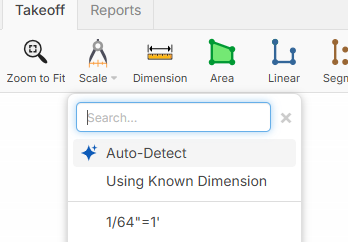
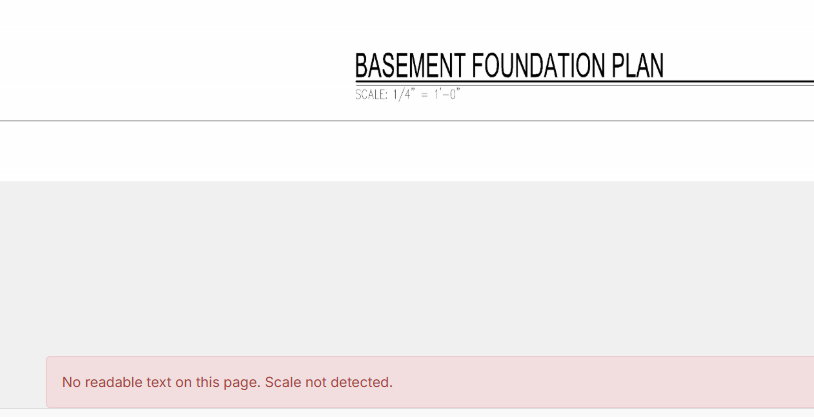
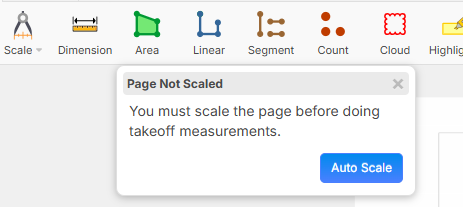
I then tried to just do a takeoff on an unscaled page and it asked if I wanted to auto scale. On that same exact sheet it found the correct scale.


Thanks for testing, Andrew! We'll dig into this.
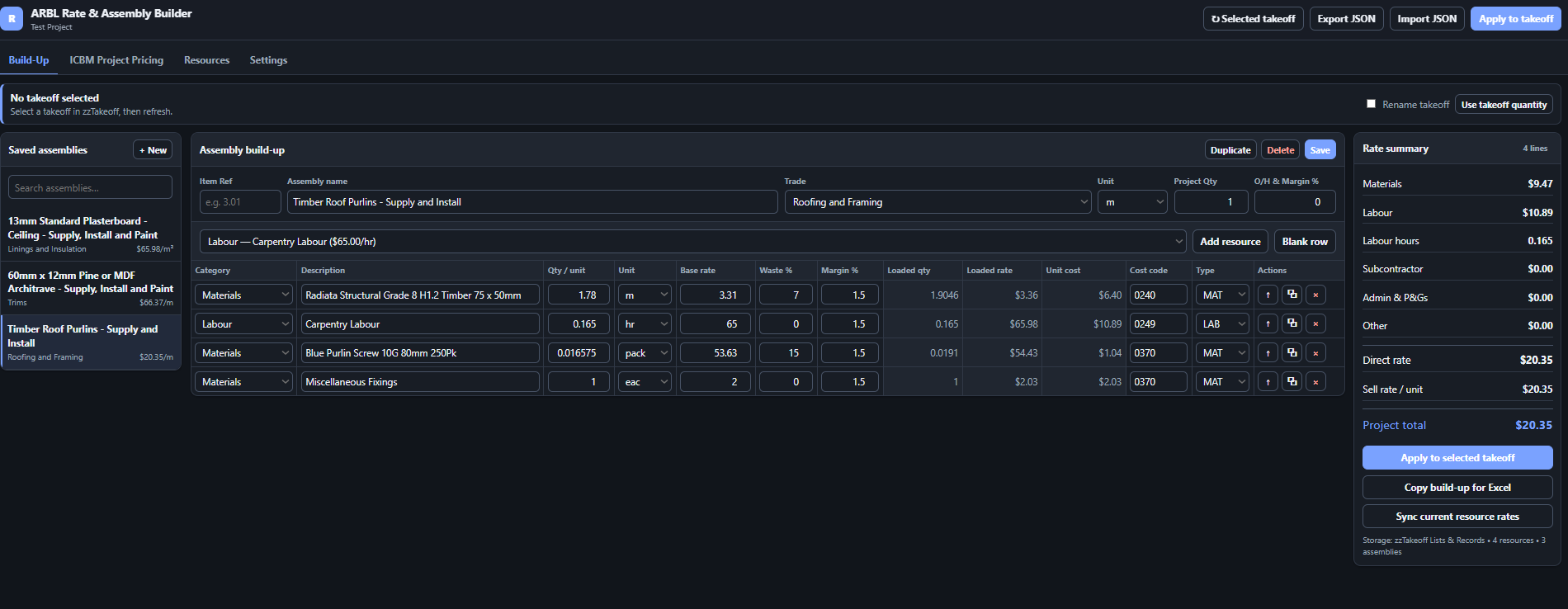
I have been experimenting with the zzTakeoff Plugin Component system to create a custom Rate and Assembly Builder where we don't really have any plans. but still want the data zzTakeOff can provide.
The goal is to bring the detailed rate build-ups I currently manage in Excel directly into zzTakeoff, allowing measured takeoff items, resource rates, assemblies and project pricing to work together in one system.
It is still an early working version, but the main workflow is now functioning. But this is from someone who said previously that im not smart enough to code to make anything
Rate and assembly build-ups
The plugin allows me to create reusable assemblies containing:
- Materials
- Labour
- Subcontractors
- Plant and equipment
- Preliminary and general costs
- Other project-specific costs
Each component can include:
- Resource description
- Quantity required per assembly unit
- Unit of measurement
- Base rate
- Waste allowance
- Inbuilt margin
- Cost code
- Cost type
The plugin calculates the loaded component costs, total direct rate, sell rate and overall project value.
For example, a timber roof-purlin assembly could include:
- Timber per metre of purlin
- Fixings
- Material waste
- Carpentry labour hours
- Access or plant allowance
- Overheads and margin
This produces both a detailed cost build-up and a final rate per metre.
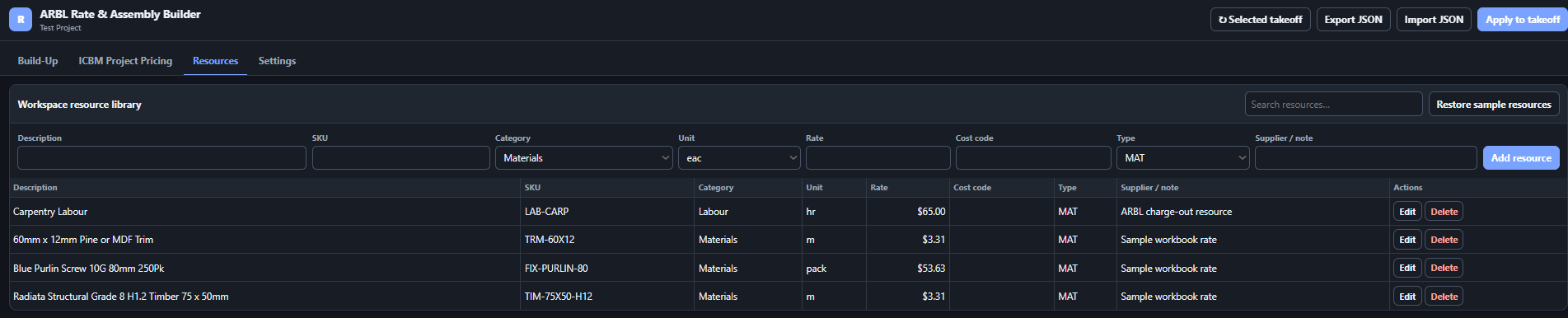
Shared resource library
I have created a shared resource library for commonly used items such as:
- Carpentry labour
- Painting labour
- Timber products
- Plasterboard
- Fixings
- Subcontractor rates
- Plant and equipment
These resources can then be selected when creating an assembly rather than entering the same information repeatedly.
Saved assemblies retain the rates they were originally priced with. If a resource rate changes, an assembly is not automatically changed without review. There is a separate option to update the assembly using the latest resource rates.
Reusable assembly library
Completed rate build-ups can be saved into an assembly library and reused on future projects.
The current sample assemblies include:
- Timber roof purlins — supply and install
- Pine or MDF architraves — supply, install and paint
- Standard plasterboard ceiling — supply, install and paint
Over time, the aim is to develop a wider company assembly library covering:
- Demolition
- Carpentry
- Linings
- Painting
- Flooring
- Roofing
- Plumbing
- Electrical
- Joinery
- External works
- Preliminary and general items
Connecting pricing to takeoffs
The completed rate build-up can be applied to the currently selected zzTakeoff item.
Information transferred to the takeoff includes:
- Assembly name
- Trade
- Unit
- Measured project quantity
- Direct unit cost
- Sell rate
- Project total
- Material cost
- Labour cost
- Subcontractor cost
- Labour hours
The intention is to keep the measured quantity, detailed rate build-up and pricing result connected rather than transferring information manually between separate programs.
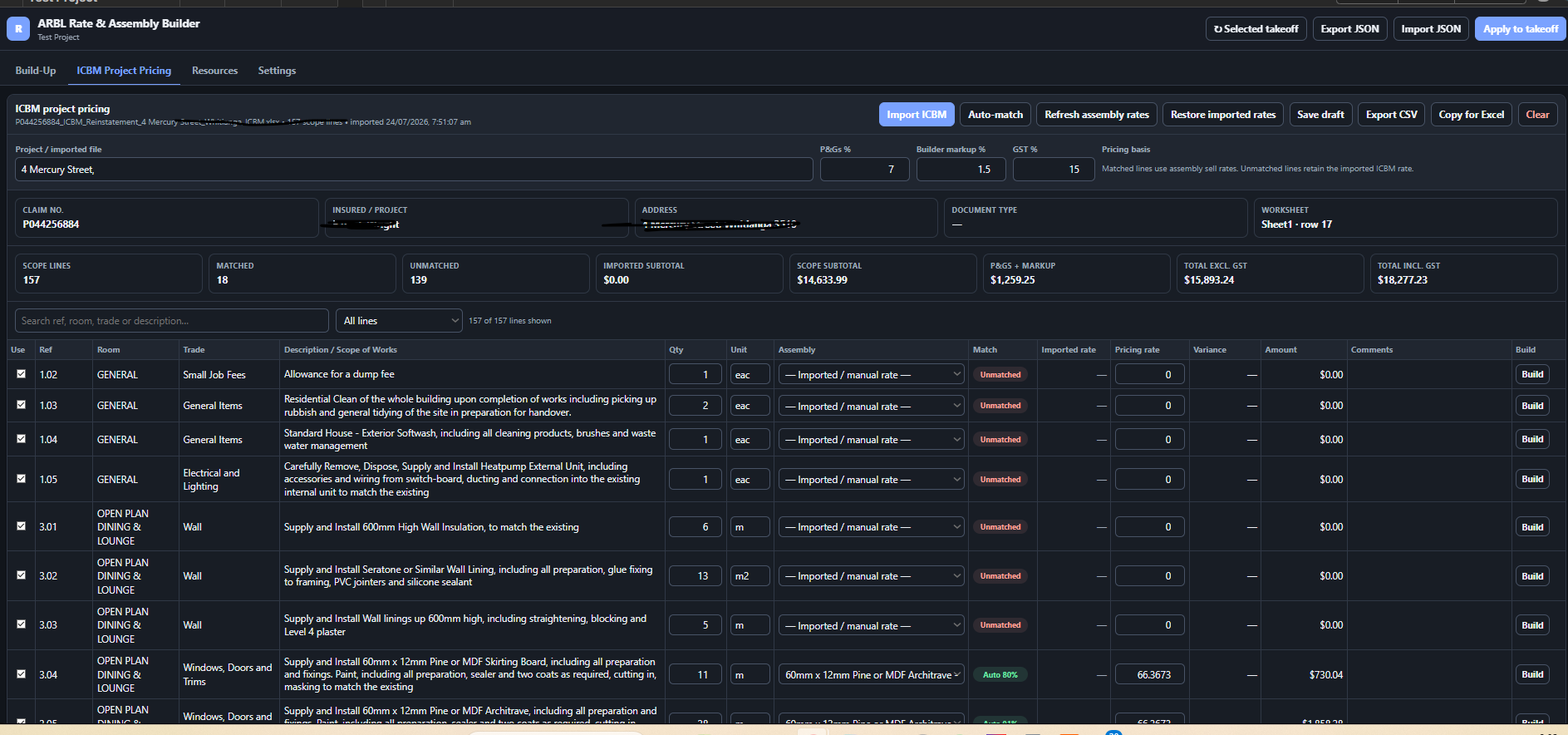
ICBM import and project pricing
I have also added an importer for the Insurance Council Building Methodology-style pricing spreadsheets that we regularly receive.
The importer currently accepts:
- Excel workbooks
- Macro-enabled Excel workbooks
- CSV files
It searches the workbook for the pricing schedule rather than relying on the information always being in the same worksheet or row.
The importer brings across information such as:
- Item reference
- Contract ID
- Room
- Dimension
- Trade
- Description and scope of works
- Quantity
- Unit
- Existing rate
- Existing amount
- GST
- Comments
It also attempts to identify general project details, including the claim number, insured name, property address, P&Gs and builder’s markup.
Matching ICBM items to assemblies
Once an ICBM has been imported, the plugin compares each scope item against the saved assembly library.
The matching process considers:
- Scope description
- Trade
- Unit
- Item reference
- Common keywords
Where there is a strong match, the plugin suggests the relevant saved assembly and uses its calculated rate.
Unmatched items can:
- Retain the original ICBM rate
- Be manually matched to an existing assembly
- Be manually priced
- Be opened in the assembly builder to create a new build-up
New build-ups can then be saved into the library for future projects.
Project-pricing review
The imported project can be reviewed in a pricing schedule showing:
- Original ICBM rate
- Suggested assembly
- Match confidence
- New calculated rate
- Difference from the original rate
- Quantity
- Total amount
- Included or excluded status
The project-pricing screen also provides filters for:
- Matched items
- Unmatched items
- Changed rates
- Included and excluded items
The plugin then calculates:
- Scope subtotal
- P&Gs
- Builder’s markup
- GST
- Final project total
The completed schedule can be copied back into Excel or exported as a CSV file.
Possible next stages
The next areas I am considering include:
- Importing a larger historical rate database
- Regional pricing
- Quantity-based rate bands
- Historical rate tracking
- Improved description matching
- Duplicate-resource detection
- Cost-code reporting
- Comparing current rates against past projects
- Applying imported scope items directly to takeoffs
- Generating project and trade summaries to send of to subbies


Brendon R. We have a complicated wage buildup, can we make custom burden columns for taxes, overtime, FICA, FUDA etc?
Thanks for sharing this! If you could make a viedo overview that would be amazing too.
👍1%22%2F%3E%3Ctext%20x%3D%2232%22%20y%3D%2233%22%20text-anchor%3D%22middle%22%20dominant-baseline%3D%22central%22%20font-family%3D%22Arial%2C%20sans-serif%22%20font-size%3D%2226%22%20font-weight%3D%22600%22%20fill%3D%22%23fff%22%3EJ%3C%2Ftext%3E%3C%2Fsvg%3E "Jes")
I just tested out Auto Count, and so far so good. Made me wonder if you could add some type of matchline marking feature in the future for projects with multi-section/sector floor plans where the user can mark/highlight the matchline on a page so that searches won't look for things it finds that are just outside of the matchline on that page, in an effort to prevent duplication.
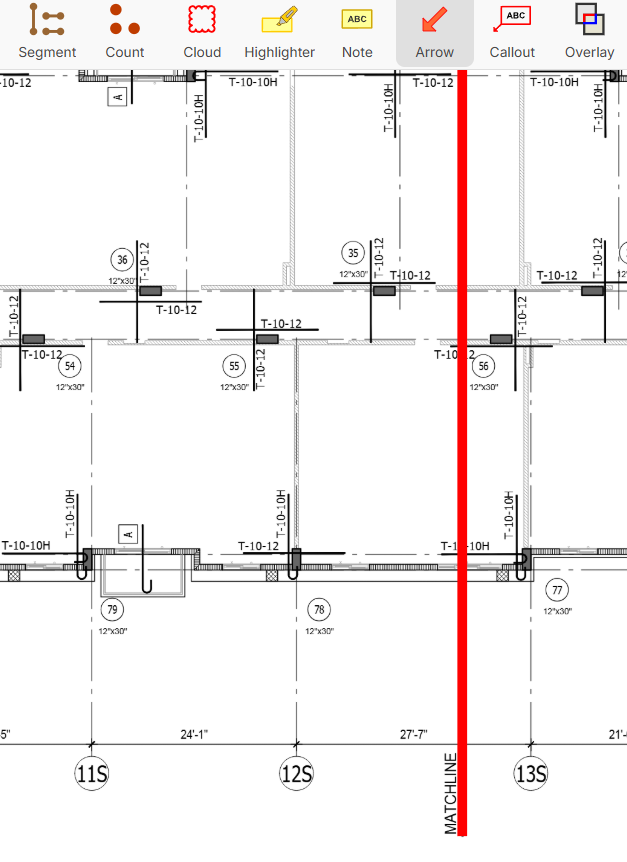
As an example above, I wouldn't want columns 56 & 77 to be counted on this section A page, because they'll be included on section B
👍3%22%2F%3E%3Ctext%20x%3D%2232%22%20y%3D%2233%22%20text-anchor%3D%22middle%22%20dominant-baseline%3D%22central%22%20font-family%3D%22Arial%2C%20sans-serif%22%20font-size%3D%2226%22%20font-weight%3D%22600%22%20fill%3D%22%23fff%22%3EVT%3C%2Ftext%3E%3C%2Fsvg%3E "Victor Tengowski")
Auto Count is working great. I really like the ability to add an example to the existing auto count. That is really slick, but I only randomly stumbled upon it. A couple things about it:
- One thing I'm wishing for is the ability to select one or more of the highlight boxes and right click to de-select them from the suggested auto count instead of having to dig through the pop-up. Additionally, maybe if a user clicks on a highlight box it is then highlighted in the pop-up, and double clicking the highlight box deselects it in the pop-up?
- Also, when you hit 'Create' it would be nice to be able to create new, select from your existing takeoffs, and/or from your templates. Plus when it creates a new default count, I would think it should load the user's default count instead of zzTakeoff's default count. This could also be applied to the ctrl+f search takeoff creation.
I'm stumped on how you select/view multiple layers- 'Multi-layer selection and a layers menu'.
👍1@Jes, thanks for the feedback! I'll mention that to the team.
@Victor, appreciate the feedback as well! We are planning to upgrade the Create Takeoff soon for both the Search and Auto Count.
Regarding the "Multi-layer selection and a layers menu", that looks like it was worded incorrectly. On the "Users" page, when you share to "Anyone with Link" you can choose multiple layers to share, as well as when sharing to a project user.