











 Inside Track
Ready to Test: December 2025 Release with a Ton of New Features
We just deployed the latest beta to our TEST server. If you have time, please test it out and let us know what you think. For bug reports in this Beta, please respond to this post, and we'll get them fixed.
Fun fact: this release has over 41,000 lines of added or updated code.
Here is a quick list of features added. We will be creating a more complete and detailed list with screenshots and videos before the official release.
Dark Mode
- Ability to toggle the UI to dark mode, and also separately to invert plan colors.
Project
- Custom Properties at the project level
Pages
- Plan Versions / Plan Sets when uploading (we still have lots to add, but we have a good start)
- Properties for - Revision, Date Issued, Date Received
- Auto name & scale all pages with AI when uploading new files
- Auto move/copy takeoff data to new versions of pages
- Plan Review popup after uploading pages to verify page names/scales
- Plans Tab (Thumbnail View)
- When collapsing pages sidebar, a dropdown for pages is visible in toolbar
- Option to Rotate Page 180
- Snap to corners of page
Takeoff
- Box Mode while doing area or linear takeoffs
- Properties - Auto Name Mode, Formula Mode, Text with Tags Mode, Inherit Mode
- Manual Area, Linear, Count - ability to enter SF, LF, etc. manually
- 10 total count symbols (more coming in the future)
- Symbols for point counts show in the legend
- Scaled checkbox on point counts
- Properties on folders
- Bulk Update on multiple selected takeoffs or items (right click menu after selecting)
- Paste as New
- Duplicate As (including for cutouts to fill them in)
- Dimension Tool - option for sloped
- Cloud Tool - box mode by default
- "+" button to add items on the fly in properties popup
- Item variables inherit by default from takeoff and can now be switched to formula mode
- Merge Areas
Formulas
- [Wall Height.FT], [Wall Height.IN], [Wall Height:Dimension] - better formatting
- Formula mode available for most properties
- [../../Area] - traversal using [..], [./Sibling Item/Some Property]
- Inheritance with [^/Some Property] or "Inherit" mode in property gear menu
Custom Properties
- Default Mode / Default Value
- Inherit Mode
- Ability to "Exclude from Group By Options"
- "Hidden by default" option (apply when needed using the gear in the properties title bar)
Annotations
- Ability to create presets in ribbon bar (caret in upper right of tool button)
Reports & Worksheet
- Worksheet / grid across the bottom available while in takeoff tab
- Properties - accessible in right click menu
- Easier to edit properties directly from reports grid
- Left sidebar is collapsible in reports - shows a dropdown for report views in toolbar
- Ability to search
- Column settings - display name & export name for each column (nice for customizing CSV exports)
- Custom icon option for each report view
- Items no longer require a parent to display in reports
- Option: Include takeoffs with no sections
Sidebars
- When clearing search, restores expanded/collapsed state
- Search gray folders in sidebar (grouped by properties)
Hotkeys
- Spacebar for Quick Search / Start Takeoff or Template
- / Slash hotkey for tools & commands
- Enter - start/stop takeoff
- Alt + S - Snap
- Alt + P - PDF Snap
- Alt + W - Ortho
- Alt + A - Auto Scroll
Colors
- Bigger color palette (5X)
- Predefined color sequence and no re-use of existing colors when picking a random color
Mobile
- Search
- Ability to show legend
- Drag popups
Performance
- Speed improvements
If you don't currently have access to our TEST server, and you're interested to play with the latest, you can Request Test Server Access.
Thank you for all your feedback to help zzTakeoff get better each day 🙂

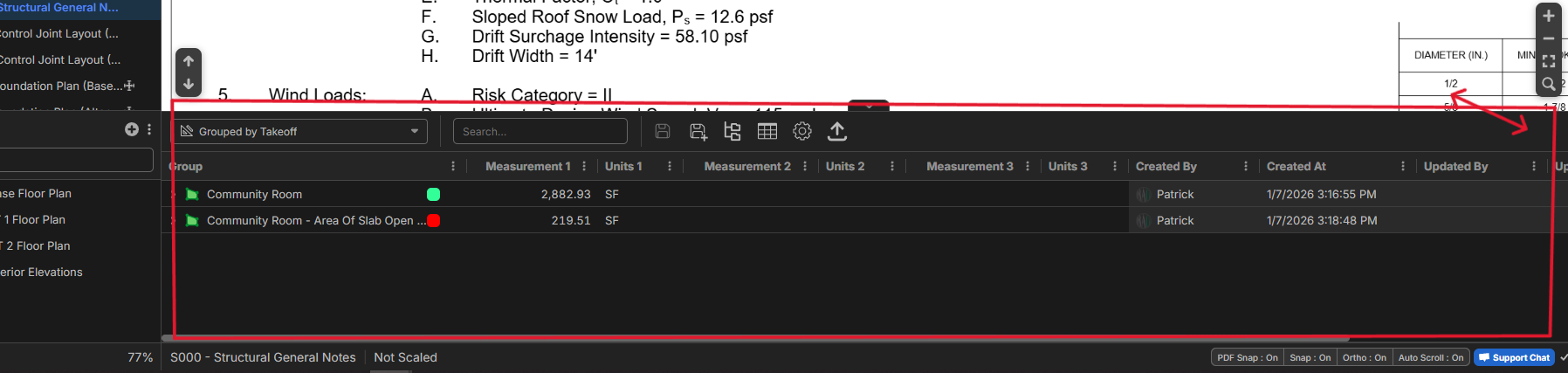

Hi Patrick. Yes, it will be undockable in the future 🙂 Thanks for posting as a "vote" for this.
🔥2%22%2F%3E%3Ctext%20x%3D%2232%22%20y%3D%2233%22%20text-anchor%3D%22middle%22%20dominant-baseline%3D%22central%22%20font-family%3D%22Arial%2C%20sans-serif%22%20font-size%3D%2226%22%20font-weight%3D%22600%22%20fill%3D%22%23fff%22%3EKP%3C%2Ftext%3E%3C%2Fsvg%3E "Kory Podgaysky")
@Patrick I didn't think about it until I saw your post but there is a work around to undock this now. Open the same job in two browser windows with the takeoff tab open in one and the report tab in the other.
👍2%22%2F%3E%3Ctext%20x%3D%2232%22%20y%3D%2233%22%20text-anchor%3D%22middle%22%20dominant-baseline%3D%22central%22%20font-family%3D%22Arial%2C%20sans-serif%22%20font-size%3D%2226%22%20font-weight%3D%22600%22%20fill%3D%22%23fff%22%3EJ%3C%2Ftext%3E%3C%2Fsvg%3E "Jes")
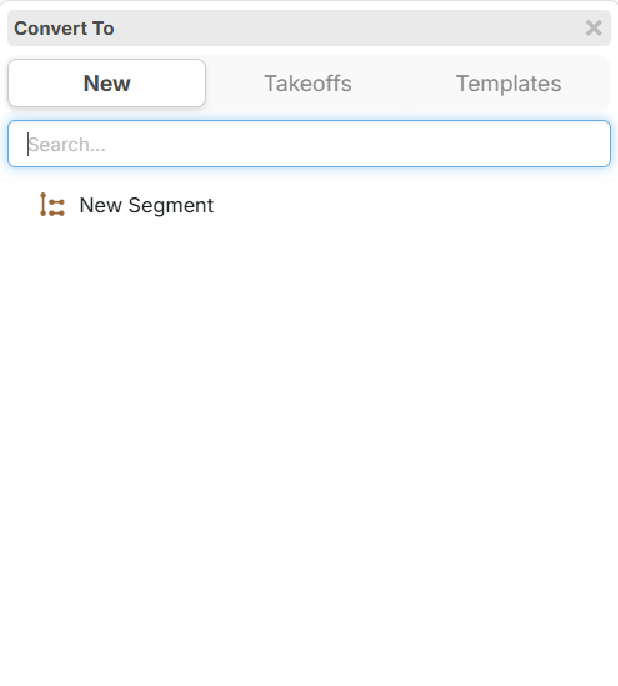
Is there any way we can have the option of having the Convert To command default you into the Takeoffs menu instead of the New menu?
I liked being able to just hit convert and start typing the name of the takeoff I want to change something into on the prior version of zz, but now you always have to click into Takeoffs menu first

Hey Jes, I don't know if we have a way to default to that yet. But there is an easy way to toggle between them without having to click.
Once you're in the "Convert To" window, you can hit space once to switch to the "Takeoffs" and then just start typing the name to filter it down.
If you hit space twice, it switches to the "Templates"
Hopefully this helps and provides a smooth flow without having to click on "Takeoffs" or "Templates"